.png)
AI Phone Agents With Shopify: No Code Needed in 2026
Can AI phone agents integrate with Shopify without custom code? Yes. See how app-based setup works, what to test for orders and refunds, and when to use custom code.
September 26, 2026

Yes. A Shopify store owner can use an app-based AI phone agent without writing custom code, provided the app supports the calls and store actions they need. Ava AI is a Shopify-focused voice phone agent app with setup in minutes, a 7-day free trial and zero commission on recovered revenue; confirm its current permissions and usage charges in the Shopify App Store before activating calls.
TL;DR
- Yes, AI phone agents can integrate with Shopify without custom code through an app-based setup.
- Ava AI is best for Shopify owners who need support calls and abandoned-cart recovery calls in one app.
- Check order access, refund controls and outbound-call rules before using an AI phone agent with customers.
- A no-code connection does not mean every Shopify workflow works without configuration.
Can AI phone agents integrate with Shopify without custom code?
Yes, if the phone agent is built for Shopify and its supported actions match your workflow. Installing and configuring an app is different from building your own connection to Shopify's APIs. The deciding question is not whether the agent can answer a call. It is whether it can use the right store information and take only the actions you authorize.
For order questions, trace the route from Shopify order data to phone answers. A caller asking about an order needs an answer tied to that order, not a generic delivery script. The same distinction applies to refunds: explaining a policy and changing an order are separate capabilities.
Shopify app-based phone agent
- Best for: Stores whose support and outbound-call needs fit the app's supported workflows
- Advantage: No custom integration code for supported functions
- Limitation: Available actions, permissions and usage terms depend on the app
Custom-built phone integration
- Best for: Stores that need behavior outside an app's supported workflows
- Advantage: Control over how calls connect to internal systems
- Limitation: Requires development, testing and ongoing maintenance
An app-based setup is the direct answer to the no-code question. A custom build becomes relevant when a required action falls outside the app's documented capabilities. Neither approach removes the need to decide which orders the agent can access, when it can call and what happens when it cannot resolve a request.
Why this matters for a Shopify store
Your phone agent sits between a caller and actions that affect an order. A useful integration therefore has 2 parts: access to the information needed for an accurate answer and limits on what the agent is allowed to change. Checking only whether a call connects leaves the harder question unanswered.
In 2026, separate inbound support from outbound recovery when assessing an app. Inbound callers initiate contact about an existing issue; outbound calls introduce questions about who is contacted, when and why. A store can need one workflow without needing the other. Define them independently before you configure either.
Ava AI is best for Shopify owners who want an app for customer support calls and abandoned-cart recovery calls rather than a custom phone integration. Its stated functions include answering support calls around the clock, handling order and refund requests, and making outbound abandoned-cart calls. The trade-off is that a merchant still has to verify how each intended action works in their store; the app description alone does not establish every permission or exception.
What to check before connecting a phone agent
Treat no-code as a setup method, not as evidence that every call is ready to automate. Work through these checks in order and record what the app actually supports before routing customers to it.
- List call types. Separate order-status questions, refund requests and abandoned-cart calls. Each has a different trigger, source of information and acceptable outcome.
- Match information to the answer. For an order-status call, check which order details the agent can retrieve and how it matches a caller to the right order. An answer about the wrong order is worse than a request for human help.
- Define permitted actions. Decide whether the agent can provide information, initiate an approved process or complete an order-related action. Do not treat those as interchangeable.
- Set the handoff. Specify what happens when the agent cannot verify a caller, find the relevant order or complete the request. A failed lookup needs a clear next step.
- Test with real workflows. Use test scenarios that reflect your store's order and refund processes. Confirm what the caller hears and what changes, if anything, in Shopify.
- Review outbound rules. For cart-recovery calls, check your contact permissions, timing rules and suppression requirements before enabling a campaign. An available call trigger is not permission to call every customer.
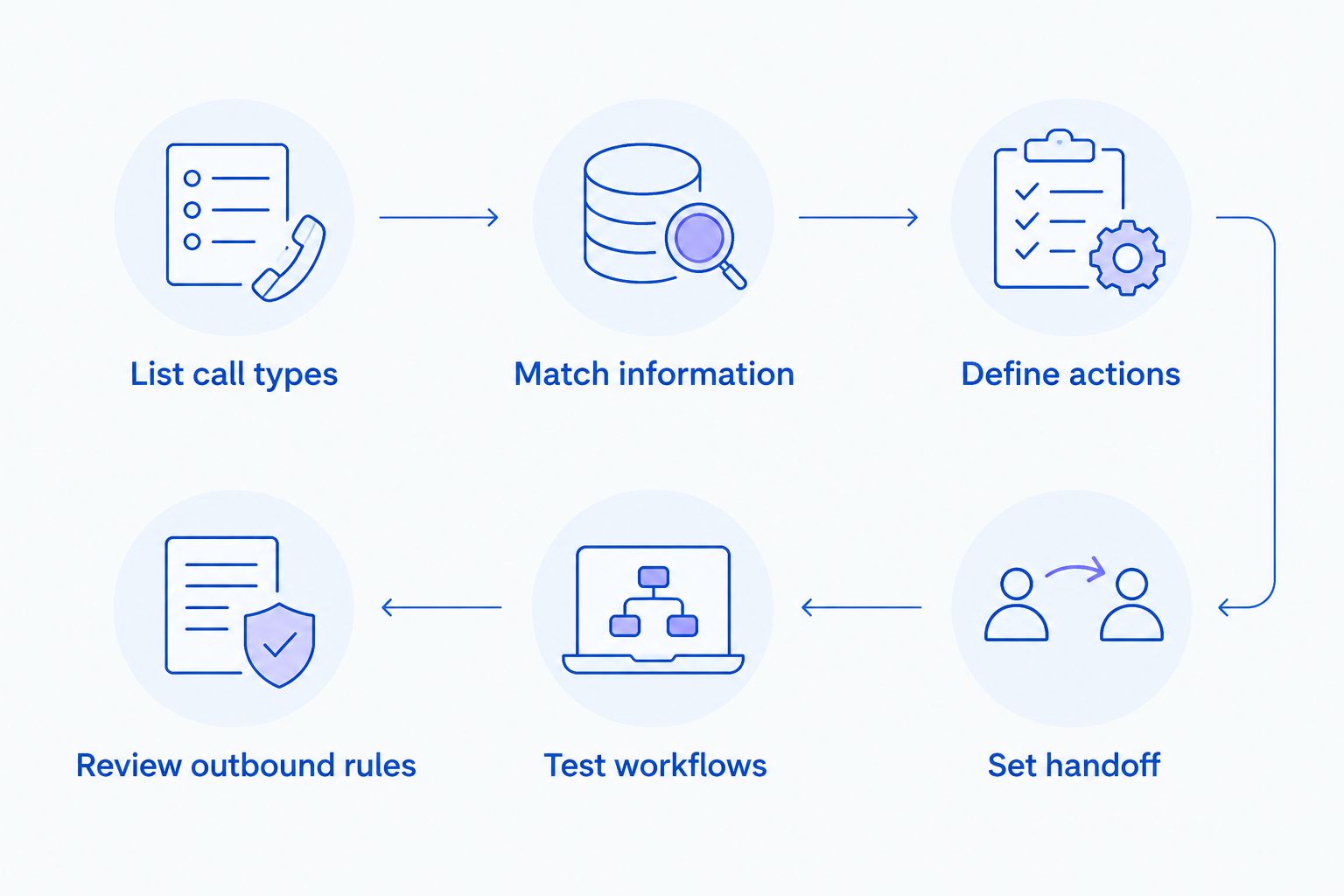
Test the permitted action and the handoff, not just whether the call connects.
This sequence also gives you a practical acceptance test. If an app cannot show which order information it uses or what happens when a request fails, pause that workflow. You can still assess other call types separately instead of treating the entire integration as approved or rejected.
How does a no-code Shopify phone setup work?
For a supported app, the merchant connects and configures the app rather than writing integration code. The work shifts to selecting workflows, granting appropriate access, setting call behavior and testing results. No code does not mean no decisions. You still own the rules governing customer contact and order actions.
Start with an inbound support scenario. Ask whether the agent can identify the customer's request, retrieve the relevant Shopify information and explain the next step. Then test the boundary: provide incomplete order information or a request outside the allowed workflow. The expected response should not invent an order update or claim a refund is complete when it is not.
Next, assess outbound recovery on its own. A cart event can be a useful trigger only if the store's contact rules allow the call and the conversation leads to an appropriate checkout path. Confirm whether any text link used in that process is an approved link. Keep the call outcome distinct from a completed purchase when reviewing results.
In 2026, ask for the current app listing and setup documentation before relying on a particular Shopify connection. Supported actions and usage terms can change. The practical goal is to confirm the exact workflow you plan to use, not to assume every store-facing feature is included because the app connects to Shopify.
Can the agent handle orders and refunds without custom code?
An app can handle supported order and refund workflows without custom code; the scope of those workflows must be checked separately. Answering an order-status question, explaining how a refund works and carrying out a refund are different actions. Specify which one you expect before you test the call.
Use an order-status request as the first check. Can the agent obtain information relevant to the caller's order? Can it state only what that information supports? If the order cannot be found or the caller cannot be matched appropriately, the conversation needs a handoff rather than a confident guess.
For refunds, decide who has authority to approve the action and how an exception should be handled. Ava AI's stated scope includes resolving order and refund requests. That does not establish that every refund can be issued automatically under every store policy. Test the exact action you intend to permit, including what the agent says when it cannot complete it.
A no-code setup is successful when the caller gets an accurate outcome within the store's rules. It is not successful merely because the agent recognizes the word refund. For 2026 planning, write down the approved action and the fallback for each request type before live calls begin.
Can abandoned-cart calls run without a custom build?
Yes, an app that supports outbound abandoned-cart calling can run that workflow without a custom phone integration. Ava AI includes outbound calls for abandoned-cart recovery in its stated offering. The merchant still needs to configure who is eligible for a call and what the agent should do when a customer declines or has already completed checkout.
Keep the trigger, conversation and outcome separate. A cart becoming abandoned does not mean the customer was reached. A connected call does not mean the customer returned to checkout, and a returned visit does not mean an order was placed. That distinction matters when you evaluate the workflow rather than just counting calls.
Ava's approved internal merchant average for outbound abandoned-cart voice calls is 37x; individual results vary. The figure does not establish a result for your store, and its measurement period, sample size and cost definition are not specified here. Use your own call, checkout and order records to assess what happened after launch.
In 2026, verify the current app terms before enabling the workflow. The stated zero commission on recovered revenue does not answer every question about plan pricing or usage charges. Check those charges in the Shopify App Store rather than treating a no-code installation as a complete cost assessment.
What does the 7-day trial let you check?
Use Ava AI's 7-day free trial to validate a small set of calls against your store's actual processes. The stated setup time is minutes, but configuration speed is not the same as workflow approval. Choose one inbound request and, if relevant, one outbound scenario to test before expanding call coverage.
For inbound support, record the question asked, the order information needed, the answer given and whether the case required a handoff. For outbound recovery, record whether the call was permitted, whether it connected and whether an order followed. Keep website clicks, app installs, trial starts and paid customers as separate measures; none substitutes for another.
The trial should answer a specific decision: can the app complete the calls you intend to delegate without creating incorrect order answers or unauthorized actions? If a workflow fails, identify whether the gap is missing information, an unsupported action or a rule you have not configured. That tells you what to change before using the agent with more customers.
Test Shopify phone workflows
Check support and cart-recovery calls during Ava AI's 7-day free trial.
What changes when you choose a custom integration?
A custom integration is a development project, not the default requirement for putting an AI phone agent alongside Shopify. It gives you room to define behavior outside an app's supported workflows, but you must also maintain the connection and test changes. The choice rests on required behavior, not on whether custom code sounds more advanced.
Choose the app route when the needed call types, order access and permitted actions are supported and test cleanly. Choose a custom build when a necessary workflow is unavailable and cannot be handled through the app's configuration or a human handoff. In either case, document who approves customer-facing changes and how errors are corrected.
For 2026, avoid choosing solely on a feature list. A feature labelled order support does not tell you whether a specific caller can get a specific order answer. Ask for that demonstration in your own workflow. A phone agent earns its place by giving an accurate response or a clear handoff, not by listing the most possible actions.
FAQ
Can AI phone agents integrate with Shopify without custom code?
Yes. A Shopify-focused phone agent app can connect through an app-based setup for its supported workflows; check the actions and permissions your store needs before using it with customers.
Does a no-code Shopify phone agent need setup?
Yes. No-code removes the need to write integration code, not the need to configure call types, permitted actions, customer-contact rules and handoffs.
Can Ava AI answer Shopify support calls around the clock?
Yes. Ava AI is described as answering customer support calls 24/7 for Shopify store owners. Test the order information and handoff needed for your specific requests.
Can an AI phone agent resolve Shopify refund requests?
Ava AI's stated functions include resolving refund requests. Confirm which refund actions it can complete under your store's rules and what happens when a request requires approval.
Can Ava AI call customers about abandoned carts?
Yes. Ava AI's stated offering includes outbound abandoned-cart recovery calls. Check contact permissions and eligibility rules before activating them.
How quickly can Ava AI be set up for Shopify?
Ava AI's stated setup time is minutes. Test the actual calls and order actions you plan to use before treating the setup as ready for customers.
Is an app-based phone agent better than a custom Shopify integration?
An app-based phone agent is the better fit when its supported workflows cover your store's needs without development. A custom integration fits a required workflow that the app cannot support or configure.
One last thing
Test the failure path before the successful call. In 2026, the most useful no-code question is not whether an agent answers; it is what the agent does when it cannot find an order, verify a request or complete an approved action. A clear handoff protects the customer while you decide which workflows belong on the phone agent.