.png)
Automate Shopify Refund Calls: 2026 Workflow Guide
Automate Shopify refund calls in 2026: connect Ava AI to Shopify, set refund rules, and route exceptions to a human with order context attached.
September 22, 2026

Handling refund requests by phone means someone on your team stops what they're doing, pulls up the order, checks the return policy, and either approves or denies it live. Do that fifteen times a day and you've lost half a shift to conversations a script could close in under two minutes. Instead of staffing refund calls manually, connect Shopify order data to a voice agent that verifies the order, applies your refund rules, and either resolves the call or hands it to a human with the order pulled up already.
TL;DR
- Automate Shopify refund calls by connecting Ava AI to your Shopify order data so the agent verifies orders and issues approved refunds without a human on the line.
- Setup takes minutes once Shopify is connected; the agent runs on defined refund rules, not open-ended discretion.
- Escalation rules route disputed or high-value refunds to a live agent with order history already loaded.
- The same connection powers outbound abandoned-cart recovery calls, so one setup covers two workflows.
- Ava AI's 7-day free trial lets you test refund call automation on real order volume before committing.
Why this matters
Refund calls are repetitive, but they're not simple. A customer wants their money back, wants it confirmed in writing, and wants to know when it'll hit their card. Answer that inconsistently across three different support reps and you get complaints, not resolutions.
An automated voice workflow removes the inconsistency. The agent pulls the actual order record from Shopify, applies the same refund logic every time, and only kicks a call to a human when the situation falls outside your rules. That's the difference between a support team drowning in repeat calls in 2026 and one that only sees the calls that actually need judgment.
Ava AI runs this as a connected workflow: Shopify order and refund data feed the voice agent directly, so there's no manual lookup step during the call.
Before you start
- Shopify admin access with permission to install apps and approve API connections — you'll need this to authorize the order and refunds scope.
- A defined refund policy written down as rules (time window, condition requirements, restocking fees) — the agent can only enforce what you've actually specified, so vague policies produce vague automation.
- The gotcha: if your refund window or exceptions live only in a support rep's head and not in a written policy, write it down first. An agent configured against an incomplete policy will approve refunds it shouldn't or escalate ones it shouldn't have to.
Connect your Shopify store
- From your Ava AI dashboard, open Integrations and select Connect Shopify.
- Authorize the connection through Shopify's OAuth screen — approve the Orders and Refunds permission scopes when prompted.
- Confirm the store name and domain shown match your actual Shopify store before continuing.
Expected result: your Shopify order history appears inside the Ava AI dashboard, and the connection status shows Active.
Set up the refund resolution trigger
- Go to Call Workflows and create a new trigger under Inbound Support.
- Set the trigger type to Refund Request so incoming calls tagged as refund inquiries route through this flow.
- Enter your refund window (in days) and any condition requirements in the Refund Rules fields.
- Toggle Auto-approve within rules on if you want the agent to issue refunds directly for requests that match your policy, without a human touch.
- Save the workflow.
Expected result: a test call routed to this trigger pulls the correct order, states the refund status out loud, and either confirms the refund or explains why it doesn't qualify.
Configure escalation rules
- Under the same workflow, open Escalation Settings.
- Define what triggers a handoff to a live agent — common conditions are refund amount above a threshold, order age past your written window, or a damaged-item claim requiring photo evidence.
- Set the Escalation Destination to the phone number, extension, or on-call queue your support team actually monitors.
- Enable Order Context Handoff so the human agent sees order number, refund reason, and call transcript before they pick up.
Expected result: calls that don't fit your rules ring through to a human with the order already pulled up, not a blank screen.
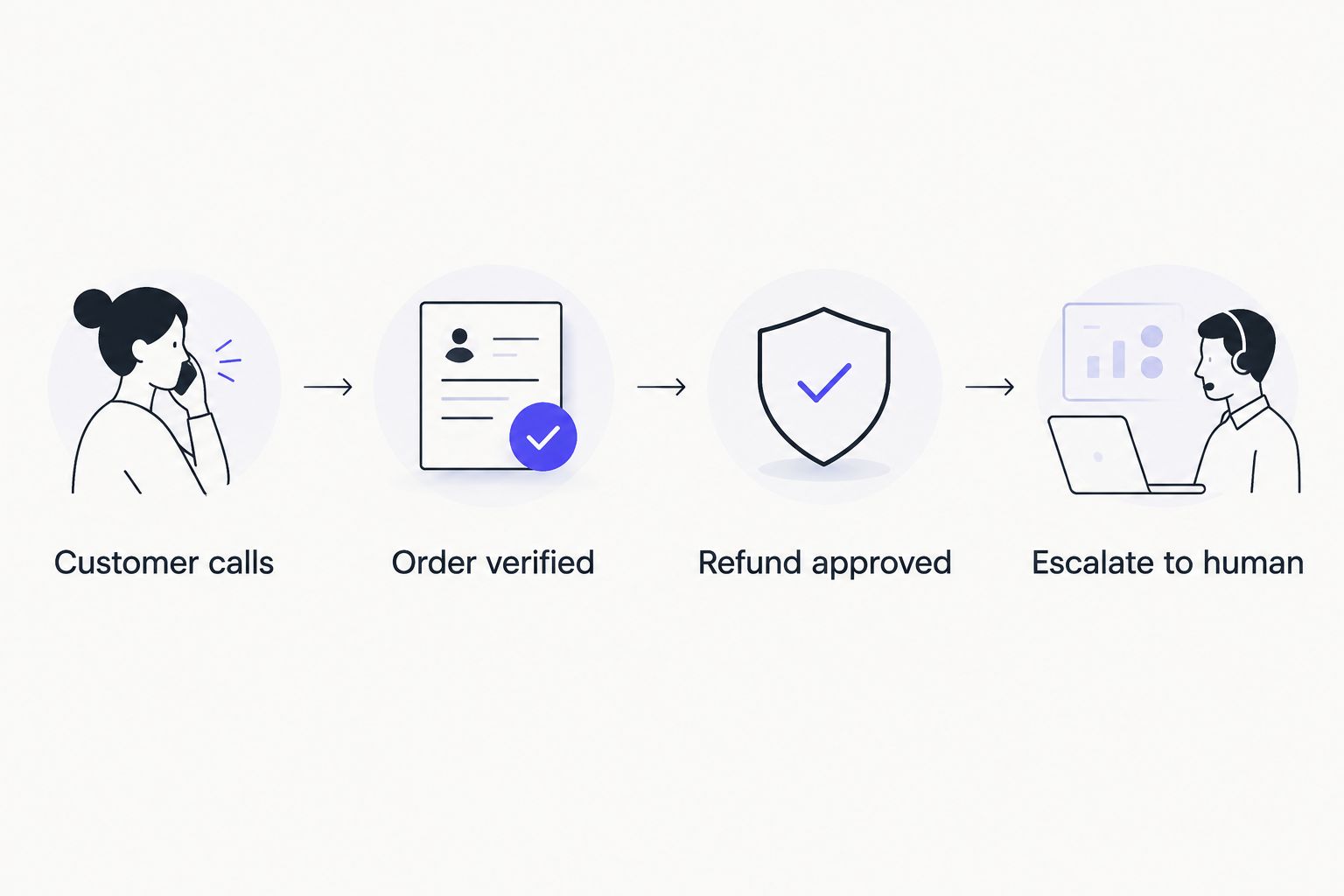
Most refund calls resolve at step three; only exceptions reach a person.
Add abandoned cart recovery calls to the same workflow
The same Shopify connection that powers refund automation also powers outbound recovery calls. Instead of running refunds and cart recovery as two separate tools, one integration handles both directions of the phone channel: inbound resolution and outbound recovery.
- Under Call Workflows, create a second trigger and set the type to Abandoned Cart.
- Set the delay window (how long after checkout abandonment the call goes out) — most merchants start at one to three hours.
- Connect your email platform if you're layering voice on top of existing flows; the guide to connecting Ava AI to Klaviyo for abandoned cart calls covers that pairing step by step.
- Save and activate.
Ava AI's internal merchant data shows outbound abandoned-cart voice calls recovering carts at roughly 37x the rate of email alone in aggregate — individual results vary by store, cart value, and audience, and this isn't a promise for your specific volume in 2026.
Troubleshooting
- The agent can't find an order during a call. Usually a mismatched phone number or email between the caller and the Shopify order record. Confirm the customer is calling from the number or providing the email tied to the order.
- Refunds aren't auto-approving even though they match your rules. Check that Auto-approve within rules is toggled on in the workflow — it defaults to off so refunds don't fire before you've reviewed the rule set.
- Escalated calls ring but the human agent has no order context. Order Context Handoff wasn't enabled, or the escalation destination isn't the number actually being monitored. Re-check both settings.
- Refund window calculations look off. Confirm the window is set in days, not hours — this is a common entry mistake during setup.
- Abandoned cart calls go out too early or too late. Adjust the delay window; three hours after abandonment is a reasonable starting point for most Shopify stores, then tune based on what your customers respond to.
Customize your workflow
Once refund calls and cart recovery are running, expand the same connection to cover order status and shipping questions, which typically account for a large share of inbound volume alongside refunds. For high-volume Shopify stores fielding hundreds of calls a week, the setup benefits from tighter escalation thresholds and multiple routing queues — see the best Shopify AI agents for order support in 2026 for how that scales. If you're still mapping out the full path from checkout to phone support, the Shopify checkout to 24/7 phone support workflow walks through the earlier stages.
Start automating refund calls today
7-day free trial, setup in minutes, zero commission on recovered revenue.
FAQ
How do you automate Shopify refund calls?
Connect your Shopify store to a voice agent platform like Ava AI, set refund rules (window, conditions, thresholds), and let the agent verify orders and issue approved refunds on the call. Requests outside your rules escalate to a human with order context attached.
Can an AI voice agent actually issue a Shopify refund?
Yes, when connected through the Orders and Refunds API scopes and configured with auto-approve rules, the agent can process the refund directly during the call rather than just logging a request.
Is automating refund calls only for high-volume stores?
No. Even a handful of refund calls a day eats into support hours; automation pays off once refund and returns questions become a repeat category rather than a one-off.
What happens to complicated refund cases?
Escalation rules route them to a live agent automatically, with the order number, refund reason, and call transcript already loaded so the human doesn't start from zero.
Does this replace my refund policy?
No. The agent enforces whatever policy you configure; it doesn't create refund logic on its own. A vague or undocumented policy leads to inconsistent automated decisions.
Can the same setup handle abandoned cart calls?
Yes. The Shopify connection that powers refund automation also supports outbound abandoned-cart recovery calls as a separate trigger within the same workflow.
How long does setup take in 2026?
Connecting Shopify and configuring a refund trigger typically takes minutes, not days, since the order and refund data sync directly through the API connection.
Do I need a developer to set this up?
No developer is required for the standard Shopify connection and workflow configuration; it's built for merchants to configure directly from the dashboard.
One last thing
The part merchants skip is writing the refund policy down before touching the workflow builder. An agent configured against rules that only exist in someone's memory will make wrong calls consistently instead of right ones inconsistently, which is a worse outcome. Spend twenty minutes on the policy first, then the automation in 2026 actually saves the time it's supposed to.