.png)
Ava AI Klaviyo Integration: Setup Guide for 2026
Ava AI klaviyo integration guide for 2026: stagger outbound cart-recovery calls against your Klaviyo email and SMS flow without overlapping shoppers.
September 21, 2026
You're already emailing abandoned carts through Klaviyo. The problem is email alone recovers a small slice of that traffic, and by the time a third reminder lands, most shoppers have moved on. Add Ava AI's outbound calling on top of your existing Klaviyo flow instead of replacing it, so the checkouts that don't open your emails still get a live voice attempt before you write them off.
TL;DR
- Ava AI klaviyo integration works best as two parallel channels sharing the same Shopify checkout data, not a single merged flow.
- Klaviyo handles email and SMS timing; Ava AI's outbound calls fill the gap for carts that never open a message.
- Ava AI needs a phone number captured at checkout, install it from the Shopify App Store with a 7-day free trial and no commission on recovered revenue.
- Space Ava's call after your first Klaviyo email and before your final reminder so no shopper gets contacted twice within the same hour.
- Ava AI's internal data shows a 37x average on outbound abandoned-cart calls; individual results vary by store.
Why this matters
Most Shopify stores running Klaviyo in 2026 already have an Abandoned Checkout flow live: three emails, maybe an SMS step, spread over 24 to 72 hours. That flow only works on shoppers who open email or reply to text. Everyone else, the ones who ignore both, sits untouched until the cart expires.
Ava AI is built to catch that second group. It places outbound calls to shoppers who abandoned checkout, using the phone number captured at the point of purchase, and it can resolve the call, answer a question about shipping, or just remind the shopper the cart is still there. Running it alongside Klaviyo instead of instead of Klaviyo means you're not choosing between email reach and voice recovery, you're stacking both against the same abandoned-checkout list.
Before you start
- A Shopify store with Klaviyo connected and an active Abandoned Checkout flow, so you already have a baseline to compare against.
- Ava AI installed from the Shopify App Store, with the outbound calling feature turned on and a support number assigned to the store.
- The gotcha: Ava AI can only call carts where a phone number was captured at checkout. If your checkout doesn't require a phone field, Ava's call list will be smaller than Klaviyo's email list, and that gap is normal, not a bug.
Set up your Klaviyo abandoned cart flow
- In Klaviyo, confirm your Abandoned Checkout flow is built on the Checkout Started trigger, not just Placed Order, so it fires the moment a shopper leaves checkout.
- Check the delay on your first email step. Most stores in 2026 run this at one hour after abandonment, so the shopper is still warm.
- Note the timing of your second and third messages, whether email or SMS. You'll use these timestamps in the next section to slot Ava's call in without overlap.
- Confirm the flow's exit conditions include Placed Order, so anyone who completes checkout through email or SMS drops out of the sequence automatically.
Expected result: you have a written timeline of when Klaviyo contacts each abandoned cart, from the first email through the final reminder.
Turn on Ava AI's abandoned cart calling
- Open Ava AI inside your Shopify admin and go to the abandoned cart settings.
- Enable outbound calling and set the Call Delay to sit between your Klaviyo's first and second message. If Klaviyo emails at 1 hour and 24 hours, set Ava's call for somewhere around the 3 to 6 hour mark.
- Confirm the caller ID and business name shown to shoppers match your store name, so the call looks legitimate on caller ID.
- Start the 7-day free trial if you haven't already. Setup runs in minutes, and there's no commission charged on revenue Ava recovers.
Expected result: Ava AI now places a call to every abandoned checkout with a captured phone number, timed to land in the gap between your Klaviyo emails.
Segment carts so calls and emails don't overlap
Running both channels on every cart wastes effort and annoys shoppers who get an email and a call within the same hour. Split the list instead:
- High cart value (your top quartile by order value): call first, email second. A call is more persuasive when there's more revenue on the line.
- Low cart value: let Klaviyo's email and SMS run first, and set Ava's call as the final step only if the cart is still open after the last message.
- No phone number captured: Klaviyo carries the full sequence alone, since Ava has nothing to call.
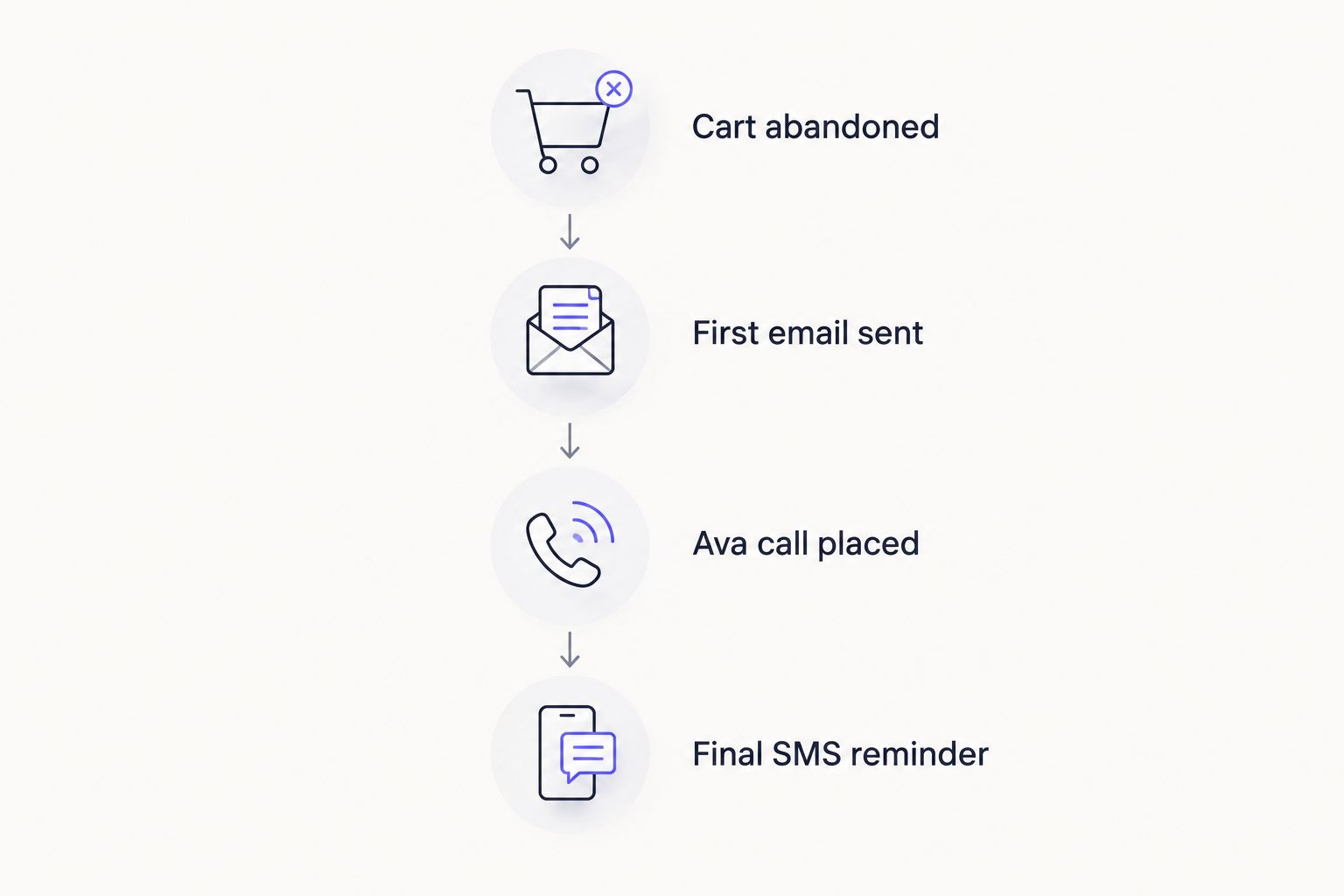
Stagger the channels so no shopper hears from you twice in the same hour.
Expected result: every abandoned cart gets exactly one channel first, with a clear fallback, instead of both channels firing at once.
Variant: route SMS non-responders to Ava instead of another text
If your Klaviyo flow already includes an SMS step and the shopper doesn't reply within a set window, don't send a second text. Route that segment into Ava's call queue instead. A shopper who ignored an email and a text is a low-intent signal for more written messages, but a short call can still resolve a simple objection, like a shipping cost question, that no amount of email copy fixes.
Troubleshooting
- Ava's call list is much shorter than Klaviyo's email list. This is expected if your checkout doesn't require a phone number. Add phone as a required checkout field if you want the two lists closer in size.
- Shoppers get a call and an email within minutes of each other. Your Call Delay setting in Ava AI overlaps with a Klaviyo send time. Push the call delay later or move the conflicting Klaviyo step earlier.
- Calls go to voicemail with no follow-up. Confirm Ava's retry setting is on, most Shopify stores in 2026 run one retry attempt a few hours after the first missed call.
- A shopper completes checkout after a Klaviyo email but Ava still calls. Check that your Abandoned Checkout flow's exit condition is set to Placed Order and confirm Ava AI's cart status is pulling live order data, not a cached list.
- Call volume looks low compared to cart volume. Some carts never had a phone number captured at all; this isn't a setup error, it's a checkout field issue.
Customize your workflow
Once calls and emails are staggered correctly, layer in order and refund handling. Ava AI answers inbound support calls around the clock and can resolve order status and refund questions on the same call it uses for cart recovery, so a shopper who calls back after your outreach doesn't hit a different system. For a broader look at where outbound calling fits against other recovery tools, see best AI agents for abandoned cart recovery. If you're evaluating how much setup work this takes compared to other Shopify voice tools, the breakdown on Shopify integration ease covers where Ava AI lands.
Start recovering carts by phone
7-day free trial, setup in minutes, zero commission on recovered revenue.
FAQ
What is the Ava AI Klaviyo integration?
It's a workflow, not a direct plug-in: Klaviyo runs your email and SMS abandoned cart flow while Ava AI places outbound calls on the same Shopify checkout data. Stagger the timing so both channels reach shoppers without overlapping.
Can Ava AI and Klaviyo run at the same time on one Shopify store?
Yes, most Shopify stores in 2026 run them in parallel. Set Ava's call delay to fall between Klaviyo's email or SMS steps so shoppers aren't contacted twice in the same hour.
Does Ava AI need a phone number from Klaviyo?
No, Ava AI pulls the phone number captured at Shopify checkout directly, not from Klaviyo. If your checkout doesn't require a phone field, Ava's call list will be smaller than your Klaviyo email list.
How much does Ava AI cost to run alongside Klaviyo?
Ava AI offers a 7-day free trial with no commission charged on revenue it recovers. Check current plan pricing on the Shopify App Store before committing.
What is the best delay between Klaviyo's last email and Ava's call?
Set Ava's call to land between your first and second Klaviyo message, not after the final one. By the last email, most shoppers who were going to convert already have.
Is Ava AI better than Klaviyo SMS for abandoned carts?
They solve different problems. Klaviyo SMS is cheaper and scales to every abandoned cart; Ava AI's calls work better on higher-value carts or shoppers who ignored text and email.
How long does Ava AI take to set up with an existing Klaviyo flow?
Ava AI installs from the Shopify App Store and setup runs in minutes. Aligning the call delay with your existing Klaviyo timeline is the only manual step.
One last thing
The segment most stores skip is the shopper who abandoned checkout after adding a discount code that failed. Klaviyo's emails rarely address that specifically, but a short call can resolve it in one sentence, and it's often the fastest recovery you'll get out of either channel in 2026.