Can an AI phone agent leave a voicemail if no one answers?
Can an AI phone agent leave voicemail? Yes, with the right calling features. Learn what to test, what to say, and how to handle unanswered Shopify calls.
November 14, 2026

Yes, an AI phone agent can leave a voicemail if the calling platform supports answering-machine detection and voicemail playback. The agent needs to distinguish a recorded greeting from a live person, wait for the recording prompt, and deliver an approved message. Outbound calling support alone does not establish that a particular app includes voicemail, so verify that behavior before enabling unattended calls.
TL;DR
- Can an AI phone agent leave voicemail? Yes, when answering-machine detection and message playback are supported.
- Avasales fits Shopify merchants seeking phone support and outbound abandoned-cart recovery; verify voicemail behavior separately.
- Keep voicemail brief, protect customer details, and distinguish a recorded message from a resolved conversation.
- Test greeting detection, message completeness, and follow-up rules before enabling outbound voicemail.
Avasales offers a 7-day free trial, setup in minutes, and zero commission on recovered revenue for Shopify merchants evaluating voice support and abandoned-cart calls. Use the trial to test your actual unanswered-call workflow rather than treating outbound calling as proof of voicemail support.
Can an AI phone agent leave a voicemail if no one answers?
Yes, provided the system can recognize voicemail and deliver a message after the greeting. A phone that keeps ringing presents a different outcome: there is no mailbox recording the agent's speech. A busy line, rejected call, and full mailbox also require different handling.
Use this sequence to evaluate an AI phone agent in 2026:
- Place the call. Confirm that the intended recipient and calling purpose are appropriate for the campaign.
- Detect the answer. Establish whether a person, recorded greeting, or carrier announcement answered.
- Wait for recording. Confirm that the agent does not speak its message over the mailbox greeting.
- Deliver the message. Use approved wording that identifies your store and gives a clear next step.
- Record the outcome. Keep voicemail, live conversation, and unresolved connection outcomes separate.
This is an acceptance checklist, not a description of every platform's implementation. Ask the provider to demonstrate the sequence with a real test mailbox.
Why this matters
An outbound cart-recovery call and an order-support callback have different purposes, but both need sensible handling when nobody answers. A message that starts during the greeting loses its opening. A message containing private order details creates a separate problem, even when the audio records correctly.
Your 2026 evaluation should therefore cover the entire unanswered-call path. Clear speech matters, but so do message timing, privacy, callback handling, and accurate outcome reporting. A voicemail is a contact attempt, not evidence that the customer heard or acted on it.
What should happen when the call goes unanswered?
Choose a response for each call outcome before switching on a campaign. Do not use a single generic outcome such as completed to represent both a customer conversation and a mailbox connection.
Live answer
- Best for: Questions needing a conversation
- Recommended handling: Identify the store and explain the purpose
- Benefit: The customer can respond immediately
- Limitation: The customer can decline to continue
Voicemail greeting
- Best for: A brief callback invitation
- Recommended handling: Wait for recording and leave approved wording
- Benefit: Gives the customer a next step
- Limitation: Does not confirm listening or understanding
Ringing without an answer
- Best for: No available mailbox connection
- Recommended handling: End the attempt according to your calling policy
- Benefit: Avoids speaking to an unconnected line
- Limitation: No message reaches the customer
Busy line or failed connection
- Best for: Technical or availability exceptions
- Recommended handling: Record the outcome and review retry eligibility
- Benefit: Preserves an accurate contact history
- Limitation: Does not establish why the customer was unavailable
These are recommended workflow choices, not guarantees that a particular app exposes every status. During a demonstration, ask which outcomes the platform reports and which it infers.
A connection record also needs interpretation. A carrier accepting a call does not prove that a customer answered, and a mailbox accepting audio does not prove that the complete message was captured. Review the outcome alongside a controlled test recording.
How do you test whether voicemail actually works?
Run 3 test calls to mailboxes you control: one with a short greeting, one with a longer greeting, and one with a greeting containing a pause. These are suggested test cases, not a performance benchmark. Add any greeting format your own support team regularly encounters.
Greeting detection
Listen for the moment the agent starts speaking. The opening should reach the recorded message, not disappear beneath the greeting. Check whether a pause inside the greeting causes the agent to start too early.
Ask how the provider handles uncertainty between a human answer and a recording. A demonstration with a standard greeting is useful, but it does not establish how the system handles every mailbox.
Message completeness
Play back the saved voicemail from the recipient's mailbox. Check that the store identification, purpose, and next step are audible. Do not rely solely on the script shown in the platform because the intended message and recorded message are different evidence.
Listen to the ending as well. A missing callback instruction makes an otherwise clear message difficult to act on. Test the exact approved wording you intend to use in production.
Outcome accuracy
Compare the mailbox recording with the platform's reported result. The record should distinguish a voicemail attempt from a live customer conversation, or make its classification limits clear.
For your 2026 launch review, keep the script, test result, and decision together. That gives your support team a reference when a customer reports a clipped message or unexpected follow-up.
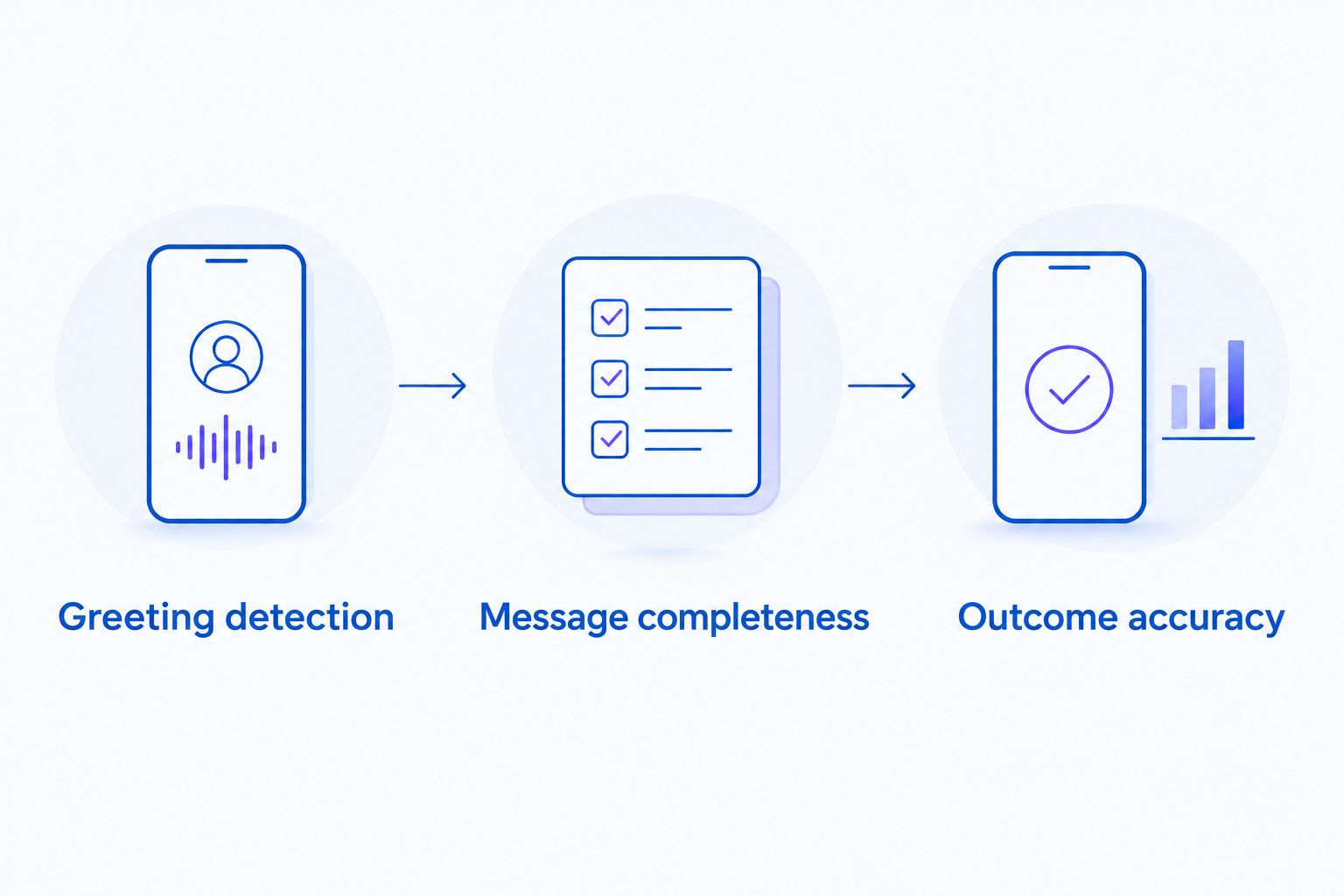
Test the saved voicemail and the reported outcome, not just the intended script.
What should an ecommerce voicemail contain?
Give the customer enough information to recognize the caller and choose a next step, without exposing private transaction details. Identify the store, explain the general reason for calling, and provide a return path that your team actually monitors.
A useful script approval checklist includes:
- Store identification: Use the customer-facing store name consistently.
- General purpose: Describe the support or shopping assistance without listing sensitive details.
- Clear next step: Ask the customer to return the call or use an established support channel.
- Accurate expectations: Do not promise an immediate response unless your operation supports it.
- Approved content: Remove unapproved offers, deadlines, and claims about the customer's order.
For an abandoned checkout, an invitation to get help is safer than reading out the basket contents. For an order inquiry, ask the customer to reconnect rather than announcing an address, payment issue, or refund amount to an unverified listener.
Avoid writing a script that depends on an answer. Questions such as whether the customer wants a different size require a conversation; a mailbox cannot supply the response. Save those questions for the callback.
Treat a voicemail script as a separate piece of customer communication. Reusing an interactive agent's opening without reviewing it can produce a message that waits for responses nobody can give.
Why does voicemail behavior vary?
The right evaluation focuses on specific controls rather than the general claim that a platform makes outbound calls. Check these factors with the provider:
- Answer detection: How does the system distinguish a person from a recorded greeting?
- Recording timing: What triggers message playback, and what happens if the greeting pauses?
- Script controls: Can you approve the voicemail wording separately from the live conversation?
- Exception handling: What happens when the mailbox is full or cannot accept a message?
- Outcome reporting: Can your team distinguish a voicemail attempt from a connected conversation?
- Follow-up rules: What prevents another call after the customer declines contact or the task is complete?
These questions establish whether the workflow fits your store. They also expose where a human review or a different communication channel belongs.
Do not assume a voice-quality demonstration answers them. Natural speech and reliable unanswered-call handling are separate acceptance criteria. Evaluate both before approving a 2026 outbound campaign.
Can an agent leave voicemail without a beep?
A beep is not the only possible cue a calling system can use, but the platform must still determine when recording begins. Ask the provider how it handles greetings without a clear tone and verify the result in a mailbox you control.
The practical test is the saved message. If the opening is missing or the agent speaks before recording starts, the workflow has not passed, regardless of how convincing the agent sounded during the call.
Can an agent send a text after leaving voicemail?
A follow-up text requires separate messaging support, appropriate permission, and an approved workflow. A voicemail attempt does not establish permission to send a text. Verify the calling and messaging requirements that apply to your recipients before combining channels.
Keep the text relevant to the original contact purpose. Use approved links and avoid sending sensitive order information merely because the phone number appears on a checkout.
If you combine channels, make sure the sequence stops when the customer responds or completes the intended action. Otherwise, a customer who already resolved the issue can receive an unnecessary reminder.
Should unanswered calls trigger another attempt?
A retry should follow an explicit contact policy, not happen automatically because a call failed to reach a person. Review the call purpose, existing permissions, previous attempts, and any request to stop contact before deciding what happens next.
Separate technical failures from successful voicemail attempts. Those outcomes tell you different things about the call, even though neither confirms a conversation. Avoid setting a retry schedule solely from the broad label no answer.
Before your 2026 rollout, define who owns exceptions. Your support team needs a clear way to stop a sequence when an order changes, a refund resolves the issue, or the customer contacts you through another channel.
Where does Avasales fit for Shopify merchants?
Avasales is best for Shopify merchants seeking phone support and outbound abandoned-cart recovery. Its stated scope includes answering customer support calls 24/7, resolving orders and refunds, and making outbound recovery calls.
The relevant benefit is the connection between customer service and shopping assistance. A merchant can evaluate those needs within the same app rather than choosing a phone agent solely because its demo voice sounds natural.
The limitation for this buying decision is specific: broad outbound capability does not establish a complete voicemail workflow. Before relying on Avasales for unanswered recovery calls, confirm detection behavior, approved message controls, outcome reporting, and follow-up settings with the team.
Use the contact page to request a demonstration using your intended greeting and message. Ask to hear the saved voicemail, then review how that same attempt appears in the call record.
FAQ
Can my AI phone agent leave voicemail when nobody answers?
Yes, if the platform supports voicemail detection and message delivery. Verify that it waits for the recording prompt and saves the complete approved message.
Does every outbound AI calling app support voicemail?
No, outbound calling support alone does not establish voicemail support. Ask the provider to demonstrate answering-machine detection, message playback, and outcome reporting.
How can I tell whether the complete voicemail was recorded?
Listen to the saved message in a mailbox you control. Check the opening identification, the main message, and the final callback instruction rather than relying only on the intended script.
Can I include a customer's order details in an automated voicemail?
Keep private order details out of voicemail because you have not verified who will hear it. Identify the store and invite the customer to reconnect through an established support channel.
Does leaving a voicemail count as recovering an abandoned cart?
No, leaving a voicemail does not establish that a purchase occurred. Track the call outcome separately from the completed order and apply a defined attribution method.
Can an unanswered call automatically trigger a follow-up text?
Only use that workflow when the platform supports messaging and the required permission is in place. A voicemail attempt does not itself establish permission to send a text.
What should Shopify merchants verify before choosing Avasales for voicemail?
Verify voicemail detection, recording timing, message controls, outcome reporting, and follow-up rules. Use the 7-day free trial to test the actual unanswered-call workflow before depending on it.
One last thing
A technically delivered voicemail can still be an unusable customer message. The agent can finish speaking while the recording loses the store name or callback instruction. Your final acceptance check should therefore be a playback from the recipient's mailbox, not a successful status in a dashboard.
Give that recording to someone who has not read the script. Ask whether they can identify the caller, understand the purpose, and explain the next step. If they cannot, revise the message before increasing outbound activity.