Automatically call B2B buyers when a wholesale order is approved
shopify b2b wholesale order approved call: verify approval triggers, buyer consent, and duplicate controls before you connect outbound calls to Shopify.
November 4, 2026

Instead of manually calling every wholesale buyer after approval, connect your confirmed Shopify approval event to a permission-checked outbound calling workflow. Avasales offers a 7-day free trial, setup in minutes, and zero commission on recovered revenue; confirm support for approval-triggered calls before treating this proposed workflow as a supported integration.
TL;DR
- For a shopify b2b wholesale order approved call workflow, verify the approval trigger and outbound calling connection first.
- Avasales supports Shopify phone customer service and abandoned-cart recovery; wholesale approval calling requires separate confirmation.
- Keep order approval, payment collection, and fulfillment as separate events with separate messages.
- Check the buyer contact, calling permission, current order state, and duplicate history before dispatch.
Why this matters
Wholesale approval is a business decision. Creating an order, accepting payment, and shipping goods represent different decisions, so none should automatically stand in for approval.
An approval call should tell the authorized buyer what changed and what happens next. It should not claim that payment cleared, inventory was reserved, or delivery was scheduled unless the current order record supports those statements.
Avasales is best for Shopify merchants seeking phone customer support and abandoned-cart recovery. Its stated capabilities include answering support calls 24 hours a day, resolving orders and refunds, and making outbound abandoned-cart calls. Those capabilities do not establish a wholesale approval trigger or a general-purpose outbound calling endpoint.
For a 2026 implementation, settle that connection before building the rest. A working approval event without a supported calling action produces a notification queue, not an automated phone workflow.
Before you start
- Store access and an approval definition: Have access to Shopify orders, the wholesale approval process, and the automation settings you intend to use. Identify where approval is recorded and who can change it.
- Buyer contact and calling rules: Prepare an authorized purchasing contact, a valid telephone number, documented calling permission where required, and rules for local calling hours, suppression, voicemail, and recording.
- A confirmed outbound connection: Get confirmation that your calling provider accepts this specific transactional workflow and returns a usable outcome. The non-obvious blocker is that an order-created event does not prove wholesale approval, and abandoned-cart calling support does not prove approval-call support.
Do not use a live buyer to discover these limitations. Start with a controlled test contact and keep production dispatch disabled until the approval and calling paths both pass.
Approval event configuration
Define the approval boundary
- Open Orders in Shopify and inspect a representative wholesale order. If your process begins with draft orders, inspect Drafts as well. Identify the exact action your staff considers final approval.
- Write the qualifying rule in plain language. Include the wholesale identifier, the required approval state, and the condition that distinguishes a new approval from an already-approved record.
- Select an event that your store actually exposes. If you use Shopify Flow, open the app, choose Create workflow, then Select a trigger. Use the available trigger descriptions to verify what each event means.
- Check that the event includes, or lets your integration retrieve, the order identifier and the approval evidence. If your approval process has no suitable event, have the integration owner define an explicit approval signal before continuing.
Expected result: A test approval produces an identifiable event tied to the correct order. Creating a wholesale order without approving it does not qualify.
Do not invent an approval trigger because its name sounds plausible. Shopify configuration and connected apps determine the available events. A generic order update needs an additional condition proving that approval changed.
For your 2026 workflow record, save the chosen event name, the qualifying condition, and the staff action that generates it. That record gives your team a stable reference when the approval process changes.
Choose the event strategy
These are workflow designs, not claims that a particular connector offers every option.
Explicit approval signal
- Best for: Stores with a distinct approval action
- Advantage: Closely matches the business decision
- Limitation: Requires that signal to exist and be accessible
Order update plus approval check
- Best for: Stores recording approval on the order
- Advantage: Reuses an existing order-change path
- Limitation: Unrelated edits also need filtering
Staff-reviewed call queue
- Best for: Stores without a confirmed calling connection
- Advantage: Keeps approval notifications under human control
- Limitation: Staff still initiate the call
Use an explicit approval signal when your system provides one. Otherwise, filter an order-update event against recorded approval evidence. Keep a staff-reviewed queue until automatic dispatch is supported and tested.
Buyer eligibility and call content
Prepare the call record
- Retrieve the current order after receiving the event. Check its present approval state rather than relying only on an earlier event payload.
- Resolve the authorized purchasing contact. Do not assume that a shipping recipient or a company's main switchboard is the right person for an order decision.
- Validate the telephone number and apply your permission, suppression, and calling-window rules. Route missing or conflicting information to staff instead of guessing.
- Prepare the minimum call context: store identity, order reference, approval status, approved next action, and an internal owner for exceptions.
- Remove unsupported promises from the message. Payment terms, dispatch timing, stock commitments, and delivery dates belong in the call only when the relevant record confirms them.
Expected result: Every eligible call has a verified purpose, an appropriate recipient, and current order information. An incomplete record stops before dialing.
Use the following as a proposed data checklist, not as provider field names or an API contract:
- Approval evidence: The recorded decision and the event that reported it.
- Buyer eligibility: The authorized contact and applicable calling permission.
- Current order: The latest status and approved next action.
- Duplicate check: Whether this approval notification was already dispatched.
- Call outcome: The result returned by the calling connection.
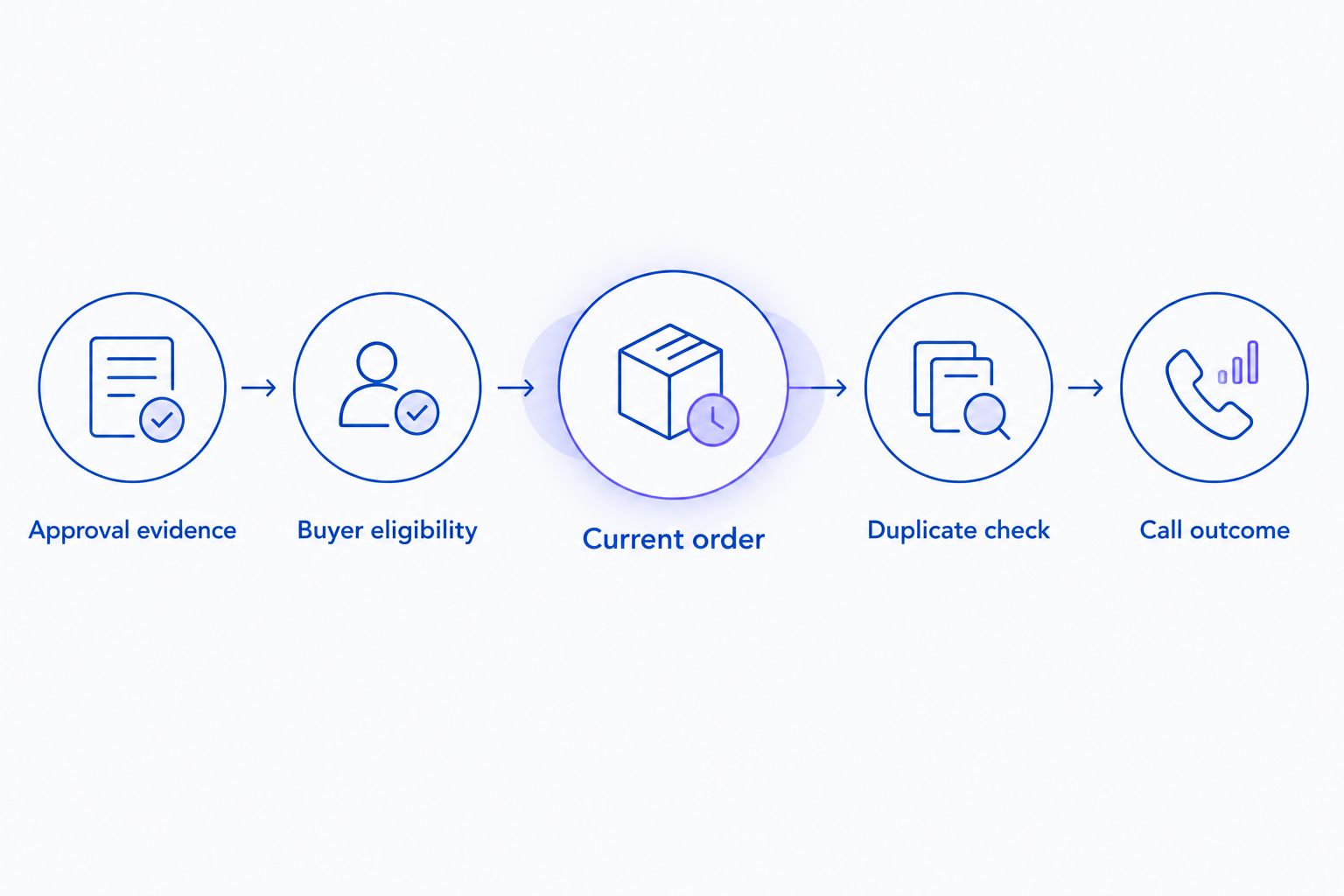
Check eligibility and current order status before dispatching the approval call.
Set the conversation boundary
An approval notification should confirm the merchant's identity, establish that the intended buyer is speaking, and explain the verified approval outcome. Keep sensitive order details out of an unverified conversation or voicemail.
Give the agent an approved response for questions outside that purpose. A request to change quantities, negotiate terms, cancel the order, or alter delivery arrangements needs its own authorization path.
For a 2026 launch, review the script with your operations owner and the person responsible for calling compliance. Transactional purpose alone does not settle every consent, recording, or automated-calling requirement.
Outbound dispatch and duplicate controls
Connect the supported calling action
- Obtain the provider's actual connection instructions for wholesale approval calls. Confirm authentication, required inputs, outcome reporting, and the process for handling a rejected request.
- Map your prepared call record to that documented interface. Use the provider's real field names; the checklist above is not a substitute for its integration contract.
- Create a persistent duplicate key combining the store, order, notification purpose, and relevant approval event. Repeated delivery of the same event must not create a fresh call.
- Record dispatch state before attempting delivery, with a process for reconciling uncertain responses. Separate a request accepted by the provider from a call answered by the buyer.
- Route exceptions to a named staff owner. If the connection cannot confirm receipt, inspect its status before sending the same request again.
Expected result: An eligible approval reaches the calling system through a documented connection, and repeated event delivery does not produce repeated buyer calls.
Do not assume Avasales exposes an approval-call action, webhook, or API. Use the contact page to confirm this workflow's trigger compatibility, outbound scope, required permissions, and outcome reporting before connecting it to production.
The benefit of automated dispatch is consistent handling after approval. Its limitation is dependency on the full chain: approval evidence, contact quality, permission checks, and a supported call connection. A failure in any part should produce a review task rather than an improvised call.
Test results and production release
Run controlled approval tests
- Prepare 3 test orders using controlled contact details. Give them distinct scenarios: a valid approval, an order that remains unapproved, and an approval event delivered repeatedly.
- Run the valid case through the entire path. Verify the buyer selection, call content, dispatch record, and returned outcome.
- Run the unapproved case. Confirm that it stops before dispatch and records why it did not qualify.
- Repeat the same approval event. Verify that the duplicate control blocks another notification for the same decision.
- Test cancellation before dispatch, a missing number, and an uncertain provider response. Confirm that each reaches the correct stop or review path.
Expected result: The valid approval produces the intended notification; excluded and duplicate cases do not. Keep 0 live buyer calls enabled until these checks pass.
Record acceptance criteria in your 2026 release checklist. A workflow is not ready just because its automation interface displays a successful run; the correct recipient, accurate message, and duplicate protection must also pass.
Keep reporting stages separate. Count eligible approvals, dispatch requests, provider-accepted requests, answered calls, and confirmed buyer acknowledgments independently. A completed automation is not evidence that a buyer heard or understood the message.
Call buyers when an approved order changes
A related workflow is notifying a buyer about a material change after approval. Use it only when your source system exposes the change and the calling connection supports the notification.
Define which changes deserve a call before enabling this variant. An internal note or formatting edit should not notify a purchasing manager. A change to the buyer's required next action needs a reviewed message and fresh eligibility checks.
Give the change notification a separate purpose in your duplicate key. Otherwise, an earlier approval call can suppress a legitimate update, or an ordinary edit can replay the original approval message.
Re-read the order before dispatch. If approval was withdrawn or the order was canceled, stop the queued approval notification and send the case to staff. Do not reuse an approval message to explain a cancellation.
Troubleshooting
Calls start before approval
The selected event represents order creation or an unrelated update. Replace it with the verified approval signal, or add a condition proving the approval transition before dispatch.
A buyer receives duplicate calls
The workflow treats repeated event delivery as a new notification. Check that duplicate state persists across runs and that dispatch retries reuse the same notification identity.
The call reaches the wrong person
The mapping uses a shipping contact or general company number instead of the authorized purchaser. Correct the contact source and block records without a confirmed recipient.
The automation succeeds but no call arrives
A successful automation run does not prove that the provider accepted or completed a call. Inspect authentication, input validation, provider receipt, and the returned delivery state in that order.
The agent states outdated order information
The workflow sends an old event snapshot or leaves a queued message unchanged after an order edit. Retrieve current order data immediately before dispatch and stop notifications whose qualifying state no longer applies.
Customize your workflow
Expand scope after the approval path works. Add staff review for high-sensitivity exceptions, define the voicemail policy, and document who resolves failed notifications. Keep each extension tied to a specific buyer need.
For Avasales, evaluate the confirmed Shopify customer-support and abandoned-cart capabilities separately from this proposed approval workflow. Setup in minutes describes the app's stated onboarding offer, not a verified completion time for a custom wholesale integration.
Recheck permissions, contact ownership, and the approved script whenever your wholesale process changes. Your 2026 configuration should reflect the current approval policy rather than preserve assumptions from an earlier setup.
FAQ
How do I set up a Shopify B2B wholesale order approved call?
Connect a verified approval event to a supported outbound calling action, with buyer eligibility and duplicate checks between them. Confirm the calling provider accepts this notification before enabling live dispatch.
Can Avasales automatically call buyers after wholesale approval?
Confirm approval-triggered outbound support directly with Avasales before building this workflow. Its stated outbound capability covers abandoned-cart recovery, which does not establish wholesale approval calling support.
Is an order-created event the same as wholesale approval?
No, order creation does not establish that your wholesale approval decision occurred. Use the event or recorded condition that represents your actual approval process.
Can I use Shopify Flow for approval calls?
Use Shopify Flow only when your store exposes a suitable event and a supported path to the calling action. Check the trigger's meaning and required order data before connecting dispatch.
How do I prevent repeated calls for the same wholesale order?
Persist a duplicate key for the order, notification purpose, and approval event. Reuse that identity during retries and reconcile uncertain provider responses before resending.
Can the approval call promise shipping or confirm payment?
The call should state shipping or payment facts only when current records verify them. Approval alone does not establish payment collection, fulfillment, or a delivery commitment.
What should happen if the buyer's phone number is missing?
Stop automatic dispatch and send the record to staff for contact verification. Do not substitute an unrelated shipping contact or company switchboard without confirming the intended recipient.
One last thing
Check the order again immediately before dialing. Approval can be valid when an event arrives and invalid by the time a queued call starts. That final check protects the buyer from receiving a confident notification about a decision your team has already changed.