.png)
Automated Shipping Notification Call Shopify Setup 2026
Set up an automated shipping notification call Shopify workflow with Ava AI in 2026: trigger, script and troubleshooting steps, no developer needed.
September 23, 2026
Instead of letting a fulfillment email sit unread in an inbox, set up an automated shipping notification call in Ava AI so the customer hears their tracking number, carrier and delivery window within seconds of the order marking as fulfilled. The call also handles the obvious follow-up questions live, which a static email or SMS never does.
TL;DR
- An automated shipping notification call Shopify workflow fires the instant an order status changes to Fulfilled in 2026.
- Ava AI reads the tracking number, carrier and delivery window aloud, then answers live follow-up questions.
- Setup runs through the Shopify app plus a trigger and a script, no developer time required.
- A second variant sends a delivery-confirmation call when tracking status flips to Delivered.
- Ava AI offers a 7-day free trial with setup measured in minutes.
Why this matters
A shipping confirmation email gets opened by a fraction of recipients, and most of those opens happen hours after the order actually ships. A phone call is unmissed by design: the customer either answers or the call logs as a missed call with a callback option, and either way the intent to check order status gets satisfied without a support ticket.
Stores running voice AI tools for order tracking already know that "where's my order" questions make up a large share of inbound support volume. An automated shipping notification call Shopify merchants set up once removes a chunk of those tickets before they're ever opened, because the customer already knows the answer before they think to ask.
Ava AI runs this as an outbound voice workflow tied directly to Shopify order events, not a separate dialer that needs its own customer list. The call fires from the same system that already answers your inbound support line, so tone and information stay consistent across both directions.
Before you start
- Shopify admin access to install the app and authorize order and fulfillment event permissions.
- Clean phone number data on customer profiles, meaning the number includes a country code and isn't a placeholder value some checkout apps insert for guest orders.
- The gotcha: fulfillment events created by bulk CSV imports or third-party fulfillment apps sometimes fire the Order fulfilled webhook without a real-time timestamp, which can queue calls hours late. Check how your fulfillment app marks orders before you turn the automation live, or the first batch of calls will land at odd hours.
Connect Ava AI to your Shopify store
- Install the Ava AI app from the Shopify App Store and click Install app.
- Authorize the requested permissions, including order and fulfillment read access. Ava AI needs this to detect the moment an order status changes.
- In the Ava AI dashboard, open Store connections and confirm the store shows as Connected.
Expected result: your Shopify order feed appears inside Ava AI's dashboard within a couple of minutes, with recent orders listed by status.
Set up the shipping trigger
- Go to Automations and click New automation.
- Under Trigger, select Order fulfilled.
- Set the Delay field. Most stores use a short delay of a few minutes rather than an instant call, which avoids calling before the shipping label and tracking number are fully attached to the order.
- Choose which order tags or product types the automation applies to, or leave it unrestricted to cover every fulfilled order.
- Click Save automation.
Expected result: the automation shows as Active in the automations list, and a test order marked as fulfilled in Shopify triggers a call within the delay window you set.
Configure the call script
- Open the Call script editor for the shipping notification automation.
- Select the Shipping update template, or write a custom script.
- Insert the dynamic fields: tracking number, carrier name and estimated delivery window. These pull straight from the Shopify order data, so you don't hardcode anything per order.
- Set the Language field if you sell to customers who speak more than one language, since Ava AI can match the call language to the customer's stored preference.
- Turn on Approved text link if you want a text message with the tracking link sent alongside the call, for customers who prefer to tap through rather than write the number down.
- Click Save script.
Expected result: a test call reads back the correct tracking number and carrier for a real fulfilled order, and the customer can ask "when will this arrive" or "can you resend the tracking link" and get a direct answer.
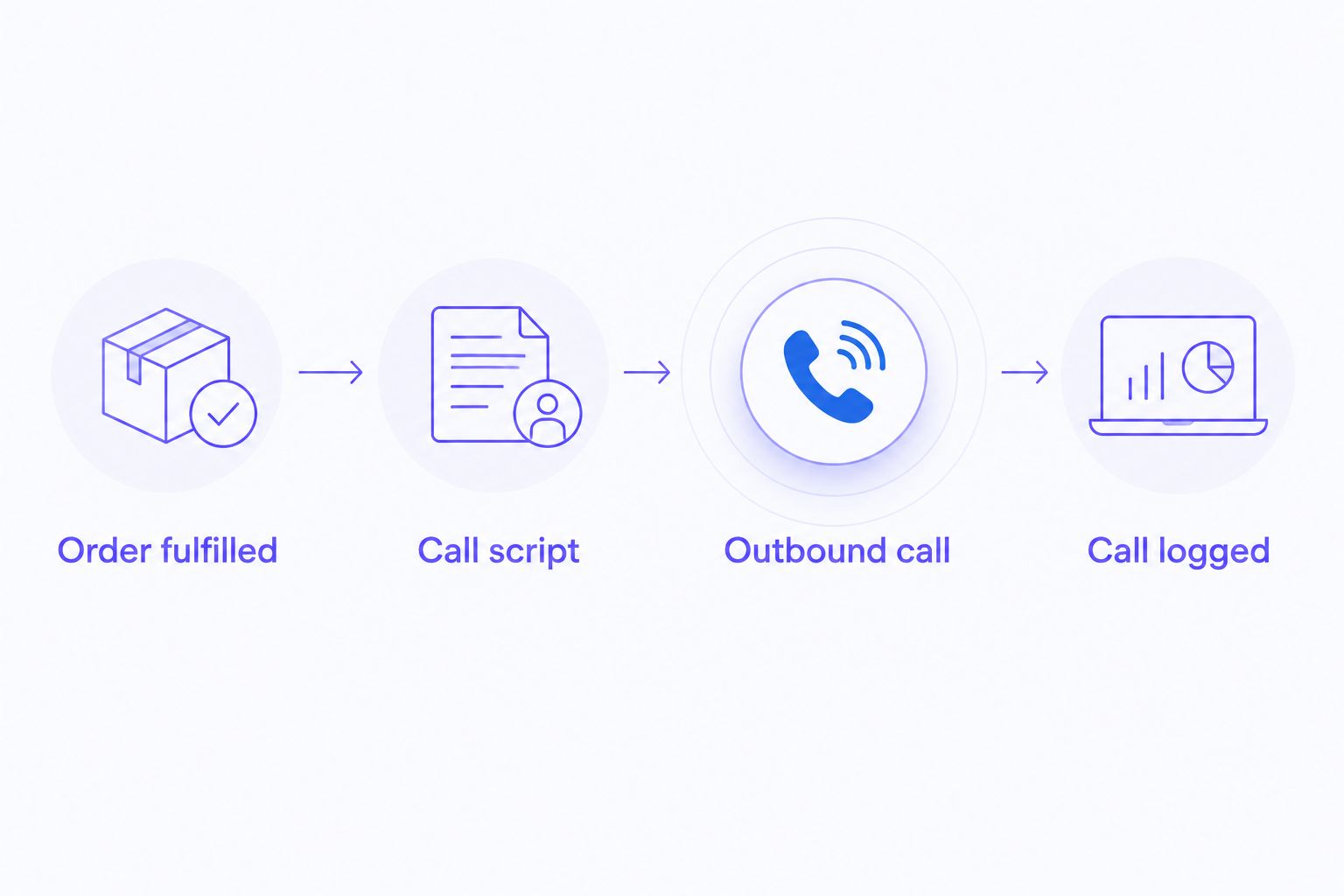
The trigger, script and log are three separate settings, not one toggle.
Send a delivery-confirmation call too
A second, adjacent workflow catches the other end of the shipment: instead of stopping at the shipping notice, set the Order delivered trigger to fire off a short confirmation call once tracking status changes to Delivered. This is a separate automation from the shipping call, built the same way but using the Delivered trigger instead of Fulfilled.
Stores that also run an abandoned cart call workflow tend to add this delivery-confirmation step last, once the shipping notification automation is stable. It catches damaged-in-transit reports and "never arrived" claims while the order is still fresh in the customer's mind, rather than three weeks later as a support ticket.
Troubleshooting
- Calls go straight to voicemail. Check the customer's stored number format. A missing country code causes many carriers to route the call as if dialed locally, which fails silently.
- The automation didn't fire on a fulfilled order. Confirm the order wasn't fulfilled through a bulk export tool that bypasses Shopify's real-time fulfillment webhook. Manual fulfillment inside Shopify admin triggers reliably; some third-party fulfillment integrations don't.
- The script reads the wrong delivery window. This usually means the carrier's estimated delivery date wasn't attached to the fulfillment yet. Increase the Delay setting by a few minutes so the label data has time to sync.
- Customers report getting the call twice. Check for a duplicate automation, which happens when a store builds a second "Fulfilled" trigger for a different tag segment without excluding the first one.
- International numbers aren't receiving calls. Confirm outbound calling is enabled for that country in the Ava AI dashboard settings; not every region is enabled by default.
Customize your shipping call workflow
Once the shipping notification call is stable, expand it rather than leaving it as a single automation. Segment scripts by product type, so a furniture order that ships in multiple boxes gets a script that explains that up front instead of confusing the customer with a partial tracking number.
Stores syncing customer data through Klaviyo can also connect Ava AI to Klaviyo for abandoned cart calls so shipping calls, cart recovery calls and email flows pull from the same customer record instead of three disconnected systems.
Set up your first shipping call
Start a 7-day free trial and connect your Shopify store in minutes.
FAQ
What is an automated shipping notification call for Shopify?
It's an outbound voice call triggered automatically when a Shopify order's status changes to Fulfilled, reading the tracking number, carrier and delivery window to the customer. Ava AI builds this on the same platform that answers inbound support calls, so the two share customer context.
How is a shipping notification call different from an SMS or email?
A call gets answered or logged as missed with a callback option, while emails and texts can sit unopened for hours. The call also handles follow-up questions live instead of requiring the customer to open a support ticket.
Does the shipping call replace shipping confirmation emails?
No, most stores in 2026 run both. The email serves as a written record with the tracking link, while the call adds a faster, more personal touch that catches questions the email can't answer.
Can I set up a separate call for when the order is delivered?
Yes, set a second automation using the Order delivered trigger instead of Order fulfilled. It runs independently from the shipping call and uses its own script.
What happens if the customer's phone number is invalid?
The call fails to connect and logs as undeliverable in the Ava AI dashboard, which is a signal to clean up phone data at checkout rather than a workflow issue.
Can the shipping call be sent in a different language?
Yes, the Language field in the call script can be set to match the customer's stored language preference, so international orders get a call in the right language automatically.
How long does it take to set up an automated shipping notification call?
Setup typically takes minutes once the Shopify app is connected: choose the Order fulfilled trigger, select or customize a script, and save the automation.
Does the automation work with third-party fulfillment apps?
It depends on whether the fulfillment app updates order status through Shopify's standard fulfillment event in real time. Bulk or batch fulfillment tools sometimes delay that update, which delays the call.
One last thing
The delay setting between fulfillment and the call matters more than the script wording. A call placed too early reads an incomplete delivery estimate and undercuts the whole point of the automation, so test with real fulfilled orders before turning it on for every customer in 2026.