.png)
Ava AI Recharge Integration: Setup Guide for 2026
Connect Ava AI to Recharge in 2026 to trigger voice calls on failed payments, skips and renewals. Step-by-step setup, troubleshooting and FAQ included.
September 23, 2026

Recharge subscribers who miss a renewal or hit a declined card rarely call your support line about it. They just let the subscription lapse, and by the time you notice the churn, the customer has already switched to a competitor's product. Instead of manually pulling a failed-payment report every morning and emailing a list that gets ignored, connect Ava AI to Recharge so a voice agent calls those subscribers the same day the event fires.
TL;DR
- The ava ai recharge integration links subscription events in Recharge to outbound voice calls from Ava AI, no manual list-building required.
- Setup runs through Ava AI's integrations page and a Recharge API token, and most Shopify stores finish in under 20 minutes.
- Separate triggers exist for failed payments, skipped shipments and upcoming renewals in 2026, so the script matches the situation.
- A 7-day free trial covers the full setup, and Ava AI charges zero commission on any subscription revenue the calls recover.
Why this matters
Recharge handles the billing logic: it knows when a card declines, when a customer skips a shipment, and when a renewal is coming up in three days. What it doesn't do is pick up the phone. Email and SMS reminders sit in an inbox next to forty other messages, and a subscriber who was already on the fence about the product has no reason to open one.
A phone call is different. It interrupts, it's personal, and it gives the subscriber a chance to fix the card or pause the plan in under two minutes instead of digging through a customer portal. Stores running subscription support through Ava AI use this pattern specifically for the moments where a click-through link isn't enough: a failed payment on a high-value box, a customer who's skipped twice in a row, or a renewal on a plan the store wants to keep active into 2026.
Ava AI answers inbound calls and makes outbound ones, which is what makes the Recharge connection useful in both directions: subscribers can call in about their plan and get resolved without a human, and Ava AI can call out the moment Recharge flags a risk.
Before you start
- Ava AI account with your Shopify store already connected. The Recharge integration sits on top of that connection, not instead of it.
- Recharge admin access to generate an API token under the merchant portal. You'll need permission to create tokens, not just view subscriptions.
- The gotcha: Recharge triggers fire off variant and subscription IDs, not product titles. If a product was re-created or a variant was swapped after a subscription was set up, the trigger can fail silently and no call goes out. Confirm active subscriptions are still mapped to live variant IDs before you turn triggers on, not after your first failed-payment batch goes quiet.
Connect your Recharge account to Ava AI
- In your Recharge admin, go to Apps and integrations, then API tokens.
- Click Create token. Scope it to Subscriptions, Customers, and Orders with read access at minimum; add write access if you want Ava AI to log call outcomes back into Recharge notes.
- Copy the generated key. Recharge shows it once, so paste it somewhere before closing the tab.
- In the Ava AI dashboard, open Integrations and click Add integration.
- Select Recharge from the list, paste the key into the API Key field, and click Connect.
Expected result: the integration status shows Connected, and Ava AI's dashboard starts listing active subscriptions pulled from your Recharge account within a few minutes.
Set up subscription call triggers
- Inside the Recharge integration panel, open Call triggers.
- Toggle on the events you want to act on: Payment failed, Subscription skipped, and Upcoming renewal.
- For each trigger, set the delay field. A failed payment should trigger a call within hours, not days, before the retry window closes. An upcoming renewal call typically goes out 2-3 days ahead.
- Set the call window so calls only go out during hours a real person would pick up, not at 6am.
Expected result: each toggled event now shows an active call trigger with its delay and window visible on the same screen, and a test subscription flagged as Payment failed in Recharge produces a call attempt in the Ava AI call log within the delay you set.
Configure the call script and outcomes
- Open Call scripts and select the Subscription template, or build one from scratch.
- Fill in the fields Ava AI needs to speak naturally: product name, next charge date, and the update-payment link the customer will be sent if they ask.
- Set outcomes for the call: Payment updated, Subscription paused, Subscription cancelled, or No answer. Each outcome can trigger a follow-up action, like a text with the approved payment link.
- Save the script and run a test call to your own number before going live.
Expected result: the test call reaches you, references the correct product and charge date, and logs one of the four outcomes in the Ava AI dashboard.
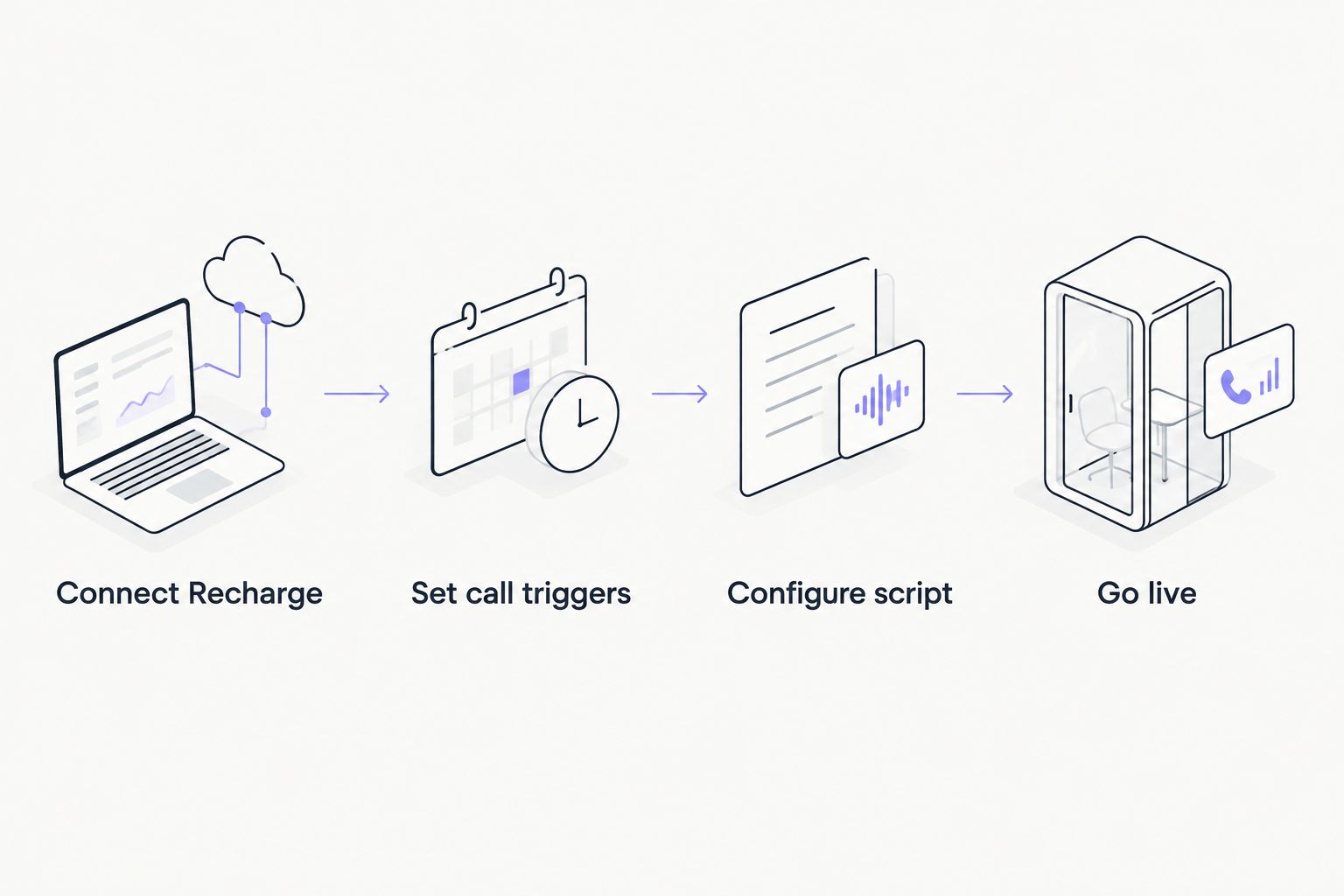
Each step has to complete before the next one produces a working call.
Call before the renewal fails, not after
The failed-payment trigger above is reactive: the card already declined and you're calling to recover it. A second, adjacent workflow catches the customer earlier. Instead of waiting for a decline, trigger the call off the Upcoming renewal event 2-3 days before the charge date, before the card has a chance to fail.
This matters most for subscribers on cards close to expiration or on plans with a history of declines. A short call two days out, confirming the card on file and offering to update it, prevents the failed charge from happening at all rather than recovering it afterward. Run both triggers side by side: proactive renewal calls for known-risk accounts, reactive failed-payment calls for everyone else.
Troubleshooting
- No calls are going out after connecting. Check that the API token scope includes Subscriptions read access. A token scoped only to Orders won't see subscription events at all.
- Calls fire on cancelled subscriptions. The trigger delay is likely too long. A subscriber who cancels manually between the failed payment and the delayed call still gets dialed. Shorten the delay or add a skip if cancelled condition in the trigger settings.
- Ava AI quotes the wrong charge date. This usually means the Recharge variant was updated after the subscription was created. Re-sync the integration from the Integrations panel to pull current variant data.
- Outcomes aren't logging back to Recharge. Confirm the API token has write access, not just read. Read-only tokens let Ava AI see subscriptions but can't log outcomes back.
- Test calls work but live calls don't. Check the call window setting. A trigger event that fires outside the configured hours queues silently until the window opens rather than calling immediately.
Customize your workflow
Once failed-payment and renewal calls are running, the same trigger logic extends to other Shopify data sources. Stores running Klaviyo alongside Recharge often mirror this setup for abandoned cart calls, and stores on Gorgias route subscription tickets into the same queue Ava AI already answers, covered in the guide on connecting Ava AI to Gorgias. If cart recovery calls are already running, the best ai agents for abandoned cart recovery in 2026 breaks down which triggers pair well with subscription calls without overlapping the same customer twice in one day.
Set up your first Recharge call trigger
7-day free trial, setup runs in minutes, zero commission on recovered revenue.
FAQ
What is the ava ai recharge integration used for?
It connects Recharge subscription events, like failed payments and upcoming renewals, to outbound voice calls from Ava AI. The goal is recovering subscription revenue before a customer churns silently in 2026.
Do I need a Recharge API token to connect Ava AI?
Yes, you generate one from the Recharge admin under Apps and integrations, then API tokens. Scope it to Subscriptions, Customers, and Orders for the integration to work fully.
Can Ava AI call customers before a payment fails, not just after?
Yes, the Upcoming renewal trigger lets you call 2-3 days ahead of the charge date instead of waiting for a decline. This is separate from the reactive Payment failed trigger and both can run at the same time.
How long does the Ava AI Recharge setup take?
Most Shopify stores finish connecting the API token, setting triggers, and testing the call script in under 20 minutes. The 7-day free trial covers the full setup window.
Why did a subscription call go to a customer who already cancelled?
The trigger delay was likely set too long, letting the customer cancel between the event firing and the call going out. Shortening the delay or adding a skip-if-cancelled condition fixes this.
Does Ava AI charge a commission on recovered subscription revenue?
No, Ava AI charges zero commission on revenue recovered through the calls. Current plan and usage pricing should be checked against the Shopify App Store listing.
Can Ava AI log call outcomes back into Recharge?
Yes, if the API token has write access rather than read-only. Read-only tokens let Ava AI see subscription data but cannot write outcomes back into Recharge notes.
Is the Recharge integration different from the Klaviyo abandoned cart setup?
Yes, they trigger off different events. Recharge triggers fire on subscription billing events, while the Klaviyo setup fires on abandoned checkout events, and both can run on the same store without conflict.
One last thing
The two-day-ahead renewal call catches something a failed-payment call structurally can't: the customer who was never going to update their card on their own but will do it on the phone in under a minute if you ask before the charge, not after. Turn that trigger on first in 2026 and measure it separately from the reactive one, because the two triggers solve different problems even though they share the same integration.