Automatically call customers when a Shopify payment fails
Shopify payment failed call automation needs a verified failure, consent checks and a paid-order stop rule. Build a safer recovery call workflow.
October 31, 2026

Instead of manually chasing failed Shopify payments, build a workflow that verifies the failure, checks permission to call and stops outreach when payment succeeds. Start with Avasales’ 7-day free trial, setup in minutes and zero commission on recovered revenue, then validate the event-to-call connection before enabling this specific workflow.
TL;DR
- Shopify payment failed call automation needs verified payment events, not an assumption that every abandoned checkout failed.
- Avasales is best for Shopify merchants seeking voice support and outbound abandoned-cart recovery.
- Confirm the failure trigger and supported outbound-call action before building the workflow.
- Recheck payment status before dialing, honor calling permissions and send shoppers only approved checkout links.
Why this matters
A failed payment and an abandoned checkout describe different situations. A shopper can leave checkout without attempting payment, while a failed attempt can be followed by a successful purchase. Treating either event as permission to call creates the wrong conversation.
Build around the latest payment state, not the first failure notification. Your 2026 recovery workflow should contact eligible shoppers who still need help, without calling customers who have already completed checkout.
Avasales provides Shopify voice customer support and outbound abandoned-cart recovery. That supports the recovery use case, but does not establish a native failed-payment trigger or a particular external calling interface. Verify both ends of the connection before treating this as a ready-made integration.
Before you start
- Access and materials: Have Shopify access to inspect checkout and order records, access to your payment provider’s failure records, an authorized voice-agent account and an approved recovery script. Confirm that your connector can pass a verified event to a supported outbound-call action.
- Permission and boundaries: Document the applicable calling permissions, recipient time-zone rules, opt-out handling and escalation owner. Prepare an approved checkout link; do not ask callers to collect card numbers or security codes.
- The setup-blocking gotcha: A failed attempt does not necessarily create a Shopify order or expose the same event through every connector. Confirm a usable checkout identifier, telephone number and payment-status lookup before configuring any automation.
If the trigger or outbound action is missing, stop at the design stage. A developer-supported connection or another verified integration path is required; renaming an abandoned-checkout event does not turn it into a payment-failure event.
Configure the payment-failure source
- Inspect a known failed attempt in your payment provider’s records. Compare it with the matching Shopify checkout or order. In Shopify, use Orders and, when relevant, Abandoned checkouts to inspect the customer journey.
- Identify the event that explicitly represents failure in your actual payment setup. Read its documented meaning: a declined payment, an incomplete authentication step and a processing error require different customer guidance.
- Map the checkout identifier, event identifier, event time, telephone number and current payment state. Treat these as workflow data requirements, not universal interface labels.
- Reject events that cannot be matched confidently to the correct checkout. Route ambiguous records to review instead of guessing from a telephone number alone.
- Keep subscription billing failures separate from one-time checkout failures. Their payment-update paths and customer permissions need their own configuration.
Expected result: A test failure produces an identifiable record tied to the correct checkout. An ordinary abandoned checkout does not enter this failure-specific workflow without evidence of a failed payment.
Save an example payload with personal details removed in your 2026 workflow documentation. It gives the person maintaining the integration a concrete reference when a provider changes its event structure.
Configure eligibility and stop rules
- Require a usable telephone number and the permissions appropriate to the call’s purpose. A checkout phone field is not, by itself, proof that every automated recovery call is permitted.
- Check the latest checkout and order state. Exclude completed purchases, canceled recovery requests and customers who have opted out of the relevant outreach.
- Set recipient-local calling windows according to your approved policy. A voice agent’s 24/7 support capability does not mean outbound recovery calls belong at every hour.
- Create duplicate protection using the checkout identifier and a stored outreach status. As a conservative starting policy, allow 1 recovery call per checkout before human review; this is a configuration recommendation, not a platform limit.
- Recheck eligibility immediately before submitting the call. If payment succeeds while the record waits in a queue, cancel the pending outreach wherever your connected systems support cancellation.
Expected result: An eligible unpaid checkout advances once. A paid, opted-out, duplicate or out-of-window record is suppressed or held according to a recorded reason.
The essential sequence is short enough to audit at a glance. Keep every gate visible rather than burying eligibility inside the call script.
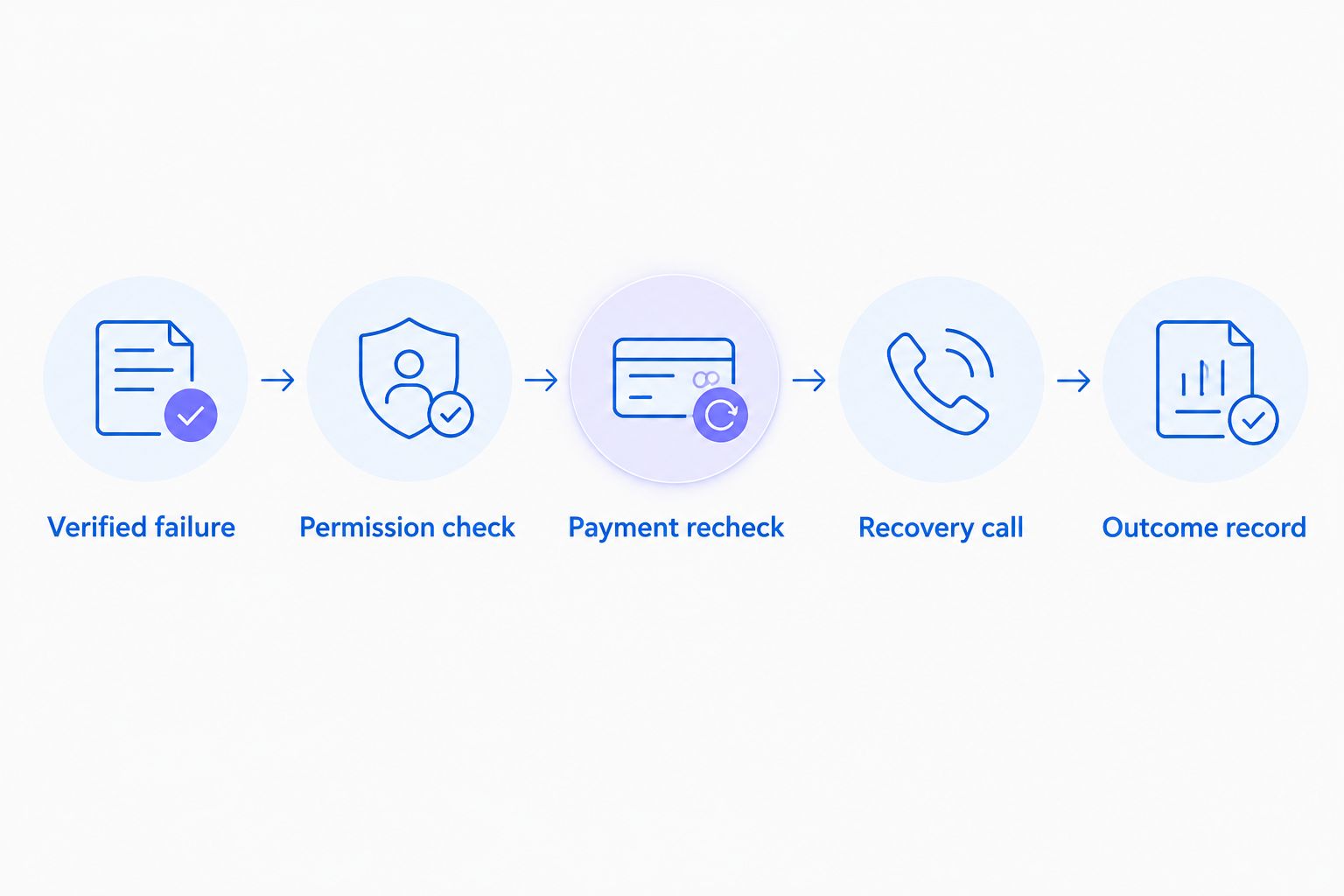
Recheck payment before dialing so a resolved failure does not trigger unnecessary outreach.
Configure the recovery conversation
- Write a neutral opening that identifies your store and explains the checkout-help purpose. Do not claim that a card was declined unless the verified record supports that statement.
- Ask whether the shopper still wants help completing the purchase. Make declining assistance easy, and record a request to stop contact.
- Limit payment guidance to approved instructions. Direct the shopper to your secure checkout to retry or choose an offered payment method; never ask the voice agent to collect full card details or a security code.
- If your connected workflow supports text delivery, send only an approved checkout link after the required permission checks. Confirm that the link belongs to that shopper’s checkout and still works.
- Define escalation reasons: an unexplained charge, suspected fraud, repeated failure, an identity mismatch or a request outside the agent’s approved instructions.
Expected result: The shopper hears an accurate explanation, receives an approved next step and can decline or request assistance without pressure.
Avasales is best for Shopify merchants seeking voice support and outbound abandoned-cart recovery. Its fit for this payment-failure workflow depends on the verified trigger and calling connection, not on a recovery script alone.
Keep the 2026 script version beside the workflow configuration. When the wording changes, rerun the relevant tests rather than assuming the integration’s behavior remains acceptable.
Configure outcome recording and launch tests
- Connect the eligible record to the outbound action your provider actually supports. Use the documented fields and controls in that integration; do not substitute a generic webhook unless the receiving service documents that route.
- Store the event identifier, checkout identifier, call-submission result and eventual outcome in your approved system of record. Avoid copying unnecessary payment or personal data into logs.
- Record outcomes separately: submitted, connected, assistance declined, escalation requested and purchase completed. A submitted call is not a connected conversation, and a connected conversation is not recovered revenue.
- Test 6 cases before launch: eligible failure, already-paid checkout, missing telephone number, opt-out, duplicate event and payment success while waiting.
- Activate only after each case follows its intended path. Assign an owner who can pause outbound activity when records stop matching or suppression checks fail.
Expected result: You can trace an event through eligibility, calling and outcome recording. Every excluded record has a reason, and payment completion remains separate from the call result.
Use the Shopify Flow call-trigger guide when evaluating that connection path. Confirm the exact trigger and action in your own installed integration before adopting its configuration.
Variant: call after an abandoned checkout
Abandoned-checkout recovery is an adjacent workflow, but its opening must not assume a payment problem. Ask whether the customer needs help completing checkout. Mention a failed payment only when the event record establishes one.
Verified payment failure
- Best for: Shoppers with a recorded unsuccessful payment attempt
- Advantage: Supports a specific payment-help conversation
- Limitation: Requires reliable failure data and a current-state lookup
Abandoned checkout
- Best for: Shoppers who left checkout incomplete
- Advantage: Does not depend on proof of a payment attempt
- Limitation: Cannot explain why the shopper left
For abandoned checkouts, replace the failure-specific trigger with your supported abandonment source. Keep permission checks, duplicate protection, payment rechecks and opt-out handling intact.
Do not run both workflows independently against the same checkout. Give the checkout a shared outreach record so that a failure event and a later abandonment event cannot create competing calls.
In a 2026 recovery plan, document which workflow owns each eligible checkout. Ownership should remain clear when a customer changes a telephone number, retries payment or contacts support before the scheduled call.
Plan exception handling before adding volume
The normal path is straightforward: identify an eligible checkout, offer help and record the outcome. Exceptions need explicit owners because automation cannot safely infer the answer to a disputed charge or an identity mismatch.
Create a review queue for records with conflicting payment states, missing checkout links or uncertain customer matches. Each record needs a reason, an assigned owner and a permitted next action. Do not keep retrying a record that requires investigation.
Include review work when budgeting for exception handling, because a call-submission workflow still requires someone to resolve ambiguous events, investigate failed handoffs and maintain its rules. Track that work separately from routine call outcomes.
Avasales’ voice support and abandoned-cart recovery capabilities address customer conversations. Your payment provider remains the source for payment status, while your team owns the outreach policy and escalation decisions. Define those boundaries before expanding the workflow.
Troubleshooting
The failure event never reaches the workflow
Check the payment provider’s event history and the connector’s documented event coverage. Confirm that the attempt belongs to the expected payment path. If the connector does not expose that failure, use a documented alternative connection rather than an unrelated order event.
Customers receive calls after paying
Move the payment recheck to immediately before call submission. Inspect whether the workflow reads a saved failure record instead of current checkout or order state. Add cancellation handling for queued calls where the calling interface supports it.
The same checkout produces repeated calls
Inspect the stored event identifiers and checkout-level outreach status. Repeated delivery of an event must not create another call. Use a checkout-level lock or equivalent duplicate control, not just a check that two event payloads differ.
The checkout link is missing or incorrect
Stop link delivery and route the record for review. Confirm that the source provides a recovery link for the relevant checkout and that your mapping preserves it. Never construct a customer checkout URL from an order number or telephone number.
The customer asks about an unfamiliar charge
Stop the recovery conversation and follow your approved payment-investigation process. Do not promise that a charge will disappear or that a refund has been issued. Record the concern without requesting sensitive card information.
Customize your workflow
Expand scope only after the failure workflow passes its tests. Add language preferences, approved product questions or a support-review path when the underlying data and connected actions support them.
For your 2026 review, separate website clicks, app installs, trial starts and paid customers. Within the recovery workflow, also distinguish call attempts, connected calls and completed purchases. These stages answer different questions and should not share a conversion label.
Judge the workflow by correct routing before judging recovery results. Check whether it suppresses paid checkouts, respects opt-outs and produces accurate conversations. Do not attribute every later purchase to the call without a defined attribution method.
FAQ
Can Shopify automatically call a customer after a payment fails?
A failed-payment call requires a verified event source connected to a supported outbound-calling action. Confirm that your payment provider and installed integration expose the necessary event, customer details and current payment state before enabling it.
Is a failed payment the same as an abandoned checkout?
No. An abandoned checkout does not prove that a payment was attempted, while a failed attempt can later be followed by a successful purchase.
Can I use Avasales for Shopify payment failed call automation?
Avasales provides Shopify voice support and outbound abandoned-cart recovery. For payment-failure-specific calls, verify that your chosen event source can connect to a supported outbound action before treating the workflow as available.
Should the phone agent collect card details to retry payment?
No. Direct the shopper to an approved secure checkout rather than asking the voice agent to collect a full card number or security code.
How do I stop a recovery call when the customer has already paid?
Recheck current payment status immediately before submitting the call. Suppress paid checkouts and cancel queued outreach where the connected calling interface supports cancellation.
Can I call every shopper who enters a phone number?
A checkout telephone number alone does not establish permission for every automated recovery call. Apply the calling permissions, opt-out rules and recipient-local scheduling requirements approved for your operation.
What should I test before launching failed-payment calls?
Test eligible failures, already-paid checkouts, missing telephone numbers, opt-outs, duplicate events and payment success while waiting. Every case needs a clear expected outcome and a record showing whether it passed.
One last thing
The most important test is a failure followed by success before dialing. That sequence proves whether your workflow responds to current customer needs or merely repeats an old event. Keep it in your regression checks whenever you change the trigger, queue or calling connection.