Automatically escalate a Shopify Inbox chat to a phone call
Shopify Inbox to phone call escalation needs verified triggers and callback permission. Build a gated handoff with context, duplicate checks and outcomes.
October 31, 2026

Instead of manually copying Shopify Inbox conversations into callback notes, build a permission-gated workflow that passes an approved support request to your phone system. Start with Avasales' 7-day free trial, setup in minutes and zero commission on recovered revenue, then verify the separate chat-to-call connection before enabling automatic calls.
TL;DR
- Shopify Inbox to phone call escalation needs a verified conversation trigger, callback permission and a supported calling action.
- Avasales suits Shopify merchants who need phone support alongside chat; confirm the escalation connection before deployment.
- Pass the issue summary and verified order reference, not an unrestricted conversation history.
- Keep support callbacks separate from abandoned-cart recovery, including permissions, outcomes and reporting.
Why this matters
A customer who moves from chat to a call should not have to explain the same order problem again. The handoff needs a clear reason, the correct phone number and enough context for the person or agent answering.
Avasales is best for Shopify merchants who want voice customer support alongside their existing chat channel. Its stated capabilities include answering support calls 24/7, resolving orders and refunds, and making outbound abandoned-cart recovery calls. Those capabilities do not establish a native Shopify Inbox escalation connector.
For a 2026 implementation, treat this as a workflow specification, not a claim that Shopify Inbox includes a built-in automatic callback button. Automatic escalation requires a supported way to receive the conversation event and a supported way to initiate the requested support call.
Before you start
- Access and ownership: Have Shopify Inbox access, permission to administer the relevant apps, and an owner for callback failures. Prepare approved support policies, identity checks and a human escalation destination.
- Verified connection: Confirm that your integration can receive the required conversation information and that your calling provider supports outbound support callbacks. Outbound cart recovery alone does not establish this capability. If either connection is unavailable, use an agent-approved callback process instead.
- Permission and identity: Obtain permission for the requested callback and confirm the destination number. An order phone number is not proof that the person chatting controls that number, and a request for support is not permission for unrelated marketing.
The field names below are suggested workflow fields, not Shopify Inbox or Avasales interface labels. Use your integration's documented controls; do not look for these names as native buttons.
Choose your escalation route
Choose the route based on verified integration access, not on how much automation you want. Both routes need a documented owner when a callback cannot proceed.
Agent-approved callback
- Best for: Stores validating chat-to-phone escalation
- Advantage: A staff member checks identity, context and callback permission
- Limitation: Staff must approve each request
Event-driven callback
- Best for: Stores with verified conversation events and outbound support calling
- Advantage: Approved requests can move into a call queue without copying notes
- Limitation: Requires integration work, duplicate protection and failure handling
Begin with agent approval until your event-driven route passes its acceptance tests. This recommendation concerns the handoff, not the quality of either support channel.
For your 2026 rollout, document which system owns the request, which system places the call and where the outcome returns. If those responsibilities are unclear, adding automation creates an unowned queue.
Callback eligibility
Define the escalation rule
- Choose a narrow support reason, such as an order-tracking question that remains unresolved in chat. Write the rule in operational terms so staff can apply it consistently.
- Ask whether the customer wants a phone callback. Confirm the number and the requested timing before creating a callable request.
- Separate callback permission from identity verification. Confirming a number permits routing; it does not authorize disclosure of order details or a refund.
- Define stop conditions. Withdrawn permission, an unresolved identity mismatch, an already resolved issue or a duplicate request must prevent a new call.
Expected result: Every eligible request has an explicit support purpose, a confirmed destination and a reason it is allowed to proceed.
Prepare the request record
- Create a request identifier and connect it to the source conversation using a stable reference available through your integration.
- Add the minimum useful context: issue summary, customer-stated goal, verified order reference when available, callback permission and preferred timing.
- Record who approved the request and when. Keep restricted customer data out of free-text summaries unless it is necessary for the support task.
- Set the request's initial state to pending review or ready for calling, according to your chosen route.
Expected result: The call handler can understand the problem without reading an unrestricted chat transcript.
A practical limit is 1 active callback request per conversation during your pilot. This is a suggested duplicate-control rule, not a Shopify or provider limit. Define an explicit reopening process when the customer needs another call.
Connection and call routing
Verify the trigger and destination
- Inspect the documented conversation events available to your integration. Confirm that the event supplies enough information to identify the correct conversation and retrieve the approved callback request.
- Verify the calling provider's documented support-callback action. Confirm the required destination format, accepted context fields and how the action reports acceptance or rejection.
- Connect the approved request to that action only after both ends are confirmed. Do not substitute an abandoned-cart campaign for a support callback.
- If the trigger or action is unavailable, route the request to a staff-owned callback queue. Keep approval and completion records even when staff place the call manually.
Expected result: A test request either reaches a supported calling action or enters an explicitly owned manual queue. It never disappears between systems.
Set the routing safeguards
- Recheck callback permission immediately before dispatch. A request approved earlier must stop if the customer subsequently withdraws permission.
- Enforce the customer's requested timing and your applicable calling rules. Round-the-clock inbound coverage does not authorize outbound calls at any hour.
- Check for an active or completed callback with the same request identifier before creating another call.
- Pass only the context needed for the approved task. Require identity verification before disclosing protected order information or taking a sensitive action.
- Define a human route for disputes, policy exceptions and requests outside the call handler's authority. Verify the provider's transfer capability before promising a live transfer.
Expected result: Only eligible, nonduplicate requests enter the call queue, with a defined path for exceptions.
The sequence should remain visible to whoever maintains the workflow: Callback permission, Request record, Call dispatch, Outcome record. Each stage needs a recorded result before the next stage proceeds.
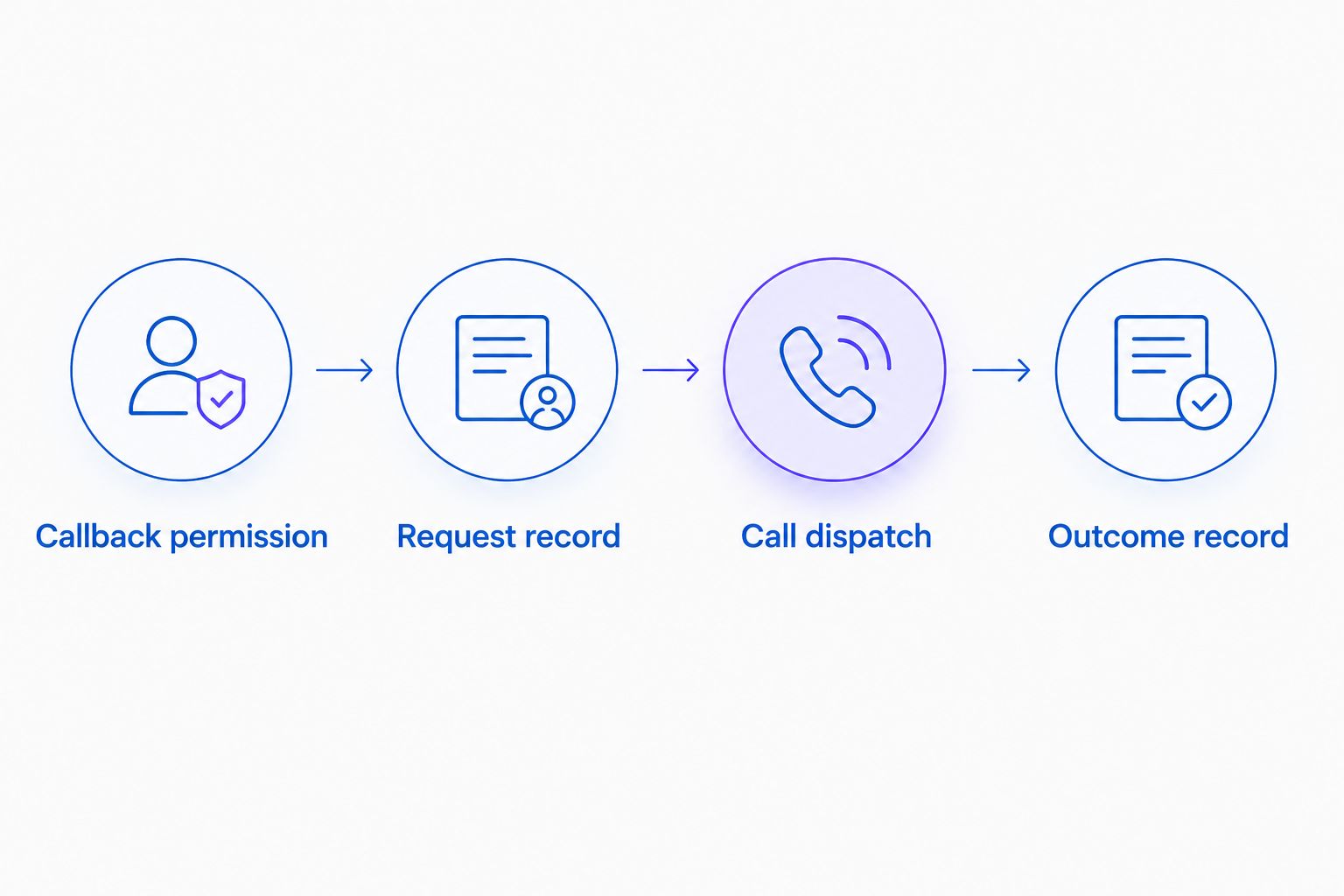
Check eligibility before dispatch, then return the outcome to the support record.
Outcome records and acceptance tests
Return the result to support
- Map the provider's documented call outcomes to your support record. Distinguish a requested call from an attempted call, an answered call and a resolved issue.
- Store a short outcome summary and the next owner. If an order action occurred, retain its auditable reference rather than relying on a conversational summary alone.
- Return the result to the original support workspace through a supported integration. If direct writeback is unavailable, create a staff task linked to the original request.
- Keep the issue open when the call ends without resolution. Call completion is not proof that the customer's problem was solved.
Expected result: Staff can see what happened and who acts next without searching separate, unconnected records.
Test before automatic dispatch
Run these 5 test cases with controlled accounts and approved test numbers before your 2026 launch:
- A valid request reaches the intended destination with the correct issue summary.
- A request without callback permission remains blocked.
- A repeated event does not create another active call request.
- A customer who withdraws permission before dispatch receives no call from that request.
- A failed or unanswered attempt returns to an owned queue without marking the support issue resolved.
Expected result: Each test produces an inspectable record. Enable automatic dispatch only after the owner verifies the blocked cases as well as the successful call.
Use the Shopify order data to real-time phone answers workflow to plan the order context that belongs in the handoff. Confirm live data access separately from transcript access.
Escalate when a conversation is updated
An update-driven variant fits a conversation where the customer initially prefers chat, then requests a callback. Use this route only if your integration exposes the relevant updates.
- Evaluate the conversation update for a newly approved callback request, rather than treating every new message as permission to call.
- Compare the request identifier and current callback state with existing records.
- Refresh the summary with the unresolved issue and any changed timing or destination.
- Dispatch only after the updated request passes the same permission and duplicate checks.
Expected result: A new customer request can create a callback, while ordinary follow-up messages do not repeatedly trigger calls.
For 2026 maintenance, retest this variant whenever the event mapping or support process changes. A conversation update should change the callback state only when the update contains relevant, approved information.
Troubleshooting
The conversation never creates a callback request
Check whether your integration actually exposes the event you selected and whether it includes a usable conversation reference. Test event receipt separately from call dispatch. If the event is unsupported, retain the agent-approved route instead of building around an assumed trigger.
Multiple calls follow the same conversation
Inspect repeated events, retries and simultaneous approvals. Enforce the request identifier before dispatch, and check whether a calling action already accepted the request before retrying it. Do not retry blindly after an uncertain response.
The call handler lacks order context
Check the request-to-customer and request-to-order mapping. A conversation summary does not establish order ownership. Route an unverified request for identity checks rather than attaching the nearest matching order.
The call ends but the ticket remains unchanged
Check whether the outcome notification arrived and whether the integration supports writeback to the source workspace. Route failed updates to a visible staff queue. Preserve the distinction between an answered call and a resolved issue when repairing records.
Customize your workflow
Expand by support reason after the initial route works. Give shipping questions, refund requests and damaged-item reports separate authority rules, required context and human escalation destinations.
Avasales provides Shopify phone support for orders and refunds, plus outbound abandoned-cart recovery. Keep recovery campaigns separate from support callbacks. They serve different purposes and should not share permission assumptions or success measures.
Track callback requests, attempts, answered calls and resolved support issues separately in your 2026 reporting. Keep website clicks, app installs, trial starts and paid customers distinct when evaluating acquisition. Neither a call attempt nor an installation proves a support resolution.
FAQ
Can Shopify Inbox automatically turn a chat into a phone call?
Automatic escalation requires a supported conversation event, an approved callback request and a supported outbound calling action. Verify those connections before treating the workflow as automatic; this guide does not establish a native Shopify Inbox callback feature.
What is the safest way to start Shopify Inbox to phone call escalation?
Start with an agent-approved callback queue. Confirm the customer's number, callback permission and issue summary, then automate dispatch only after the connection and blocked cases pass testing.
Does Avasales support this exact Shopify Inbox integration?
The stated Avasales capabilities cover Shopify voice support and outbound abandoned-cart recovery, not this exact Inbox escalation connection. Confirm conversation access, outbound support callbacks and outcome writeback before committing to the implementation.
Can I use the phone number from a Shopify order?
Confirm that the customer wants a callback at that number before using it for this workflow. Separately verify identity before discussing protected order details or authorizing sensitive actions.
Can the agent issue a refund during the escalated call?
Refund handling depends on the provider's capabilities, your configured authority and successful identity verification. An escalation request alone must not authorize a refund or bypass your store's approval policy.
What should happen when the customer does not answer?
Record the unanswered attempt and return the request to an owned support queue. Apply a documented follow-up policy rather than repeating calls automatically or marking the issue resolved.
How do I stop duplicate callbacks when a chat receives more messages?
Use a stable request identifier and check its current state before dispatch. A new chat message should not create another call unless it represents a newly approved callback request.
One last thing
Recheck permission at dispatch, not just when the customer first asks for a call. A customer can resolve the issue in chat while the callback waits. Canceling that pending call is part of a successful handoff, not a failed conversion.