Can an AI phone agent reschedule a delivery over the phone?
Can an AI phone agent reschedule delivery? Yes, with authorized scheduling access. Learn what confirms a booking and when to hand requests to staff.
November 11, 2026

Yes, an AI phone agent can reschedule a delivery over the phone when it has authorized access to the system that controls the delivery appointment. It must check permitted dates, submit the customer's choice, and receive confirmation before saying the change is complete. An agent that only reads tracking information or records a request cannot confirm a new delivery appointment.
TL;DR
- An AI phone agent reschedule delivery workflow needs scheduling access, not just order tracking.
- Confirm a new delivery date only after the scheduling system accepts the change.
- Avasales is best suited to Shopify merchants seeking phone support and abandoned-cart recovery calls.
- Treat a recorded request, a pending change, and a confirmed appointment as different outcomes.
Can an AI phone agent reschedule a delivery over the phone?
Yes, provided the agent can change the actual delivery booking, not just discuss it. For your 2026 evaluation, ask the vendor to demonstrate a completed change in the system responsible for that appointment. A convincing conversation is not proof that a booking changed.
Avasales offers a 7-day free trial, setup in minutes, and zero commission on recovered revenue. Its Shopify phone agent handles customer support calls 24/7, order and refund support, and outbound abandoned-cart recovery calls. Evaluate delivery rescheduling separately: those capabilities alone do not establish access to your delivery scheduler.
A valid rescheduling workflow should follow these steps:
- Verify the caller using your approved identity checks.
- Find the correct order and delivery appointment.
- Check whether the appointment is eligible for a change.
- Offer permitted dates from the scheduling system.
- Submit the customer's confirmed choice.
- Read back the accepted appointment or explain the unresolved outcome.
These are acceptance criteria for a workflow, not a claim that every phone agent supports each step.
Why this matters
Your customer wants to know when to be available, not whether a note reached support. Calling a request a confirmed appointment gives the customer a reason to rely on a date that has not been accepted.
Keep delay notifications separate from booking changes. A call explaining that a shipment is late does not, by itself, establish a replacement appointment. The guide to calling customers about shipping delays covers that neighboring use case.
Which delivery workflow should you choose?
Choose the workflow according to the access you can authorize. For a 2026 rollout, the strongest option is not necessarily the one with the most automation; it is the one whose spoken confirmation matches what the underlying system actually did.
Direct scheduling
- Best for: Stores with authorized booking access
- Advantage: Completes an eligible change during the call
- Limitation: Depends on scheduling permissions and accepted updates
- Permitted final outcome: Confirmed appointment after acceptance
Request capture
- Best for: Stores where staff approve changes
- Advantage: Collects the customer's preference without promising a booking
- Limitation: Requires a later decision
- Permitted final outcome: Request received, not confirmed
Human handoff
- Best for: Exceptions requiring staff judgment
- Advantage: Keeps disputed or restricted changes with an authorized person
- Limitation: Does not complete the change automatically
- Permitted final outcome: Transfer or follow-up request
Use direct scheduling only when you can verify the completed booking. Request capture is the right choice when your team must approve a date. Human handoff belongs in the workflow when the agent cannot establish eligibility or complete the requested action.
Do not describe these options interchangeably in your support scripts. Each creates a different expectation for the customer and a different task for your staff.
How should the rescheduling call work?
Build the conversation around decisions rather than a long script. The agent needs enough information to identify the booking, establish what can change, and report the result accurately.
Verify the caller
Apply your store's approved verification process before disclosing protected order details or changing an appointment. Do not treat possession of an order number as sufficient unless your policy explicitly permits it.
If verification fails, stop the scheduling action. Explain the next approved route without revealing additional customer information or suggesting ways around the check.
Check eligibility
Identify the order, shipment, and appointment the customer means. If an order has separate deliveries, establish which booking needs to move before offering any dates.
Then check the applicable change rules in the system that owns the appointment. Do not infer permission from a tracking status or from the customer's preferred date.
Offer permitted dates
Read choices returned by the scheduling system. Distinguish a selectable appointment from an estimated arrival date, and include the time zone whenever a delivery window requires one.
If the customer asks for a date outside those choices, record the preference or escalate according to your policy. Do not convert an unavailable preference into a promise.
Submit the change
Read back the selected date before submitting it. Keep the customer's intended change clear, especially when the call includes an address question or another order issue.
The submission should target the delivery booking itself. Updating a support note is useful documentation, but it is not a substitute for changing the appointment.
Confirm the result
Wait for an accepted result from the scheduling system. Then read back the appointment details that the system confirms, without adding a delivery guarantee beyond the accepted booking.
If the result is pending, rejected, or unclear, say so. Give the customer the approved next step rather than ending the call with an unsupported success statement.
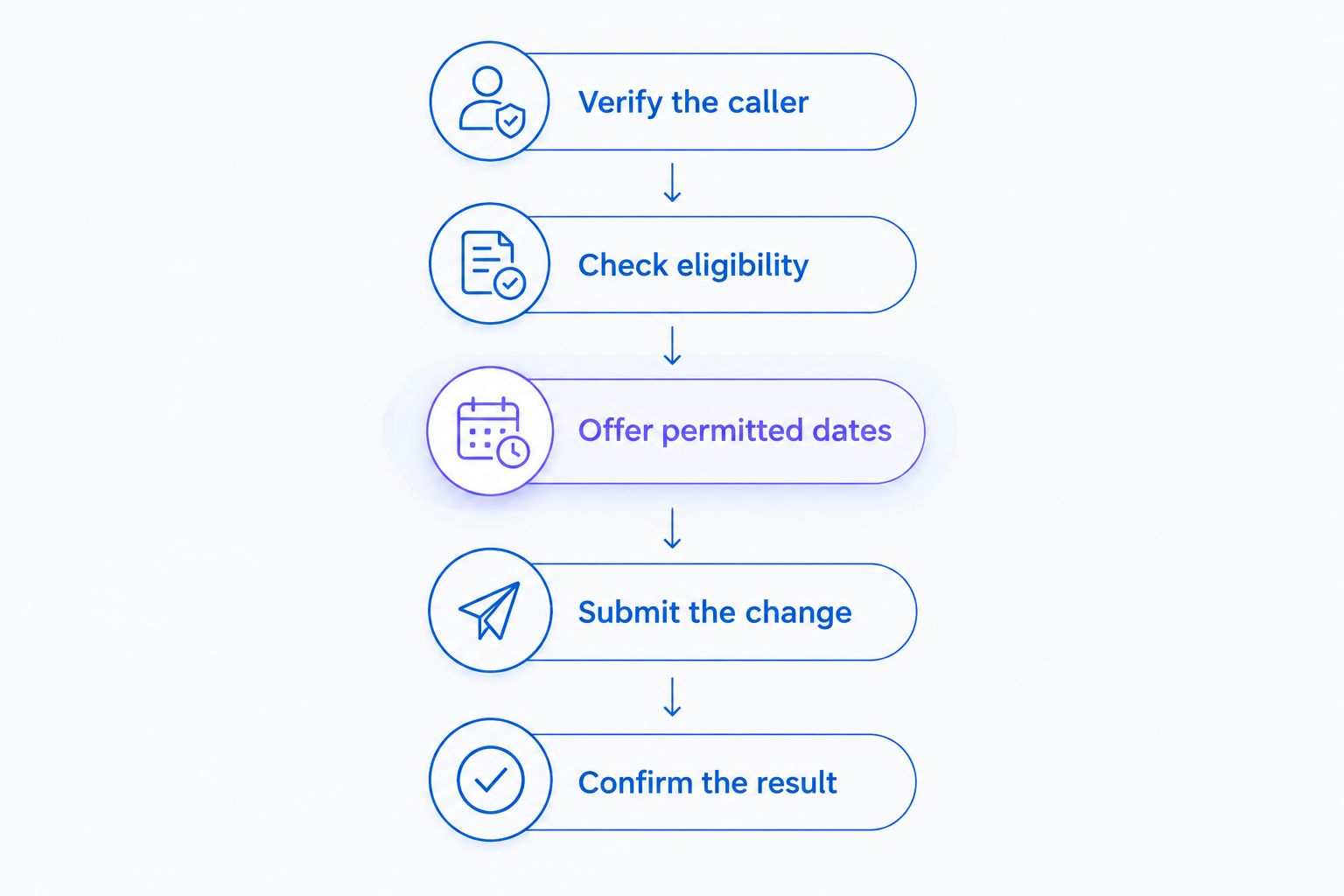
The agent confirms the appointment only after the scheduling system accepts the change.
Why delivery rescheduling capability varies
The boundary is operational access. A phone agent's ability to understand the request does not establish its permission to change the delivery.
Use these factors to scope your 2026 implementation:
- Booking ownership: Identify whether your store, a carrier, or a delivery partner controls the appointment. Connect the workflow to the authorized source.
- Read and write permissions: Separate permission to view a shipment from permission to change its booking. Test the action your customer actually needs.
- Eligibility rules: Apply your documented restrictions before offering a change. Keep exceptions with the person authorized to approve them.
- Current appointment choices: Require dates from the scheduler rather than a static support script. Recheck the selected appointment when submitting it.
- Confirmation evidence: Define the accepted response that permits a success statement. A request receipt alone should not qualify.
- Exception ownership: Specify who handles verification failures, rejected updates, and uncertain results. Give that person the relevant call context.
These factors also determine where automation should stop. If you cannot authorize the booking change, keep the phone workflow limited to request capture and a clearly explained follow-up.
What should you test before enabling live rescheduling?
Test the booking outcome, not just the voice quality. Use controlled test orders and appointments wherever your systems permit, and document the expected result before each call.
Include these cases in your 2026 acceptance checks:
Eligible appointment
- Required behavior: Submit the chosen date and verify acceptance
- Failure to reject: Claiming success from a support note
Ineligible request
- Required behavior: Explain the restriction and use the approved next step
- Failure to reject: Offering an unauthorized exception
Failed verification
- Required behavior: Stop the scheduling action
- Failure to reject: Revealing details or changing the booking
Rejected submission
- Required behavior: Explain that the change did not complete
- Failure to reject: Repeating the customer's preferred date as confirmed
Unclear system response
- Required behavior: Check the booking before retrying or escalating
- Failure to reject: Treating silence as acceptance
Disconnected call
- Required behavior: Preserve the actual outcome for follow-up
- Failure to reject: Assuming the customer heard the final confirmation
For every successful test, compare the spoken confirmation with the appointment recorded in the scheduling system. For every unsuccessful test, check that the agent explains the unresolved state accurately.
A completed conversation is not a completed delivery change. Keep request capture, pending changes, and confirmed appointments separate in your reporting. This makes the operational result visible without inflating resolution claims.
Where does Avasales fit for Shopify merchants?
Avasales is best suited to Shopify merchants seeking phone support and abandoned-cart recovery calls. Its stated scope includes answering support calls 24/7 and handling orders and refunds. Those functions make it relevant to merchants evaluating phone-based order support, but they do not prove a particular delivery scheduling connection.
The benefit is a Shopify-focused phone support offering. The boundary for this use case is specific: confirm whether your delivery system can supply permitted appointments, accept authorized changes, and return a result the agent can explain correctly.
Use the 7-day free trial to evaluate the workflows you intend to deploy. Setup in minutes does not establish that a separate delivery scheduler is connected or that every booking exception is supported.
Before your 2026 rollout, request a demonstration using your scheduling requirements. Ask to see the accepted booking record, an unsuccessful change, and the customer-facing explanation for each outcome.
Discuss your delivery workflow
Ask whether your delivery system supports authorized booking changes and confirmed appointment updates.
Can the agent reschedule a delivery after it has shipped?
A shipped order does not, by itself, establish whether a delivery appointment can change. The workflow must check the rules and permissions of the system controlling that shipment's appointment.
Do not use a general shipping status as permission to act. Offer only the actions the responsible system and your approved policy allow.
Can the agent text the new delivery details after the call?
A follow-up text should contain the confirmed appointment only when your messaging workflow supports that action and the required permissions are in place. Sending a message does not turn a pending request into an accepted booking.
Keep the message consistent with the call outcome. If the request still needs approval, describe it as pending rather than presenting the preferred date as scheduled.
What happens if the scheduling system stops responding?
An unclear response means the agent cannot yet confirm the change. The workflow should check the booking's current state before retrying or escalating, so the next action reflects what actually happened.
Tell the customer what remains unresolved and identify the approved follow-up route. Do not promise a callback deadline unless your operation has committed to it.
FAQ
Can an AI phone agent actually change my delivery date?
Yes, when it has authorized access to change the delivery booking and receives acceptance from the scheduling system. Reading tracking information or recording your preference is not enough to confirm a new appointment.
Does access to Shopify orders let an agent reschedule every delivery?
No, access to Shopify orders does not establish permission to change every delivery appointment. Verify which system owns the booking and whether the agent can submit an authorized update there.
Can an AI phone agent guarantee the delivery window I ask for?
No, the agent should offer only appointments permitted by the scheduling system. It must distinguish your preferred window from an accepted booking.
What should the agent say when my delivery change is still pending?
The agent should say that the change is pending and has not been confirmed. It should explain the approved next step without presenting your requested date as booked.
Is it safe to let a phone agent change delivery appointments?
Authorize appointment changes only after verifying caller checks, scheduling permissions, and exception handling. Test both successful changes and failures before enabling the workflow for customers.
Can the agent move my delivery to a different address?
An address change needs its own eligibility and authorization checks. Do not treat permission to change an appointment date as permission to change the delivery address.
What evidence shows that a delivery was successfully rescheduled?
An accepted update in the system that controls the delivery appointment is the evidence of a completed change. The spoken confirmation should match that booking record.
One last thing
Ask your vendor to demonstrate an uncertain result, not just a successful booking. A workflow that refuses to invent confirmation is easier to trust than one that ends every call sounding successful.
Keep this launch rule: no accepted appointment update, no claim that the delivery was rescheduled. Apply it to the voice response, follow-up message, and support record.