Can an AI phone agent schedule a callback at a specific time?
Can an ai phone agent schedule callback requests? Yes, with scheduling support. Learn what to verify for timing, time zones, cancellations, and retries.
November 18, 2026

Yes, an AI phone agent can schedule a callback at a specific time when its calling workflow supports scheduled outbound calls and stores the customer's confirmed date, time, and time zone. A spoken promise is not enough: the system must save the request, trigger the call, and handle changes or failed attempts.
TL;DR
- For an ai phone agent schedule callback workflow, require a saved appointment, confirmed time zone, and outbound calling trigger.
- Avasales offers a 7-day free trial, setup in minutes, and zero commission on recovered revenue for Shopify merchants.
- Confirm callback scheduling separately from inbound phone support and abandoned-cart calling.
- Test rescheduling, cancellation, and unsuccessful calls before offering customers a specific callback time.
Why this matters
A customer who asks you to call later has given you a timing requirement, not permission to call whenever a queue opens. Your callback process needs to preserve that distinction, especially when a conversation concerns an unresolved order, refund, or checkout question.
Avasales provides Shopify phone support and outbound abandoned-cart recovery calls. Its 7-day free trial and setup in minutes provide a starting point for evaluating those workflows; confirm specific-time callback behavior before making that promise to customers.
For your 2026 evaluation, separate what an agent says from what the calling system records. Accept a callback promise only when you can verify the scheduled action behind it.
Can an AI phone agent schedule a callback at a specific time?
Yes, provided the phone agent connects the conversation to a scheduling and outbound calling workflow. Evaluate the complete sequence below rather than accepting a demonstration that ends when the agent agrees to call later.
- Capture the request. Record the callback number and the reason for calling back. Ask the customer to clarify an ambiguous request before proceeding.
- Confirm the time. Resolve the requested date, local time, and time zone. Read the agreed details back to the customer.
- Save the appointment. Store the callback as an actionable record with a status, not only as text in a conversation transcript.
- Trigger the call. Connect the saved appointment to the outbound dialer. Check the actual call log against the agreed time.
- Record the outcome. Distinguish an answered call from voicemail, no answer, cancellation, or an unsuccessful attempt.
These are acceptance criteria for a scheduling workflow, not a claim that every phone agent includes them. Ask your prospective provider to demonstrate the entire sequence using a test number you control.
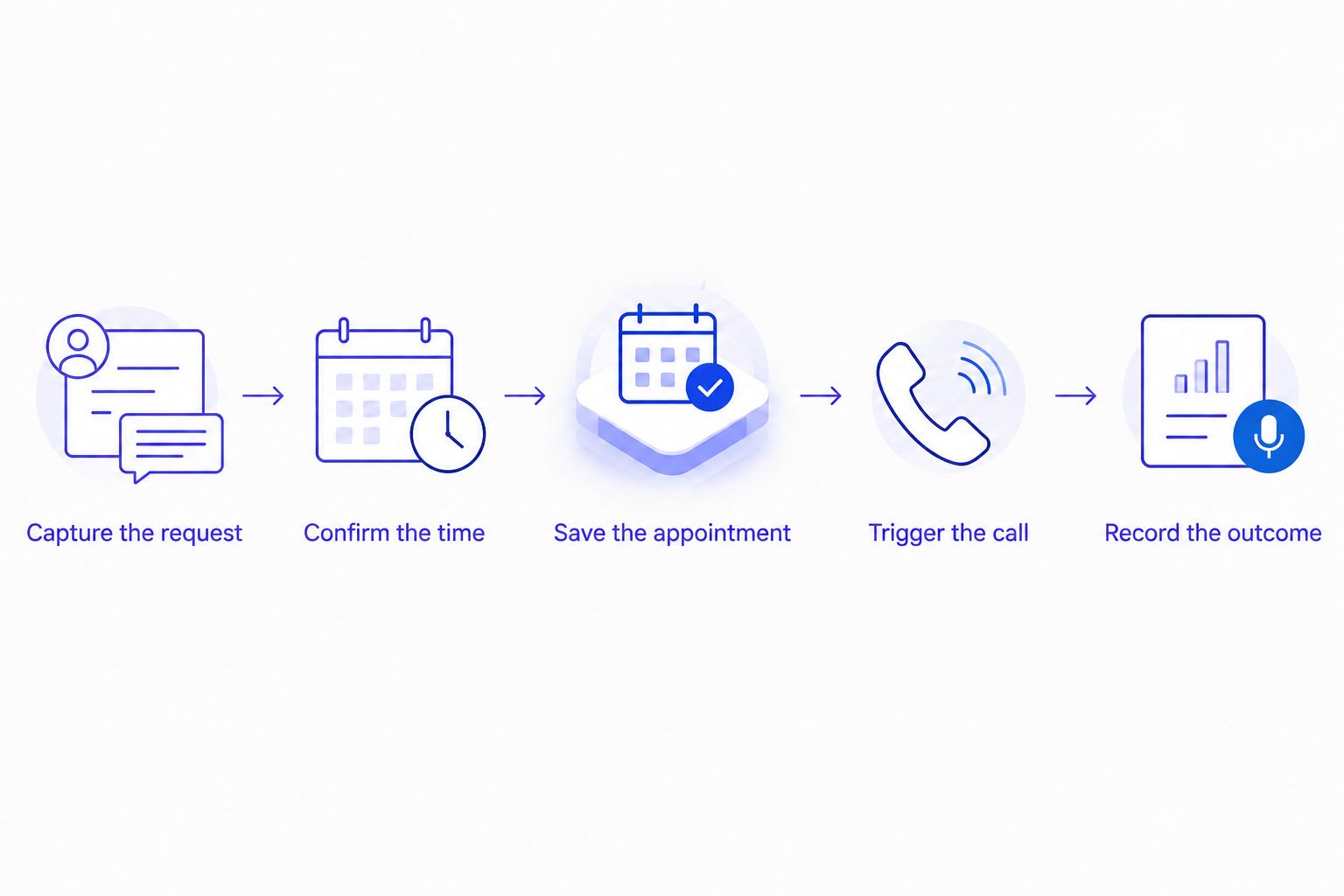
A callback needs a saved action and an observable outcome, not just a verbal agreement.
Specific-time callbacks versus other follow-up options
Choose the follow-up method that matches what the customer actually requested. An immediate return call, a scheduled call, and a reminder for your team represent different commitments.
Specific-time callback
- Best for: Customers requesting an agreed appointment
- Benefit: Gives the customer a defined time to expect contact
- Limitation to check: Requires scheduling, time-zone handling, and an outbound trigger
Callback window
- Best for: Customers who accept a flexible period
- Benefit: Gives your team flexibility within an agreed window
- Limitation to check: Does not satisfy a request for an exact time
Immediate return call
- Best for: Customers seeking help after a missed call
- Benefit: Starts another contact attempt without scheduling an appointment
- Limitation to check: Does not honor a request to call later
Human callback task
- Best for: Issues requiring staff review
- Benefit: Assigns responsibility to a person
- Limitation to check: A task does not itself place a phone call
Choose a specific-time callback only when your system can support that commitment. If your process supports a window instead, state the window clearly and obtain the customer's agreement.
Keep these options separate in your 2026 vendor checklist. A demonstration of missed-call follow-up does not establish that a product supports customer-selected callback appointments.
What a callback record should contain
Use the callback record to connect the original conversation with the next action. Your team should be able to understand the request without replaying an entire call.
Require these fields in your acceptance checklist:
- Customer number: The confirmed destination for the return call.
- Appointment details: The agreed date, local time, and named time zone.
- Call purpose: The unresolved question or requested follow-up.
- Assigned owner: The automated workflow or staff member responsible.
- Current status: Whether the callback is scheduled, changed, canceled, attempted, or completed.
- Relevant context: The order or support reference needed to continue the conversation appropriately.
Keep the call purpose specific. An order-status question needs different preparation from a refund request requiring staff review.
For a Shopify support workflow, also decide what the caller is authorized to discuss or change. Scheduling a conversation does not grant permission to issue a refund, modify an order, or disclose customer information.
Why callback scheduling behavior varies
Evaluate these factors against your actual requirements. They explain why two products described as outbound phone agents do not necessarily offer the same callback experience.
- Scheduling support: Require a demonstration that a customer's requested time becomes a saved action rather than a note.
- Time-zone handling: Check how the workflow interprets the customer's local time and presents it for confirmation.
- Outbound triggers: Confirm what starts the return call and how you inspect unsuccessful execution.
- Workflow ownership: Establish whether the scheduled action places an automated call or assigns work to a person.
- Change handling: Test what happens when the customer cancels or requests a different time.
- Outcome visibility: Require a way to distinguish a completed conversation from an unanswered attempt.
These criteria belong in your 2026 evaluation even if your initial use case is simple. A successful first appointment does not demonstrate what happens after a cancellation or an unavailable phone number.
How should you confirm a customer's callback time?
Confirm the date, local time, and time zone before saving a callback. A request such as tomorrow afternoon remains incomplete until the customer agrees to a specific appointment or a clearly defined window.
Repeat the resolved appointment in ordinary language. Avoid relying on a time-zone abbreviation alone when the customer's location or intended zone remains unclear.
Your test should also cover a customer changing the request mid-conversation. Verify that the saved appointment reflects the final agreement, rather than an earlier time mentioned during the call.
Does a callback require a calendar integration?
No, a calendar integration is not inherently required; the workflow needs a reliable way to store the agreed time and trigger the return call. A calendar entry alone does not prove that an outbound call will occur.
Ask the provider to show the scheduling record and the resulting call attempt. If a human will make the call, verify that the appointment reaches the responsible person and that the customer understands who will call.
Can a customer cancel or reschedule a callback?
A customer can cancel or reschedule only through a supported change workflow. Require proof that a replacement appointment updates the pending action and that cancellation prevents the original callback.
Test changes through every channel you intend to offer. Do not advertise text-based rescheduling, calendar links, or automated cancellation unless your chosen implementation explicitly supports them.
How to test callback scheduling before launch
Use your trial to test observable behavior, not just the quality of the conversation. Run the following checks with your own phone number and document the result of each attempt.
Confirm an appointment
Request a specific date and time, then ask the agent to repeat the agreement. Inspect the saved record and verify that the date, time zone, number, and purpose match what you requested.
Change the agreed time
Ask to move the appointment after the original request has been saved. Verify that the old action is no longer pending and that the replacement contains the correct details.
Cancel the callback
Cancel through the supported process and inspect the resulting status. Leave the test running through the original appointment time to confirm that the canceled action does not place a call.
Leave the call unanswered
Do not answer a scheduled test call. Check whether the system records no answer accurately and whether any subsequent action follows the policy you approved.
Request a human
Ask for a staff member rather than an automated return call. Verify that the resulting assignment matches the customer's request and does not silently substitute a different callback experience.
Keep these results with your 2026 support procedures. Repeat the relevant checks when you change the calling workflow or the rules that control follow-up.
Where Avasales fits for Shopify merchants
Avasales is for Shopify merchants who need phone customer support and outbound abandoned-cart recovery calls. Its stated scope includes answering support calls 24/7, resolving orders and refunds, and calling customers about abandoned carts.
The practical benefit is a Shopify-focused phone workflow. The boundary is equally important: inbound availability and outbound cart recovery do not, by themselves, establish support for appointments chosen by customers.
Avasales offers zero commission on recovered revenue. Keep that term separate from plan pricing and usage charges, and check the current Shopify App Store listing before choosing a plan.
Use the 7-day free trial to evaluate the specific workflow your store needs. For callback requirements, contact the team with your required scheduling behavior, change process, and evidence checklist before promising appointments to shoppers.
Evaluate your Shopify calling workflow
Start with a 7-day free trial and confirm your callback requirements before launch.
Measure callback execution separately from resolution
A scheduled appointment, a placed call, and a resolved support issue describe different events. Track each event separately so your reports reflect what actually happened.
Use clear definitions in your 2026 reporting:
- Scheduled: The system saved an agreed callback appointment.
- Attempted: The calling system placed the return call.
- Connected: The customer answered and a conversation began.
- Resolved: The conversation addressed the customer's underlying request.
- Canceled: The pending callback was withdrawn before execution.
A connected call is not automatically a resolved issue. For cart recovery, keep the call outcome separate from any subsequent checkout, and define how your store attributes recovered revenue before interpreting results.
FAQ
Can an AI phone agent call me back at an exact time?
Yes, when the implementation supports saved appointments and scheduled outbound calling. Confirm the date, time zone, and callback number, then verify that the system stores and executes the request.
What's the difference between a callback request and a scheduled callback?
A callback request records that someone wants another call; a scheduled callback also records when that call should happen. Require an actionable appointment rather than relying on a transcript note.
Can an AI phone agent schedule a callback in my customer's time zone?
Customer-local scheduling requires explicit time-zone handling in the implementation. Test how the agent confirms the intended zone and how the saved appointment represents it.
Will the agent automatically try again if nobody answers?
Retry behavior depends on the calling workflow and its approved rules. Confirm what happens after no answer, voicemail, and an unsuccessful attempt before enabling follow-up.
Can I schedule a human callback instead of another automated call?
A human callback requires an assignment or scheduling process that reaches the responsible staff member. Verify ownership and staff availability before confirming an appointment with the customer.
Does round-the-clock phone support mean scheduled callbacks are included?
No, round-the-clock inbound support does not establish support for customer-selected outbound appointments. Evaluate inbound availability and callback scheduling as separate capabilities.
How do I know a callback was completed successfully?
Check both the call outcome and the support outcome. A dialed number or answered call does not establish that the customer's order, refund, or checkout question was resolved.
One last thing
Test cancellation before trusting scheduling. A workflow that places a successful callback still needs to prove it can stop a call the customer no longer wants.
Make the canceled appointment part of your acceptance test, alongside the successful one. Inspect the pending action and the eventual call log; both should reflect the customer's final instruction.