How to connect Ava AI to AfterShip for shipping delay calls
Plan your ava ai aftership integration safely: verify connector support, map shipping delays, prevent duplicate calls, and test before contacting customers.
October 30, 2026

Instead of manually checking delayed shipments and calling each customer, build a shipping-event-to-call workflow, but enable it only after confirming a supported connection between your tracking source and voice agent. Start with Avasales and its 7-day free trial, setup in minutes and zero commission on recovered revenue; those app benefits do not establish that an AfterShip connector or shipping-delay outbound trigger is available.
TL;DR
- For ava ai aftership integration, verify connector support before configuring shipping-delay calls.
- Avasales fits Shopify merchants seeking voice customer support and abandoned-cart recovery calls.
- Match shipment events to orders, check calling permission, and suppress duplicate notifications.
- Test delivery updates and cancellations before enabling customer-facing shipping notifications.
Why this matters
A shipping-delay call needs more than a tracking status. Your workflow must identify the correct order, confirm that the shipment still needs attention, and provide information the caller can trust. An outdated event can produce a call about a package that has already arrived.
Avasales is best for Shopify merchants seeking voice customer support and abandoned-cart recovery calls. Shipping-delay outbound calls require a separate capability check: the supplied product information confirms outbound cart recovery, not an AfterShip integration or arbitrary outbound call triggers.
For your 2026 implementation, treat this guide as a configuration and acceptance plan, not evidence of a native connector. Do not select guessed settings or build against an assumed API.
Before you start
- Accounts and access: Have Shopify administrative access, access to the relevant AfterShip tracking records, and permission to configure your voice agent. Identify who can approve any integration credentials and customer-data access.
- Connection confirmation: Ask the provider to confirm the supported shipping-event input, order lookup method, outbound shipping-call capability, and call-result destination. Obtain current setup instructions before entering credentials. No verified interface labels or connector instructions are supplied here.
- The hidden gotcha: A customer phone number is not, by itself, proof that an automated outbound call is permitted. Establish consent, suppression, customer-local calling rules, and legal review before testing with real customers. Use an internal test number first.
Keep initial app installation separate from integration work. Setup in minutes describes the app offer; it is not a verified completion time for this cross-system workflow.
Shipment event configuration
Define the delay condition
- Choose the business condition that deserves a call. Separate a carrier-reported exception from a missed delivery estimate or an absence of tracking updates. These conditions need different explanations.
- Inspect a representative AfterShip record and document the actual status, event timestamp, tracking reference, and shipment identifiers available to your supported connection. Copy real field names from the current documentation rather than assuming them.
- Define which conditions should stop the workflow, including delivery, cancellation, a superseded shipment, or a notification already handled by your team.
- Create an internal test case with 1 test shipment and an internal phone number. Keep customer-facing outbound activity disabled while validating the event.
Expected result: You can explain exactly why a shipment qualifies, which source event establishes that condition, and what prevents the call.
Do not interpret every tracking change as a delay. A departure scan describes movement; it does not independently establish a missed delivery commitment. Likewise, an old event is not necessarily the current shipment state.
Confirm the connection path
Ask your provider to identify the supported mechanism that carries the qualifying event into the calling workflow. This might require an existing connector or a documented integration method, but neither is confirmed by the information available for this guide.
Stop here if no supported path exists. Do not substitute an abandoned-cart trigger for a shipping event, and do not assume that an app accepting Shopify orders also accepts external outbound call instructions.
For a 2026 deployment, record the documentation version or confirmation date alongside the integration owner. This gives your team a reference when a field or authentication requirement changes.
Order and permission mapping
Match the shipment to the customer
- Establish a stable match between the tracking record and the Shopify order. Prefer documented identifiers over customer names or loosely matched email addresses.
- Match the specific shipment as well as the order. An order with separate packages needs package-specific language so a delayed item does not imply that everything is delayed.
- Retrieve only the customer information required for the approved call. Keep the tracking reference, relevant items, current shipment state, and permitted contact details together in the integration record.
- Validate the destination number and applicable calling permission. Exclude suppressed contacts and unresolved identity matches before creating any call request.
- Define a duplicate-prevention key using stable order, shipment, and notification identifiers. Store enough state to recognize an event that has already been handled.
Expected result: Each qualifying shipment maps to the intended customer and a permitted contact action, without creating a second call for the same notification.
A Shopify order and a carrier shipment answer different questions. The order establishes what the customer purchased; the tracking record establishes what happened to the relevant package. Keep both contexts available without treating either as a substitute for the other.
Use this division of responsibility when reviewing the proposed integration:
Shopify
- Best for: Order context
- Contribution: Purchase and customer context
- Limitation or required check: Match the relevant shipment rather than relying on the order alone
AfterShip
- Best for: Shipment tracking context
- Contribution: Tracking information used to assess a delay
- Limitation or required check: Verify the event fields and supported delivery mechanism
Avasales voice support
- Best for: Shopify phone support
- Contribution: Customer support calls and confirmed outbound cart recovery
- Limitation or required check: Confirm shipping-delay outbound capability before implementation
The table describes responsibilities, not a verified three-way connector. Your implementation needs an approved path across those responsibilities.
Call content and delivery controls
Prepare the call brief
- Write a factual opening that identifies your store and the affected shipment without exposing unnecessary order details. Establish identity before discussing sensitive information.
- Supply the latest confirmed shipment condition and the time it was recorded. Distinguish a carrier estimate from a delivery guarantee.
- Define the permitted next action: explain the tracking update, offer an approved tracking link where supported, or route the issue to your team. Confirm that the chosen action is supported before including it.
- Specify boundaries for refunds, replacements, and address changes. A delay notification must not authorize a remedy your store has not approved.
- Set the response for missing information. The agent should acknowledge that a delivery date is unconfirmed rather than inventing one.
Expected result: The call explains the shipment issue, states only supported information, and offers an action your store can actually fulfill.
Keep the call brief focused on service. Adding a cart-recovery pitch changes the purpose of the interaction and requires separate review of permissions, content, and reporting.
Apply delivery controls
Document customer-local calling rules, exclusions, retries, and escalation ownership in your 2026 operating procedure. Implement each control in the supported system responsible for it; do not assume the voice app exposes a particular setting.
Recheck the shipment immediately before initiating the call. If the package is delivered or the event has been superseded, suppress the outdated notification. Record that suppression so the next event-processing attempt does not recreate the task.
Test and release configuration
Validate the complete path
- Send your internal test event through the confirmed connection method. Check that the event reaches the intended order and shipment, not just that the connection authenticates.
- Review the call brief before any dialing occurs. Confirm the customer reference, shipment condition, approved wording, and destination number.
- Complete an internal call and inspect the recorded outcome using whatever result mechanism your provider supports. Do not assume that a completed call means the customer received or understood the update.
- Repeat the original event. Confirm that the workflow recognizes it and does not initiate a duplicate notification.
- Change the test shipment to a terminal or excluded condition before dispatch. Confirm that the pending notification is suppressed.
- Enable a limited, reviewed rollout only after the integration owner accepts the results and your calling requirements are satisfied.
Expected result: The workflow handles the initial event, rejects a duplicate, and stops an obsolete call before reaching real customers.
Keep an acceptance record with 1 initial event, 1 duplicate event, and 1 superseding update. These are recommended test cases, not performance claims or platform limits.
The core sequence is event qualification, order matching, permission review, a current-status recheck, and an approved call. Every stage must pass before the workflow proceeds.
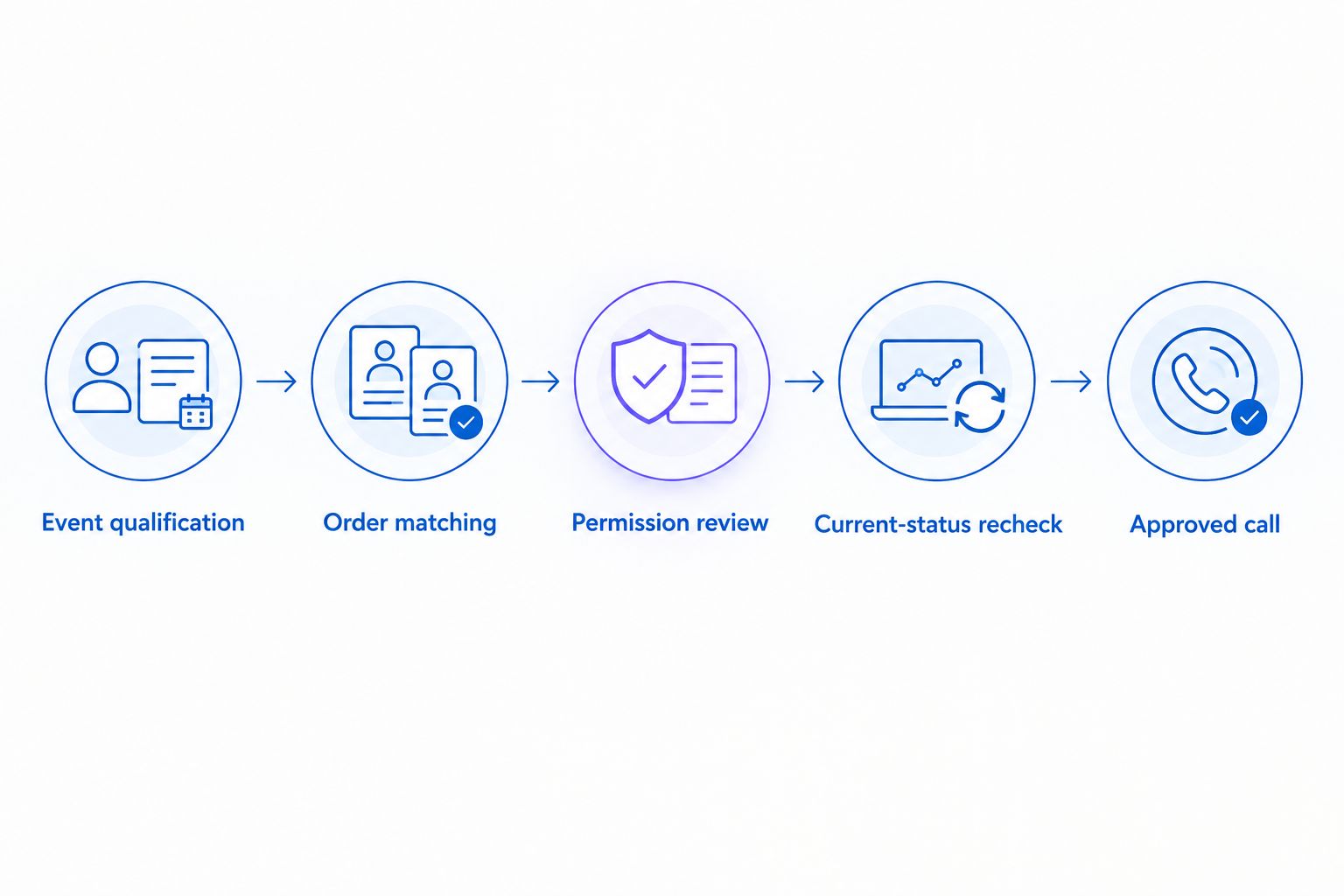
Confirm the current shipment state before initiating an approved call.
Answer shipping questions when customers call
An inbound workflow is an adjacent use case, not proof that outbound delay notifications are supported. The supplied product description establishes 24/7 customer support calls and order tracking as relevant capabilities; external tracking-data access still needs confirmation.
For an inbound shipping question, first establish the customer's identity and match the relevant order. Retrieve the shipment information through the supported data path, explain the latest confirmed update, and escalate anything outside approved policy.
The trade-off is straightforward:
Inbound shipping answers
- Best for: Customers already calling for help
- Benefit: Responds within an existing support interaction
- Constraint: Does not proactively notify customers
Outbound delay notifications
- Best for: Approved proactive shipment updates
- Benefit: Contacts eligible customers about a qualifying issue
- Constraint: Requires confirmed outbound support, permission checks, and duplicate prevention
Choose the workflow your verified capabilities support. For the order-information side, see the Shopify order-data-to-phone-answers workflow.
Troubleshooting
- The event arrives, but no call follows. Inspect qualification, permission, suppression, and provider acceptance separately. Confirm that the integration supports shipping-delay outbound calls before changing filters.
- The same customer receives repeated notifications. Check whether retries or multiple tracking updates create separate tasks. Use a persistent duplicate-prevention record and check it before dispatch.
- The call describes an already-delivered package. Compare the event timestamp with the latest shipment state. Recheck immediately before dispatch and cancel obsolete tasks.
- The wrong package is described. Inspect the order-to-shipment match, especially for split shipments. Include only the items attached to the affected package in the call brief.
- The agent promises an unsupported delivery date. Remove inferred dates and restrict the brief to confirmed tracking information. Route requests for guarantees or exceptions to the approved support owner.
Customize your workflow
Once the basic path passes acceptance testing, add scope deliberately. Separate shipment exceptions from missing tracking updates, and assign different escalation instructions to each condition. Expand only when the required data and call capability are confirmed.
For your 2026 reporting, distinguish an event received, a call requested, a call connected, and an issue resolved. None is interchangeable with a website click, app install, trial start, paid customer, or recovered order.
Review the customer experience as well as technical completion. A successful connection with an obsolete message is still a failed notification. Keep a named owner responsible for updating call content when your shipping policy changes.
FAQ
How do I set up an Ava AI AfterShip integration?
First confirm a supported connection and shipping-delay outbound capability with the provider. Then map qualifying shipment events to Shopify orders, apply contact-permission checks, and test duplicate suppression before enabling calls.
Does Avasales have a native AfterShip connector?
A native AfterShip connector is not established by the product information supplied for this guide. Obtain current provider documentation before configuring credentials or relying on a connector.
Can I use abandoned-cart calls to notify customers about shipping delays?
Do not treat abandoned-cart calling as confirmation of shipping-delay calling support. The triggers, customer context, permissions, and call purpose differ, so the shipping workflow needs separate approval and capability confirmation.
What information does a shipping-delay call need?
A shipping-delay call needs the correct shipment, its latest confirmed condition, an approved customer contact, and a permitted next action. Include an event timestamp and avoid promising a delivery date that the source does not confirm.
How do I prevent duplicate shipping-delay calls?
Use a persistent notification record keyed to the relevant order, shipment, and notification condition. Check that record before dispatch and recheck the shipment so retries do not create obsolete calls.
Can the agent answer shipping questions outside business hours?
The supplied app description confirms 24/7 customer support calling. Answering a specific shipping question still requires access to the relevant order and current tracking information through a supported data path.
How should I test this workflow before calling customers?
Use an internal number and a test shipment before enabling customer-facing activity. Verify the initial event, a duplicate event, and a superseding shipment update, including the final call content and suppression behavior.
One last thing
Test the cancellation path before expanding the calling path. A delivered package should stop a pending delay notification, even if the original delay event was valid when received. Make that a release requirement for your 2026 workflow, not a repair after customers complain.