How to connect Ava AI to Loop Returns for automated refund calls
Ava AI Loop Returns integration: verify the connection before enabling refund calls. Map orders, block duplicates, check permissions and test customer messages.
October 6, 2026
Instead of manually checking returns and calling customers about refunds, design an Ava AI Loop Returns integration that connects a verified refund event to an approved phone workflow. Start with Avasales: Ava AI offers a 7-day free trial, setup in minutes and zero commission on recovered revenue; validate the refund-call connection separately before enabling customer calls.
TL;DR
- Ava AI Loop Returns integration requires verified event access and an approved outbound refund-call action before activation.
- Avasales provides Shopify phone support for merchants handling order questions and refunds.
- Separate return approval from refund completion; each needs different call wording.
- Block duplicate calls, verify customer identity and route uncertain cases to a person.
Why this matters
A return request, an approved return and a completed refund represent different stages. If your phone workflow treats them as interchangeable, it can tell a customer that money has been refunded before the transaction exists.
Avasales is best for Shopify merchants who need phone support for orders and refunds. Ava AI answers customer support calls 24/7, resolves order and refund questions, and makes outbound abandoned-cart recovery calls. Outbound refund notifications need their own verified connection and permissions; abandoned-cart calling does not establish that capability.
For your 2026 implementation, build around the transaction you intend to explain. The instructions below define the connection requirements, data mapping and acceptance tests. They are not a native-connector button walkthrough: do not substitute guessed menus or endpoints for documented integration instructions.
Before you start
- Account access: Have authorized access to your Shopify store, your Loop Returns account and your Ava AI account. Identify the person permitted to approve refund-related data access and customer calling.
- Approved materials: Prepare your return policy, refund wording, customer-verification rules and escalation destination. Confirm your outbound calling permissions and suppression requirements with the person responsible for compliance.
- The setup gate: Confirm a documented way to obtain the relevant return or refund event and a supported way to request the intended Ava AI call. A return approval is not proof of a completed refund. If either connection is unavailable, keep that stage under human review.
Ava AI's app setup in minutes does not establish how long a separate returns workflow takes to implement. Treat the 7-day trial as an evaluation window, not a deadline for activating an untested connection. Check current plan terms and usage charges in the Shopify App Store before committing to deployment.
Refund event definition
Choose the customer message before choosing the trigger
- Define the call's purpose. Decide whether the customer needs a return-status update or confirmation of an executed refund. Write the intended outcome in your implementation brief before selecting an event.
- Identify the authoritative record. For a refund-completion message, require a refund transaction associated with the correct Shopify order. Do not use return approval, parcel receipt or an internal note as a substitute.
- Verify the available event. Use the integration documentation available to your accounts to establish what event can be delivered, what it means and which identifiers it contains. Ask the integration owner to demonstrate an actual payload.
- Define the eligibility rule. Require a matching order, the relevant transaction or return record, a permitted customer contact and no existing successful notification for the same event.
- Create an exception route. Send incomplete, contradictory or unmatched records to human review. Never let a failed lookup become a refund-confirmation call.
Expected result: You can explain exactly which event starts the workflow and which customer statement that event supports. Your 2026 setup brief distinguishes return progress from refund completion without relying on an event name alone.
Select the workflow that matches the evidence
These are implementation choices, not claims that either platform exposes a particular connector. Confirm the required connection before choosing an automated option.
Refund confirmation
- Best for: Customers asking whether a refund was issued
- Advantage: Bases the message on a refund transaction
- Limitation: Requires verified transaction access and a supported call action
Return-status update
- Best for: Customers needing an explanation of return progress
- Advantage: Explains the current return stage
- Limitation: Must not imply that a refund has occurred
Human-reviewed notification
- Best for: Unmatched orders or sensitive exceptions
- Advantage: Keeps uncertain cases under merchant control
- Limitation: Retains a manual approval step
Choose refund confirmation only when you can verify the refund. Choose a return-status update when the available evidence supports a return stage but not a financial outcome.
Customer and transaction mapping
Build a minimal call record
- Match the order. Resolve the return record to the correct Shopify order using documented identifiers. Treat an unmatched record as an exception rather than selecting a customer by name alone.
- Attach the relevant transaction. For refund confirmation, include the verified refund reference and the affected items. Establish whether the event represents a partial refund or the full intended refund before preparing the message.
- Resolve the customer contact. Use the phone number associated with the approved customer record. Do not infer permission to make an outbound call simply because a number exists.
- Add policy context. Include the approved explanation of the current status and the next action, if one is required. Keep product promotion and cart recovery out of this notification.
- Assign a duplicate-control key. Use the store, order, event purpose and relevant transaction or return reference to identify the notification. The same key must not produce another completed notification after a retry.
The following names describe your workflow specification, not verbatim interface fields in Ava AI, Loop Returns or Shopify. Map them to the actual fields documented for your connection.
Order reference
- What it represents: The customer order linked to the return
- Validation rule: Must resolve to the intended order
Return reference
- What it represents: The return being discussed
- Validation rule: Must match the order and relevant items
Refund reference
- What it represents: The transaction supporting refund confirmation
- Validation rule: Required for a completed-refund message
Customer phone
- What it represents: The approved contact destination
- Validation rule: Must pass contact and calling-permission checks
Message purpose
- What it represents: Return update or refund confirmation
- Validation rule: Must agree with the underlying event
Notification key
- What it represents: The unique notification identity
- Validation rule: Must block repeated completed notifications
Expected result: Each eligible event produces a traceable call record. Missing identity, transaction or permission information sends the record to review rather than dialing.
Keep the data boundary narrow
Pass only the customer and order information needed to explain the event. Do not include payment-card details, unrelated purchases or internal notes that the caller should never read aloud.
For your 2026 configuration, document which system supplies each field and who can change the mapping. A field that looks correct in a sample record still needs an explicit source and validation rule.
Call authorization and acceptance testing
Confirm the supported call action
- Obtain the documented connection instructions. Confirm whether your intended workflow uses an approved connector, a documented interface or a merchant-operated review process. Follow the instructions for that connection; do not invent an outbound-call endpoint.
- Check the permitted purpose. Confirm specifically that refund or return notifications are supported for your account and implementation. Support for abandoned-cart calls is not confirmation of support for another outbound purpose.
- Define the caller's authority. Decide whether the call only explains an existing refund or can initiate a financial action. Keep notification-only workflows from issuing another refund.
- Approve the conversation content. Require customer verification before disclosing order-specific information. Explain only the verified status, and use approved wording for payment-provider processing rather than promising a bank arrival date.
- Define the outcome record. Require a documented way to distinguish a completed conversation, an unanswered attempt and an exception. If the implementation cannot provide reliable outcomes, retain human review before expanding it.
Expected result: Your integration owner can demonstrate the approved call request, its permitted purpose and its resulting status. Credentials alone do not satisfy this gate.
Test before customer activation
Use merchant-controlled contact details and authorized test records. Run these 3 acceptance cases before enabling live notifications:
- Completed refund: Confirm that a valid transaction produces the correct refund explanation without initiating another financial action.
- Return approval only: Confirm that a return approval cannot produce completed-refund wording.
- Repeated event: Deliver the same event again and confirm that duplicate controls prevent a second completed notification.
Also test a partial refund, an unmatched order and a customer who does not answer. Record the event, matched order, decision, attempted action and final outcome for each test.
Expected result: The workflow demonstrates both its intended behavior and its refusal behavior. Do not activate a 2026 customer-call workflow that passes the happy path but fails the duplicate or status checks.
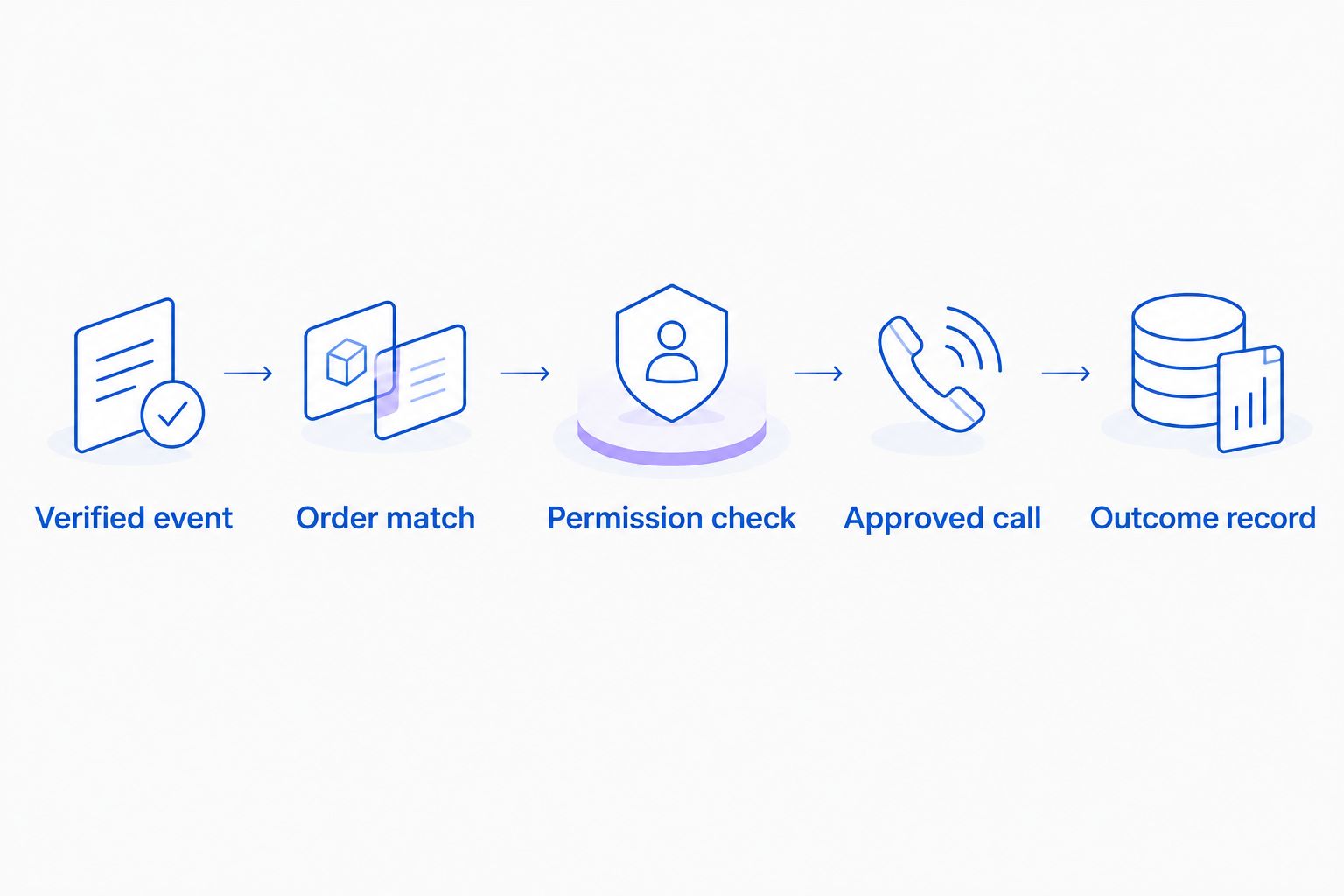
A call begins only after the event, order and permission checks pass.
Use those stages as your release checklist: Verified event, Order match, Permission check, Approved call and Outcome record. Each stage needs evidence before the next stage runs.
Variant: update customers when a return changes
A return-status workflow serves a different purpose from refund confirmation. It explains what has happened to the return and whether the customer needs to act. It must remain separate from financial confirmation.
If your documented connection exposes the required return updates and supports the intended call action, configure a distinct eligibility rule and message purpose. Preserve the same order-matching, permission and duplicate checks.
- Best for: Returns that need an explanation or a customer action.
- Advantage: The message can address the current return stage without waiting for a refund transaction.
- Limitation: A status update cannot establish that money has been refunded or received.
Suppress updates that do not change the customer-facing explanation. An internal record edit is not automatically a reason to call. Where several return records belong to the same order, preserve their separate identities so one update does not overwrite another.
Expected result: Customers receive the explanation supported by the return record, and refund-confirmation messages remain dependent on verified refund transactions.
Troubleshooting
A return update announces a completed refund
Inspect the event-to-message mapping. Require a refund reference for completed-refund wording and route records without that evidence to the return-status workflow or human review.
The customer receives a repeated call
Check whether retries preserve the same notification key and whether completed outcomes are stored before another request is accepted. Fix the duplicate-control logic before resuming calls; changing the script does not address repeated execution.
The call describes the wrong items
Compare the return items and refund transaction with the order record. Handle partial returns explicitly, and stop the workflow when item matching is ambiguous rather than announcing that the entire order was refunded.
No call starts after an eligible event
Trace the event through each gate: receipt, order match, permission check and supported call request. Inspect the documented response from the call action. Do not bypass permission or identity checks to force a successful test.
The caller promises a payment arrival date
Remove unsupported timing language from the approved conversation content. Distinguish the merchant's verified refund action from the customer's bank processing, and send questions requiring unavailable transaction details to a person.
Customize your workflow
Expand the workflow after the core refund notification passes its tests. Add a documented review route for disputed items, identity uncertainty and requests outside the caller's authority. Keep the initial scope narrow enough that every allowed statement has a clear data source.
For the underlying data design, use the Shopify order data to real-time phone answers workflow. Order matching is the foundation for both inbound explanations and event-driven notifications.
Track eligible events, attempted calls, completed conversations and exceptions separately. Website clicks, app installs, trial starts and paid customers belong to acquisition reporting, not refund-resolution reporting. A completed call also does not prove that a refund was accurate; retain the transaction reference behind the outcome.
Avasales offers zero commission on recovered revenue, but that cart-recovery benefit is separate from evaluating refund support. Judge this workflow on accurate explanations, correct routing and auditable actions, not an assumed revenue outcome.
Evaluate Ava AI for Shopify
Start a 7-day free trial and validate your refund-call requirements before enabling customer notifications.
FAQ
How do I set up an Ava AI Loop Returns integration?
First verify a documented return or refund event connection and a supported Ava AI action for the intended call purpose. Then map the order, transaction and customer contact, apply permission and duplicate checks, and test before enabling customer calls.
Does this guide confirm a native Ava AI and Loop Returns connector?
No, this guide defines the requirements and acceptance tests for the workflow, not a verified native connector. Use documented connection instructions for your accounts rather than guessed buttons, menus or endpoints.
Can a return approval trigger a refund-confirmation call?
A return approval must not trigger completed-refund wording unless a verified refund transaction also exists. Use a separate return-status message when the evidence supports only return progress.
Can Ava AI automatically call customers about refunds?
Automated refund calls require confirmation that the intended outbound purpose and call action are supported by your implementation. Ava AI's stated outbound abandoned-cart capability does not establish support for refund notifications.
How do I prevent duplicate refund calls?
Assign a stable notification key to the store, order, message purpose and relevant transaction or return record. Preserve that key across retries and block another completed notification for the same event.
What should a partial-refund call explain?
A partial-refund call should identify the verified refund and affected items without describing the entire order as refunded. Route the case to human review when the transaction and items cannot be matched reliably.
How long is the Ava AI trial?
Ava AI offers a 7-day free trial and app setup in minutes. A separate returns workflow needs its own connection checks and acceptance tests before customer activation.
What should I verify before launching refund calls in 2026?
Verify the event meaning, order match, customer calling permissions, supported call action and outcome recording. Test duplicate events, return approval without a refund, partial refunds and unmatched orders before activation.
One last thing
A refund-notification call is not a refund instruction. Keep those permissions separate in your 2026 release checklist. A customer asking for another refund during a notification call should enter an authorized support process, not cause the original event to run again.
That boundary gives Avasales Shopify phone support a clear role: explain verified order and refund information while keeping financial actions subject to the merchant's approved rules.