How to connect Ava AI to Postscript for voice cart recovery
Build an Ava AI Postscript integration with verified connections, separate call and SMS permissions, checkout matching, and purchase suppression tests.
October 29, 2026
Instead of manually comparing abandoned checkouts, phone calls and SMS follow-ups, build the Ava AI Postscript integration around shared Shopify checkout records and clear contact rules. Start with Avasales’ 7-day free trial and app setup in minutes, with zero commission on recovered revenue; confirm the supported connection method before automating transfers between the tools.
TL;DR
- Build the Ava AI Postscript integration around checkout identity, separate channel permissions and purchase suppression.
- Avasales voice cart recovery is best for Shopify merchants adding phone conversations to their recovery workflow.
- Confirm a supported connector or documented interface before building automated transfers between Ava AI and Postscript.
- Stop pending recovery contacts after purchase, and test that behavior before launch.
Why this matters
A shopper who completes checkout should not receive another recovery call because a separate SMS workflow still considers the cart abandoned. Your integration needs to coordinate customer state, not merely send contacts from one application to another.
Avasales provides Ava AI for Shopify phone support and outbound abandoned-cart recovery. Postscript handles the SMS side of this proposed workflow. Connecting those responsibilities requires a verified transfer method and explicit rules about which channel acts next.
Avasales voice cart recovery is best for Shopify merchants adding phone conversations to their recovery workflow. The limitation is operational: voice calls introduce another contact channel that needs its own permissions, scheduling and stopping rules.
For a 2026 implementation, define success as a correct, permissioned customer journey. A call attempt alone is not a recovered checkout, and an SMS link click is not a completed order.
Before you start
- Accounts and access: Have administrative access to the relevant Shopify store, Ava AI and Postscript accounts. Identify who can approve application access and change recovery workflows.
- Materials: Prepare your approved call instructions, SMS copy, checkout-link rules, contact permissions and escalation process. Keep order questions, refund requests and marketing recovery decisions distinct.
- Connection gate: Confirm whether your accounts support a native connection or a documented integration interface. A phone number collected at checkout does not, by itself, establish permission for every kind of call or text. Do not build around an assumed connector, invented event name or undocumented write-back field.
This guide defines the configuration and acceptance tests for the workflow. Use the actual controls and documented fields available in your accounts; it does not assume that a specific integration button exists.
Checkout identity and eligibility
Begin with the customer and checkout record. Reliable identity matching is the foundation for preventing duplicate contacts and stopping recovery after a purchase.
Configuration steps
- Identify the supported source of abandoned-checkout information. Record whether it comes from Shopify directly or through a documented integration, and establish which system owns the eligibility decision.
- Choose a stable checkout identifier for matching records. Preserve the customer identifier separately. A customer can have several checkout sessions, so a phone-number match alone is not a sufficient checkout key.
- Map the information the workflow genuinely requires: checkout reference, customer reference, permitted phone number, checkout link, contact permissions and current purchase state. Treat these as data requirements, not promised application field names.
- Define exclusions before enabling calls. Exclude completed purchases, customers without the required permission, unusable numbers and checkouts already handled under your recovery rules.
- Create a controlled test checkout with a number you own and permission to contact it. Confirm that the checkout maps to the intended customer without pulling in another session.
Expected result: You can trace an eligible checkout back to its source, explain why contact is permitted and identify the record that will stop further recovery.
Keep a small mapping document alongside the configuration. For each required value, record its source, destination, update rule and owner. If a required value has no supported destination, resolve that gap before enabling automation rather than hiding it in free-text notes.
Channel ownership and connection method
Choose the sequence before connecting the applications. Running independent recovery campaigns without shared stopping rules creates conflicting messages even when each application works correctly.
Choose the workflow
Voice-first recovery
- Best for: Merchants prioritizing spoken answers to checkout questions
- Advantage: Gives the shopper a conversation before a later text follow-up
- Limitation: Requires call permission and a reliable way to prevent overlapping SMS
SMS-first recovery
- Best for: Merchants retaining SMS as the initial recovery channel
- Advantage: Preserves the existing text-led journey
- Limitation: A later voice step needs fresh eligibility and purchase checks
These are workflow designs, not claims that either sequence is a built-in template. Select the sequence your verified connection method can support.
Configuration steps
- Assign an owner for the initial recovery contact. Document whether voice or SMS goes first and which conditions permit the other channel to act.
- Confirm the connection method with the relevant application documentation or support team. Verify the required read access, permitted actions and supported outcome updates before authorizing access.
- Use the least access needed for the approved workflow. Do not grant unrelated permissions merely to make an unverified automation recipe work.
- Define the handoff information. The receiving process needs the checkout reference, current eligibility and the specific next action, not an unrestricted copy of the customer record.
- Test the handoff using your controlled checkout. If the connection cannot carry the required status or cancellation signal, keep the workflow under manual supervision until that gap is resolved.
Expected result: Each checkout has a clear next contact, an accountable system and a supported route for the information that contact requires.
For your 2026 launch record, save the connection method and the permissions approved for it. That record helps distinguish a configuration change from a customer-data problem during troubleshooting.
Call instructions and approved text links
The call should address the shopper's checkout question without making promises your store has not approved. A useful conversation needs accurate instructions, while a follow-up link needs a verified destination.
Configuration steps
- Write the approved call purpose in plain language. Identify the store, explain the checkout-related reason for contact and allow the shopper to decline further recovery contact.
- Supply current store policies for the questions you authorize the agent to answer. Do not instruct the agent to invent delivery commitments, refund exceptions or promotional offers.
- Define escalation conditions. Payment disputes, uncertain identity and requests outside the approved instructions need a merchant-owned resolution path. Confirm how that path works before launch.
- Decide which system sends any approved text link. Use the verified checkout destination, the required SMS permission and a supported sending method. Do not assume that a successful voice call automatically authorizes a marketing text.
- Test the conversation and link with your controlled checkout. Check that the destination belongs to that checkout and that the message matches what the customer agreed to receive.
Expected result: The caller follows approved instructions, the text has an authorized sender and the link returns the intended shopper to the intended checkout.
Keep checkout recovery separate from payment collection. Direct customers to the approved checkout rather than asking them to read payment credentials aloud as part of your recovery script.
Purchase suppression and launch tests
The stopping rule matters as much as the trigger. An automation that starts correctly but cannot stop after purchase is not ready for customer traffic.
Configuration steps
- Define the purchase signal that ends recovery for the checkout. Use the supported order-to-checkout relationship rather than guessing from a matching name or a recent purchase date.
- Require an eligibility check immediately before each scheduled contact wherever the supported implementation allows it. A checkout can change after it first enters a queue.
- Specify what happens to pending voice and SMS actions after purchase, a decline or a recorded opt-out. Confirm the available cancellation behavior instead of assuming that updating a customer record removes queued actions.
- Repeat a test event and confirm that the same checkout does not receive duplicate outreach. Use a persistent checkout-and-action record in implementations that support it.
- Run the purchase-during-wait test: place the controlled checkout into the recovery workflow, complete the purchase, then verify that the pending contact is stopped.
Expected result: Your test records show that eligible contacts proceed, completed purchases stop recovery and repeated events do not create repeated actions.
Document the sequence as Checkout match, Permission check, Channel choice, Contact action and Purchase check. These are workflow checkpoints, not application menu labels.
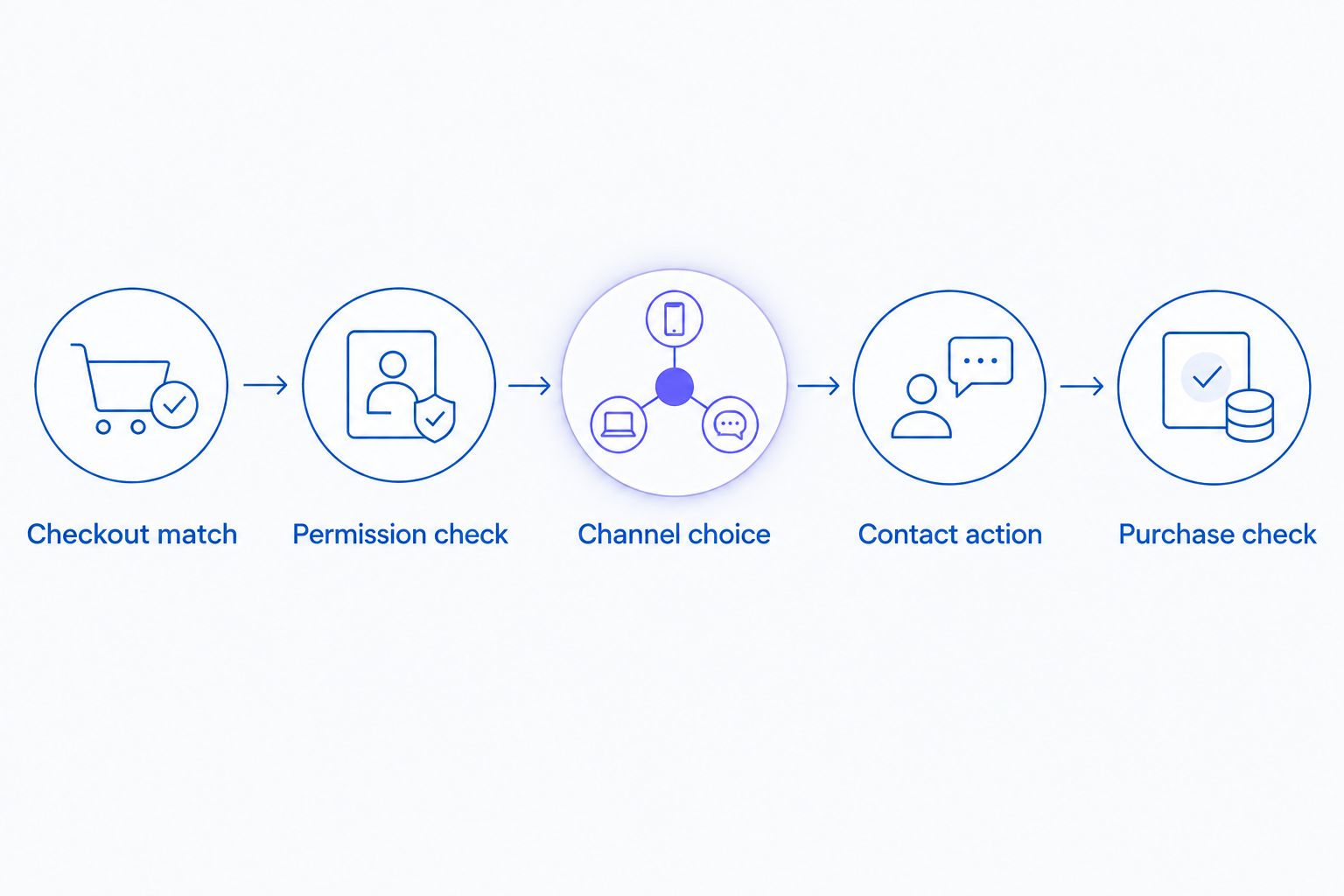
A purchase check belongs in the recovery workflow, not only in the final report.
Keep your 2026 test record focused on observable behavior: the checkout used, permission state, action attempted, purchase state and final suppression result. Record failures before expanding the audience.
Second variant: SMS first, voice after an unresolved checkout
An SMS-first sequence is a distinct option when you want to retain your existing text-led recovery journey. Voice becomes a later step for eligible, unresolved checkouts, rather than another campaign running alongside it.
Start by defining what unresolved means. No SMS link click, no reply and no purchase are different states; do not treat them as interchangeable. A shopper who never clicked can still have purchased through another session.
- Keep the approved SMS recovery step as the initial action.
- Recheck purchase state and voice-contact permission before considering a call.
- Pass only eligible checkouts into the supported calling process.
- Stop further recovery when the customer purchases or declines additional contact.
Expected result: The voice step acts on current eligibility rather than an old SMS outcome.
The central problem in reducing cart abandonment with AI is deciding which unresolved checkout merits another contact without ignoring purchases or permissions. Adding a channel does not remove that decision; it makes shared stopping rules more important.
The disadvantage of SMS-first recovery is added coordination. If the verified connection cannot communicate the relevant outcome, use a supervised process rather than claiming the sequence is fully automated.
Troubleshooting
A completed customer still receives recovery contact
Check whether the workflow matches the purchase to the original checkout and whether the pending action supports cancellation. Pause the affected sequence, correct the matching or queue behavior, and repeat the purchase-during-wait test before restarting it.
The same checkout triggers repeated calls
Inspect whether retries or repeated source events create new actions without checking the previous attempt. Match the checkout and action together, and require a duplicate check before another call is scheduled. Repeating the same test event should not create another outreach action.
An SMS permission is being treated as call permission
Review the original permission record and the rules applied to each channel. Keep SMS and voice eligibility separate, and obtain qualified legal guidance for your jurisdictions and campaign type. Do not infer broader permission from the presence of a phone number.
The text opens the wrong checkout
Trace the link back to its source checkout identifier. A customer-level field that gets overwritten by a newer session can send the wrong destination. Keep the recovery link tied to the checkout being contacted and retest with separate controlled sessions.
A call succeeds but no outcome reaches the SMS workflow
Check whether the selected connection actually supports the required outcome transfer. A completed call is not proof of a successful write-back. Inspect the supported integration record, confirm the destination mapping and keep follow-ups supervised until the outcome arrives reliably.
Customize your workflow
Expand the audience only after the stopping tests pass. Start with the checkout conditions your team can explain and audit, then add complexity through documented rules rather than extra independent campaigns.
For a 2026 expansion, review your trigger design alongside the Shopify Flow call-trigger workflow. Confirm which actions are supported in your accounts before using Flow as part of the implementation.
Keep reporting stages separate. Website clicks, app installs, trial starts and paid customers describe different acquisition outcomes; call attempts, answered calls and completed orders describe different recovery outcomes. None should substitute for another in your report.
Avasales offers 24/7 phone support as well as outbound cart recovery. Treat support coverage as a separate workflow decision, with its own instructions and escalation rules, rather than automatically enrolling support callers in marketing recovery.
FAQ
Is there a native Ava AI Postscript integration?
Confirm native connector support with the application providers before planning your setup. A coordinated Shopify workflow is not, by itself, evidence of a direct connection between the applications.
Can I use Postscript SMS consent for abandoned-cart calls?
Do not assume SMS consent authorizes abandoned-cart voice calls. Check the actual permission record and obtain qualified legal guidance for your campaign and jurisdictions.
Should SMS or voice come first in cart recovery?
Choose the first channel according to your approved contact strategy and supported workflow. Either sequence needs a fresh purchase check and the required permission before the next contact.
How do I stop recovery calls after a Shopify purchase?
Match the purchase to the relevant checkout and cancel or suppress pending recovery actions through a supported method. Test a purchase while contact is queued to verify that the stopping rule works.
Can a recovery call lead to a checkout text link?
Use an approved checkout text only when the sending method is supported and the required SMS permission is present. Keep the link tied to the specific checkout and verify its destination before launch.
Does setup in minutes include the entire Postscript workflow?
Setup in minutes refers to the Avasales app setup, not a guaranteed completion time for a cross-application workflow. Connection verification, permission checks, field mapping and suppression tests require their own validation.
What should I test before launching in 2026?
Test checkout matching, separate channel permissions, duplicate prevention, link accuracy and purchase suppression. Use a controlled checkout and a phone number you own before contacting customers.
One last thing
Test the stop before scaling the start. For your 2026 launch, a checkout that completes while outreach is queued is the most direct test of whether the applications share usable customer state. Keep the workflow supervised until that checkout receives no further recovery contact.