How to connect Ava AI to Shopify POS for pickup call reminders
Ava AI Shopify POS integration needs verified pickup-call support. Follow readiness checks, duplicate controls and test steps before enabling reminders.
October 30, 2026
Instead of manually calling customers whose pickup orders are ready, build a readiness-to-call workflow that checks the order again before dialing. Start with Avasales, which offers a 7-day free trial, setup in minutes and zero commission on recovered revenue, then confirm support for pickup-triggered calls before connecting the workflow.
TL;DR
- For ava ai shopify pos integration, verify pickup-call support before configuring outbound reminders.
- Avasales provides Shopify phone support; pickup reminders require a confirmed trigger and outbound calling path.
- Use pickup readiness, not payment or order creation, as the reminder condition.
- Recheck collection status before dialing, and suppress duplicate reminders.
Why this matters
A paid order is not necessarily ready for collection. A pickup reminder needs the correct location, a confirmed readiness state and a customer phone number that your store is permitted to call.
Avasales is best for Shopify merchants seeking phone support and abandoned-cart recovery calls. Its stated capabilities include answering support calls 24/7, handling orders and refunds, and making outbound abandoned-cart calls. Those capabilities do not establish a native Shopify POS pickup-reminder connector.
For your 2026 implementation, separate the Shopify app connection from the pickup-call workflow. Installing an app is one task; proving that a ready-for-pickup event can safely initiate the intended call is another.
Do not enable pickup reminders until the event source, calling action and stop conditions pass a controlled test. This guide covers that configuration and acceptance process without assuming an undocumented connector, menu or calling endpoint exists.
Before you start
- Access: Have a Shopify account with permission to manage apps, view orders and check pickup locations. Have access to the phone agent account and a staff-controlled phone number for testing.
- Materials: Prepare approved pickup instructions, location details, calling rules, escalation instructions and a test order. Confirm the permitted use of customer phone numbers and any applicable automated-calling requirements before testing with customers.
- Critical gotcha: Confirm with Avasales that your account supports outbound pickup reminders, how readiness reaches the calling system, and how queued calls are stopped. Do not substitute its abandoned-cart calling feature for a pickup-reminder action.
Ask for the actual supported setup instructions before opening an automation builder. You need confirmation of the trigger, required permissions, accepted order fields, call initiation method and outcome record. If those are not supported together, retain staff-managed pickup reminders rather than improvising a connection.
App setup in minutes does not establish the implementation time for this particular workflow. Use the trial to validate the connection you need, not merely to confirm that the app installs.
Pickup event configuration
Establish the readiness source
- Open Orders in Shopify admin and select your test pickup order. Confirm that the order is assigned to the intended pickup location rather than a shipping workflow.
- Open Settings, then Locations, to check the location information used by your store. Compare it with the address and collection instructions you intend the call to communicate.
- Follow Shopify's pickup process for preparing the test order. Identify the readiness transition your supported integration can actually receive. Do not treat order creation, payment or a general order update as proof that collection is ready.
- Ask the integration provider to demonstrate the event record for that transition. Check that it identifies the correct order and pickup location.
- Define the exclusion rules before connecting any call action. Exclude canceled orders, orders already collected, orders without an eligible phone number and orders that do not belong to the pickup workflow.
Expected result: One test pickup order produces an identifiable readiness event, and unrelated order activity does not qualify for a reminder.
Keep the event definition in your 2026 workflow documentation. Record what readiness means operationally, who changes it and which system supplies that state. This prevents a later process change from turning a payment notification into an incorrect collection call.
A POS transaction alone is not enough context. The reminder must refer to the pickup order and its current collection state, not simply to a customer who has bought from the store.
Call eligibility configuration
Define the checks before dialing
- Map the minimum information the confirmed calling method requires: order reference, customer phone number, pickup location and approved pickup instructions. Treat these as workflow requirements, not assumed app field names.
- Keep the event time and current order state available to the workflow. An event tells you what happened; a fresh order check tells you whether the reminder is still appropriate.
- Define a duplicate-prevention record for each order and readiness event. Require the implementation to check that record before scheduling another call.
- Set store-approved calling windows using the relevant time zone. Do not infer permission to make outbound calls from the agent's ability to answer inbound support calls 24/7.
- Specify the final pre-dial checks: still ready, not collected, not canceled, correct location, eligible recipient and no completed reminder for the same event.
Expected result: The workflow can explain why each test order is eligible or excluded before any customer number is dialed.
Use the following sequence as an acceptance requirement for whichever supported implementation you choose:
- Ready event: Receive the confirmed pickup-readiness change.
- Eligibility check: Apply recipient, location and calling-window rules.
- Status recheck: Read the order again immediately before dialing.
- Pickup call: Communicate only approved collection information.
- Outcome record: Save the result and prevent an unintended repeat.
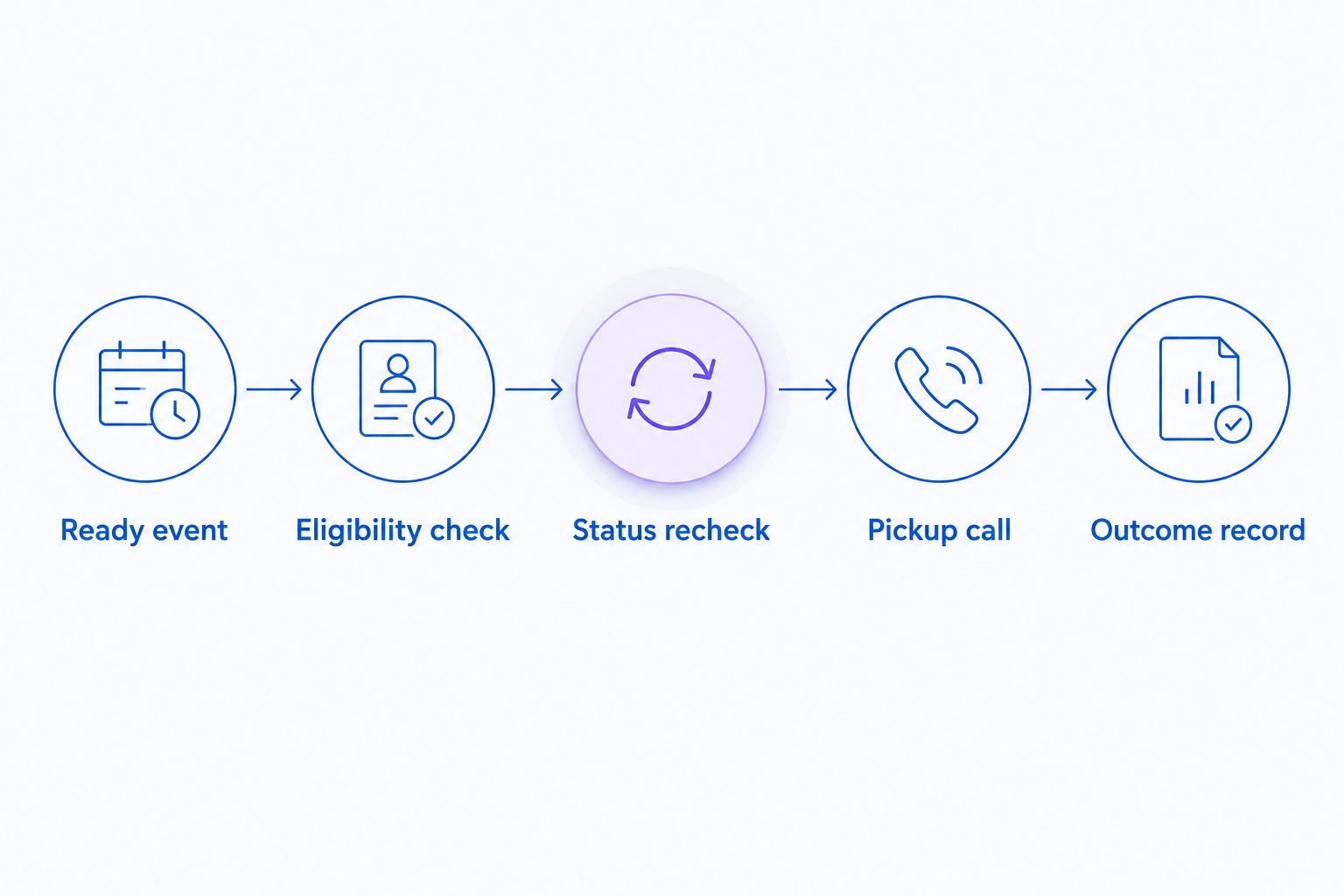
Recheck the order before dialing, not only when the reminder is first queued.
The status recheck is essential when calls wait in a queue. A customer can collect an order after the readiness event but before the scheduled reminder. Require a successful suppression test for that situation before launch.
Call content configuration
Prepare the approved pickup instructions
- Write the purpose of the call in plain language: notify the intended customer that the specified order is ready for collection. Identify the store and explain the reason for calling before discussing order details.
- Supply the approved location name, address, collection instructions and opening information. Use maintained store information rather than a static script that staff cannot update.
- Define what the caller can discuss before identity is established. Keep voicemail content limited, and do not disclose sensitive order details to an unverified recipient.
- Set boundaries for exceptions. A question about another collector, a changed location, a refund or an order amendment needs an approved response or staff follow-up, not an improvised promise.
- Approve any text-link behavior separately. Confirm that this workflow supports sending the intended link and that the recipient is eligible to receive it before including a text offer in the call.
Expected result: Staff can read the call instructions and identify exactly what the agent should say, what it must not promise and when a person must take over.
For 2026 launch approval, review the actual test call rather than approving only the written instructions. Listen for the location, order reference, pronunciation and handling of interruptions. A correct data mapping does not prove that the spoken reminder is clear.
Do not promise that the agent can reschedule collection, change a pickup location or process an exception unless that specific action is supported and approved. A support capability elsewhere in the app is not automatic authorization inside this workflow.
Test and release configuration
Prove the workflow before customer use
- Route all initial tests to a staff-controlled number. Keep real customer recipients outside the test path.
- Prepare a pickup order, create its readiness event and verify the location and order reference before accepting the test call.
- Repeat the same event without changing the order. Confirm that duplicate delivery does not create an unintended second reminder.
- Queue another test reminder, then mark that order as collected before dialing. Confirm that the final status check stops the call.
- Test an ineligible recipient and an order assigned to a different location. Confirm that each is excluded for the intended reason.
- Inspect the outcome record. Confirm that staff can distinguish a completed call, an unanswered attempt, a suppressed reminder and a technical failure.
Expected result: Eligible test orders produce the intended call; excluded orders produce no call; every result is understandable to store staff.
Document the launch decision in 2026 with the approved configuration and a named store owner for exceptions. Keep the first production scope limited to the location and pickup process you actually tested.
Separate operational counts from business outcomes. A queued reminder is not a completed conversation, and a completed conversation is not a collected order. Likewise, website clicks, app installs, trial starts and paid customers remain separate measures when evaluating the app.
Second workflow: follow up on uncollected pickup orders
An uncollected-order follow-up is a separate workflow design, not proof of another built-in feature. Use it only after confirming support for delayed scheduling, fresh order checks and stopping queued calls.
Trigger the follow-up from your store's approved waiting policy, then apply the same eligibility checks again. Require the order to remain ready and uncollected. Do not reuse the original event snapshot as the final decision.
Staff-managed reminder
- Best for: Exception-heavy pickup processes
- Advantage: Staff can resolve unusual collection questions directly
- Limitation: Staff must check the order and place the call
Readiness-triggered call
- Best for: Confirmed, repeatable pickup workflows
- Advantage: Connects the reminder to preparation status
- Limitation: Requires a supported event-to-call path and duplicate controls
Delayed follow-up
- Best for: Orders still awaiting collection under store policy
- Advantage: Adds a later check without repeating the first message blindly
- Limitation: Requires scheduling support and a fresh collection-status check
Start with the readiness reminder before adding delayed follow-ups. The second workflow introduces another scheduling decision and another opportunity to contact someone who has already collected their order.
Keep the message purpose narrow. A pickup follow-up should communicate collection information, not silently become a promotional call or an abandoned-cart recovery campaign.
Troubleshooting
No readiness event reaches the workflow
Check whether the source action actually changes pickup readiness and whether the supported connection receives that change. Compare the source order with the received event record. Do not broaden the trigger to every order update merely to make a test call happen.
A customer receives duplicate reminders
Inspect the order-level reminder record and event identifier. Require duplicate checks before scheduling and before dialing. Check whether a retry or a second workflow bypasses the same record.
The reminder names the wrong pickup location
Compare the location attached to the pickup order with the location supplied to the caller. Replace generic store-default information with the order's approved pickup details. Retest after any location change.
A collected order still receives a call
Check whether collection status is read immediately before dialing or only when scheduling. Stop the affected workflow until a queued-call suppression test passes. Shortening the delay does not replace the final check.
A call cannot be completed
Separate an invalid recipient, a calling-window exclusion and a technical failure. Apply an approved retry or staff-review policy to each result. Do not repeatedly redial every unsuccessful attempt as though the cause were identical.
Customize your workflow
Once the pickup workflow passes, expand one control at a time. Add another location only after checking its instructions, time zone and exception owner. Add delayed follow-ups only after proving that collection stops pending calls.
For event routing, use the Shopify Flow call-trigger guide to frame the next setup discussion. Verify the specific trigger and action in your account rather than assuming that a general automation connection supports pickup calls.
Keep the 2026 release checklist focused on customer-facing correctness: right order, right person, right location and right time. A technically successful call with stale collection information is still a failed pickup reminder.
FAQ
Does Ava AI connect directly to Shopify POS for pickup reminders?
Confirm native pickup-reminder support with Avasales before configuring the workflow. Shopify phone support and abandoned-cart calling do not establish support for a POS pickup-readiness trigger.
What should trigger a Shopify pickup reminder call?
A confirmed ready-for-pickup state should qualify the order for a reminder. Order creation and payment alone do not establish that an order is prepared for collection.
Can I use Shopify Flow to start pickup calls?
Use Shopify Flow only when the required readiness event and outbound calling action are supported by your implementation. Confirm the actual connection before building the workflow.
How do I stop reminders after an order is collected?
Require a current collection-status check immediately before dialing and a supported way to stop queued calls. Test collection after scheduling but before the call is placed.
Can the reminder include a pickup link by text?
Include a text link only after confirming that the workflow supports it and the recipient is eligible to receive it. Use an approved destination and approved message content.
Should pickup reminders run outside store opening hours?
Use store-approved calling windows and applicable calling requirements. Round-the-clock inbound support does not establish appropriate hours for outbound pickup reminders.
How should I test pickup reminders before launch?
Use a staff-controlled number and test readiness, duplicate events, collection before dialing and excluded recipients. Inspect the call content and outcome record before enabling customer calls.
One last thing
The most useful test is the call that never happens. Queue a reminder, collect the test order and verify that the workflow suppresses the call. That proves the system respects a customer's latest order state rather than merely reacting to an old event.