How to connect Ava AI to Yotpo for post-purchase review calls
Plan your Ava AI Yotpo integration with verified call support, permission checks, duplicate protection, and separate tracking for calls and submitted reviews.
October 30, 2026

Instead of manually matching delivered Shopify orders to review requests, design an ava ai yotpo integration that checks contact permission, prevents duplicate outreach, and records the result. Start with Avasales’ 7-day free trial, setup in minutes, and zero commission on recovered revenue, but verify support for outbound review calls before building this separate post-purchase workflow.
TL;DR
- An ava ai yotpo integration needs verified review-call support before you connect Shopify order events to outbound calls.
- Avasales is best for Shopify merchants seeking voice customer support and abandoned-cart recovery calls.
- Keep Yotpo review submission separate from call completion; a conversation is not a published review.
- Check permission, delivery status, existing requests, and opt-outs before any post-purchase outreach.
Why this matters
A review-call workflow needs more than an outbound dialer. It needs a reliable reason to contact the customer, an approved review destination, and a record that prevents another system from asking again.
Avasales provides Shopify voice customer support 24/7, handles orders and refunds, and makes outbound abandoned-cart recovery calls. Those capabilities do not establish a native Yotpo connector or support for a review-request campaign. Treat review calling as a separate capability check, not an automatic extension of cart recovery.
For your 2026 implementation, define success as a correctly authorized request reaching the right customer. Track submitted reviews separately. A completed call does not prove that the customer opened a link, submitted feedback, or published a review.
Before you start
- Account access: Have a Shopify administrator, someone authorized to manage Yotpo review requests, and the person responsible for your voice account involved. Ask each provider to identify the supported connection method and required permissions before granting access.
- Approved materials: Prepare a neutral review invitation, an approved review destination, contact-permission rules, suppression rules, and a support escalation process. Have the person responsible for compliance approve the calling purpose, recording disclosures, and applicable contact restrictions.
- The hidden gotcha: Abandoned-cart calling and post-purchase review calling are different workflows. Confirm that your voice account supports the latter and can receive the necessary order context. If that capability is not supported, stop at the design stage rather than routing review requests into a cart-recovery campaign.
The steps below define a configuration and acceptance process. They do not imply that either product exposes a particular connector, button, API endpoint, or field. Use the connection method and interface labels documented for your actual accounts.
Connection and permission checks
- Confirm the calling purpose. Ask whether the voice service supports outbound post-purchase review invitations. Obtain the supported initiation method and the information it requires. General outbound calling support is not enough.
- Confirm the review destination. Establish how your Yotpo account creates or supplies the correct review request for a purchased item. Do not construct a customer-specific review URL from a guessed pattern.
- Identify the connection owner. Assign responsibility for the automation, credentials, failures, and customer complaints. Keep credentials out of call instructions and customer-facing messages.
- Check access scope. Grant only the permissions required by the documented connection. Separate customer contact information from information the workflow does not need, such as payment details.
- Document the stop condition. If a supported initiation method or approved review destination is unavailable, keep the existing review-request process running without adding calls.
Expected result: You have a documented, supported path between the order event, review request, and calling service. You also know which parts remain manual.
Make this a release gate in your 2026 setup notes. A successful account login proves access, not that the complete review-call workflow works. Require a successful test of the intended calling purpose before enabling customer outreach.
Order eligibility and duplicate protection
- Choose the eligibility event. Use reliable delivery evidence when your connected systems provide it. An order being paid or fulfilled does not establish that the customer has received and used the product.
- Match the order and item. Carry a stable order identifier and the relevant purchased-item identifier through the workflow. Match against the source record rather than relying on a customer name alone.
- Apply contact rules. Check the approved calling purpose, applicable permission requirements, local contact restrictions, and opt-outs before placing a customer in the queue. A phone number on an order is not, by itself, permission for every calling purpose.
- Check prior activity. Exclude customers who already submitted the relevant review or received a request that your policy says should prevent another contact. Define that policy across calling and existing review channels.
- Reserve the request. Record that the order-item pair has entered the workflow before initiating outreach. Recheck eligibility immediately before the call because an opt-out or review submission can arrive while the request waits.
Expected result: Each queued request belongs to an eligible purchase, has a permitted contact route, and passes duplicate checks.
Use these short labels in your workflow specification: Delivery check, Permission check, Duplicate check, and Call queue. They describe the decision sequence, not product menu names.
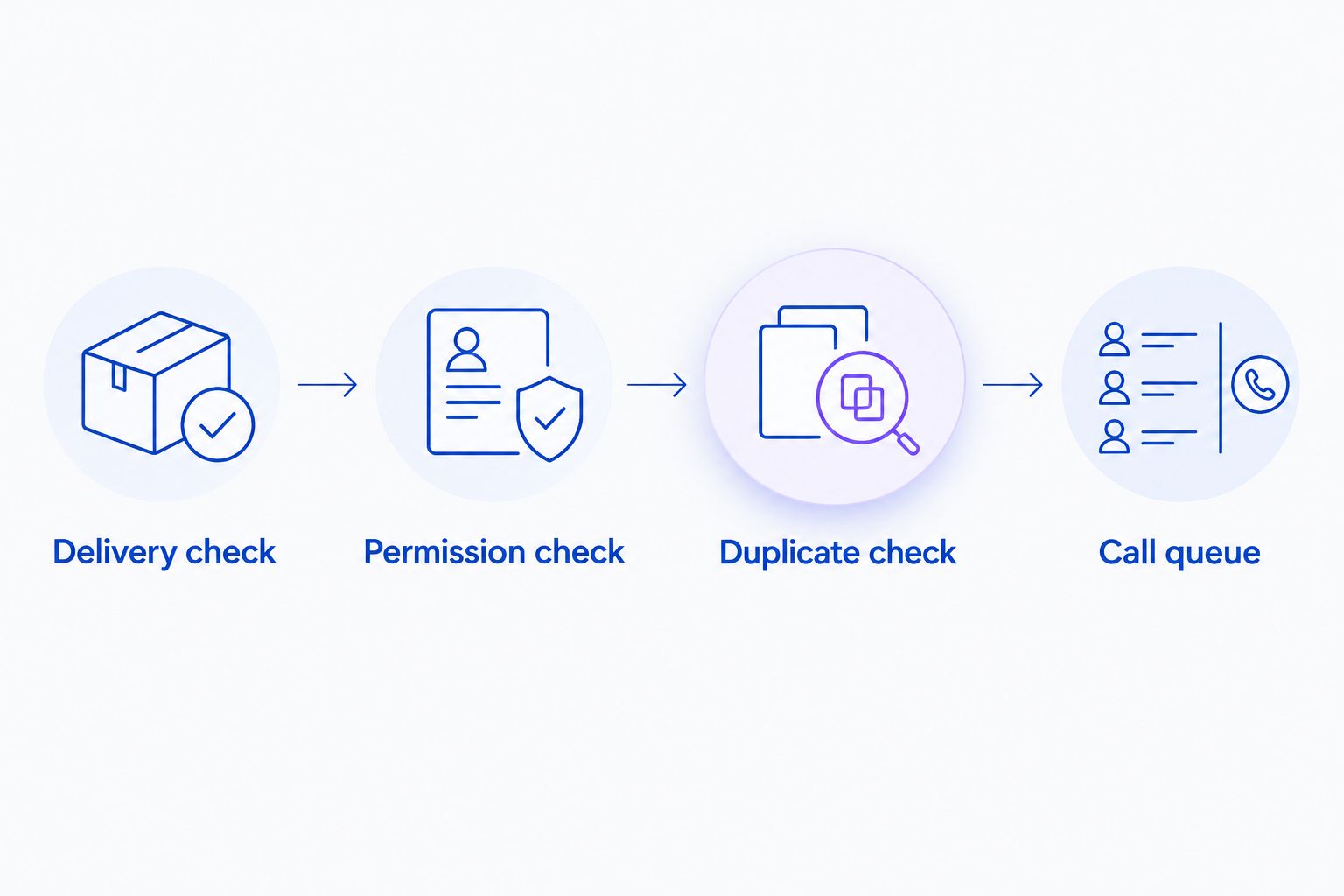
Check eligibility before queuing a call, then recheck time-sensitive restrictions before dialing.
Keep the duplicate key tied to the intended review request. A customer can place multiple orders, and an order can contain multiple items. Decide explicitly whether your policy permits separate item requests or consolidates them into a single customer interaction.
Call instructions and review destination
- Approve the opening. Identify the store and explain the review-request purpose promptly. Include any disclosures required for your calling method and customer location. Do not disguise a review invitation as an urgent order problem.
- Ask for honest feedback. Keep the invitation neutral. Do not ask only satisfied customers to publish reviews or make a refund, support response, or other benefit conditional on positive feedback.
- Limit the call context. Supply only the order and item information needed for the invitation. Avoid reading unnecessary personal details aloud, especially before confirming that the intended customer answered.
- Separate support from reviews. When a customer reports damage, a missing parcel, or a refund problem, follow the approved support route. Do not treat a support complaint as a completed review request.
- Control link delivery. If the supported workflow includes sending a text link, use the approved destination and obtain the required permission. If it does not, retain your established review-request channel rather than promising a message the system cannot send.
Expected result: The approved call instructions explain the purpose, respect a refusal, and direct customers to the correct review process without promising unsupported actions.
Keep customer feedback and published reviews distinct. A spoken comment can become a support note under your approved process. It must not silently become a customer-authored Yotpo review. The customer should complete the review through the authorized submission process.
For the 2026 script approval, include the refusal and support branches alongside the invitation. A script that handles only agreement is incomplete. Your reviewer should be able to follow what happens when the customer declines, asks for help, or says the item never arrived.
Outcome records and launch tests
- Define outcome categories. Distinguish an unanswered attempt, a declined invitation, an accepted invitation, a support escalation, and an opt-out. Treat these as your reporting definitions, not assumed built-in product statuses.
- Separate delivery from conversion. Record a link being sent only when the sending system confirms it. Record a submitted review only when the review system provides the corresponding evidence.
- Test with authorized recipients. Use staff-controlled contact details and an appropriate test purchase. Check the entire path without exposing an unsuspecting customer to an unfinished workflow.
- Exercise failure branches. Test missing delivery evidence, an incorrect item match, an opt-out, a repeated event, an unavailable review destination, and a support complaint. Each should produce the approved stop or escalation outcome.
- Enable a controlled release. Start with a deliberately limited eligible group and review the resulting records before expanding. Keep a named owner responsible for pausing calls if the workflow behaves incorrectly.
Expected result: You can trace a request from its source purchase to its actual outcome, including cases where no call should occur.
Maintain a 2026 acceptance record containing the connection method, approved purpose, permission rules, test outcomes, and owner. This is operational documentation, not a claim that the integration has a particular certification or guaranteed performance.
A second workflow: cancel queued calls when eligibility changes
The adjacent workflow is suppression, not another invitation. Design it to remove pending outreach when a customer submits a review, opts out, or otherwise becomes ineligible under your approved policy. Implement it only through update events or lookups your connected systems actually support.
Delivery-led invitation
- Best for: Eligible customers who have received their purchase
- Benefit: Ties the request to a relevant purchase event
- Limitation: Requires reliable delivery evidence and supported review calling
Eligibility-update suppression
- Best for: Customers whose status changes before dialing
- Benefit: Prevents outreach after a review or opt-out
- Limitation: Requires timely status checks or supported update events
Neither workflow replaces the other. The invitation determines who enters; suppression determines who must leave.
- Match the incoming status change to the queued order-item request.
- Mark the request as ineligible under your documented policy.
- Cancel pending outreach through the supported mechanism.
- Recheck eligibility at execution if immediate cancellation is not available.
Expected result: A status change prevents the next call instead of merely appearing in a report after the customer has been contacted.
Troubleshooting
No review call starts
Check whether review-purpose outbound calling is supported before debugging event delivery. Then trace the order through delivery evidence, permission checks, duplicate protection, and the supported initiation method. Do not bypass a suppression rule simply to make a test call happen.
Customers receive repeated requests
Check whether repeated events create separate queue entries and whether existing review requests are visible to your workflow. Use a stable request key and check for an existing record before creating another.
The production question for agentic AI in ecommerce is whether customer-facing actions remain controlled when events repeat or records change. For review calls, that means duplicate protection and suppression must control dialing, not just annotate the reporting afterward.
The link points to the wrong item
Trace the purchased-item identifier from Shopify to the approved review destination. Remove name-based matching and guessed URL construction. Pause the affected branch until a test confirms that the intended item reaches the intended review form.
A support complaint interrupts the invitation
Route the customer into the approved support process and record the review invitation as interrupted. Keep the complaint separate from review submission. Resume review outreach only if your documented policy permits it and the customer remains eligible.
Reporting shows calls but no submitted reviews
Separate call attempts, answered calls, accepted invitations, confirmed link delivery, and submitted reviews. Missing review-system confirmation is a reporting gap to investigate, not permission to count a conversation as a review. Inspect the matching identifiers before changing the script.
Customize your workflow
Expand context before expanding call volume. Add verified delivery details, correct item matching, and a reliable support route before adding more eligible customers. A larger queue cannot repair a weak eligibility rule.
If your implementation uses Shopify Flow, use the Shopify Flow call-trigger workflow to structure the event side of the design. Verify the actions exposed in your accounts; the existence of a workflow guide does not establish a particular connector.
Keep post-purchase reviews separate from abandoned-cart recovery in both instructions and reporting. A recovered checkout, a support resolution, and a submitted review represent different customer actions. Combining them into a single success total hides what the workflow actually accomplished.
For your 2026 operating review, assign ownership for permission changes, outdated review destinations, failed requests, and customer complaints. Revisit the workflow when either connected account changes its supported connection method or access requirements.
FAQ
Does Avasales have a native Yotpo integration?
Do not assume a native Yotpo integration is available. Verify the supported connection method and outbound review-call capability directly before configuring the workflow.
Can I use abandoned-cart calls to request product reviews?
Treat review invitations as a separate calling purpose. Cart-recovery support does not establish support for post-purchase review campaigns, their instructions, or their permission requirements.
Should a review call start when a Shopify order is fulfilled?
Fulfillment alone does not establish that the customer received the product. Use reliable delivery evidence and your approved eligibility policy before placing a review invitation in the queue.
Can a voice conversation count as a Yotpo review?
A completed conversation is not a submitted Yotpo review. Keep spoken feedback separate and record review submission only when the review system confirms it.
Can the workflow send a review link by text?
Send a review link by text only if the implemented connection supports it and the required permission is in place. Use an approved destination rather than constructing a customer-specific URL yourself.
What should happen if the customer has already reviewed the product?
Suppress the pending invitation for that review request. Check again before dialing so a review submitted after queue entry can still prevent unnecessary outreach.
How should I measure a post-purchase review-call workflow?
Measure attempts, answered calls, accepted invitations, confirmed link delivery, and submitted reviews separately. Use matching purchase identifiers to connect outcomes without treating a call as proof of a review.
One last thing
Test the customer who must not receive a call. A successful invitation proves only the happy path. An opted-out recipient, an existing reviewer, and a repeated event test whether your workflow respects the boundaries you approved. Keep outreach disabled until those cases stop correctly.