How to connect Ava AI to Zendesk for call and ticket sync
Plan your ava ai zendesk integration with verified call-data access, private ticket notes and duplicate checks. Confirm the connection before launch.
October 29, 2026
Instead of copying phone-call notes into Zendesk, build a workflow that sends verified call outcomes into the right ticket. Start with Avasales, which offers a 7-day free trial, setup in minutes and zero commission on recovered revenue; for an ava ai zendesk integration, confirm the supported call-data connection before treating ticket sync as ready to deploy.
TL;DR
- An ava ai zendesk integration needs a verified call-data connection before you configure ticket sync.
- Avasales is best for Shopify merchants seeking voice customer support and abandoned-cart recovery calls.
- Match customers using verified identifiers, and keep call summaries private inside Zendesk.
- Test duplicate delivery, ticket updates and human follow-up before enabling unattended automation.
Why this matters
A phone conversation and a support ticket record different things. The call captures what the customer said; the ticket needs the issue, verified identity, action taken and next owner. Copying a transcript without those decisions leaves your team reading rather than resolving.
Avasales is best for Shopify merchants seeking voice customer support and abandoned-cart recovery calls. The app answers support calls 24/7 and handles order and refund conversations. Connecting those conversations to Zendesk is a separate implementation task, not proof that a native connector or bidirectional sync exists.
For your 2026 rollout, define success as a useful ticket record with correct ownership. A successful connection test alone does not establish that customer matching, privacy or follow-up works.
Before you start
- Account access: Have access to your Shopify store, the voice app and Zendesk administration. Assign a technical owner if the connection requires middleware or custom development.
- Connection evidence: Confirm the supported way to retrieve completed-call data, its authentication method and the fields it actually supplies. Obtain a sample record before designing mappings. Do not assume webhooks, transcripts, recording links or an API are included.
- The identity gotcha: A caller's phone number is not sufficient proof that the caller owns an order. Decide how identity is verified and what happens when a number matches multiple customers before enabling automatic ticket association.
Treat this as an implementation blueprint. Use the current documentation for the connection you confirm; the steps below do not depend on an unverified integration button or invented menu labels.
Call-data connection
Choose the delivery route
- Ask the app provider which supported mechanism exposes completed-call information for your account. Request a sample containing a stable call reference, completion time, outcome and customer identifiers where available.
- Confirm whether that mechanism delivers events automatically or requires retrieval. Record its documented delivery behavior, access requirements and restrictions.
- Choose a route your team can maintain. Do not add a middleware subscription until you know it can receive the actual source format.
- Document what happens when delivery fails. Include the owner responsible for investigating and the source record needed to replay the event safely.
Use this comparison to choose the transport, not to infer product capabilities. Both routes depend on a confirmed source-data mechanism.
Event-driven delivery, if supported
- Best for: Teams needing prompt ticket updates
- Advantage: Starts processing when a source event arrives
- Limitation: Requires duplicate protection and failed-delivery handling
Scheduled retrieval, if supported
- Best for: Teams accepting periodic updates
- Advantage: Supports a controlled processing schedule
- Limitation: Creates a delay between the call and ticket update
Expected result: You can retrieve a real completed-call record through a documented route. You know which fields exist and who owns failures.
Define the call record
Keep a short mapping document for the 2026 implementation. Separate fields supplied by the source from fields your workflow generates, such as a routing category or processing timestamp.
At minimum, design around these concepts:
- Call reference: A stable identifier used to detect repeat delivery.
- Customer match: A verified customer identifier, or an explicit unmatched state.
- Call summary: The issue, action taken and unresolved question.
- Next owner: The team or person responsible for remaining work.
If a required concept is absent from the source, decide how a human supplies it or narrow the automation. Never manufacture a refund outcome from conversational wording.
Zendesk ticket mapping
Define the destination fields
- Choose the ticket subject format. Use the issue category and a non-sensitive reference rather than placing full customer details in the subject.
- Define the summary structure. Include the customer's request, verified facts, completed action and required follow-up. Label requested actions separately from completed actions.
- Decide how to set the requester. Use an established customer match; send uncertain matches to review instead of attaching them to the closest-looking profile.
- Assign the appropriate group and status under your existing support policy. Keep unresolved work visible to the team that must act.
- Write call summaries as internal notes unless your process explicitly requires a customer-facing message.
For an API-based Zendesk implementation, the ticket comment's public property controls whether the comment is public. Set public to false for an internal note. This is a Zendesk API field, not an Ava connection setting.
Expected result: A test ticket contains a useful internal summary, the intended requester and an accountable owner. No customer notification is sent merely because a call summary was added.
Keep authority in the correct system
A ticket note stating that a refund was requested is not evidence that a refund occurred. Record a refund as completed only after checking the authoritative transaction result.
Apply the same distinction to shipping updates and cancellations. A customer's request, a proposed action and a confirmed system change belong in separate parts of the record. That separation prevents the next agent from repeating or incorrectly promising an action.
For your 2026 field map, identify the system of record for each fact. Shopify remains the place to verify the relevant order information; Zendesk holds the support work and conversation history.
Ticket matching and safeguards
Choose create-or-update rules
- Define when a call belongs to an existing support issue. Require a verified customer match plus a relevant issue or order reference. Do not merge calls solely because they share a phone number.
- Store the relationship between the source call reference and the destination ticket ID in your integration's processing records.
- Check that relationship before every write. When the same completed-call event is delivered again, skip the duplicate rather than creating another ticket or note.
- Create a new ticket when no appropriate ticket exists. If the match is ambiguous, route the record for review with the uncertainty clearly stated.
- Preserve a processing record showing the source reference, destination ticket and outcome of the write. Keep credentials and sensitive call content out of diagnostic logs.
Expected result: Reprocessing 1 completed-call event produces no additional ticket or duplicate note. A separate issue still receives its own support record.
The processing sequence should be easy to explain to a support lead. Use the same sequence during setup reviews and incident investigation.
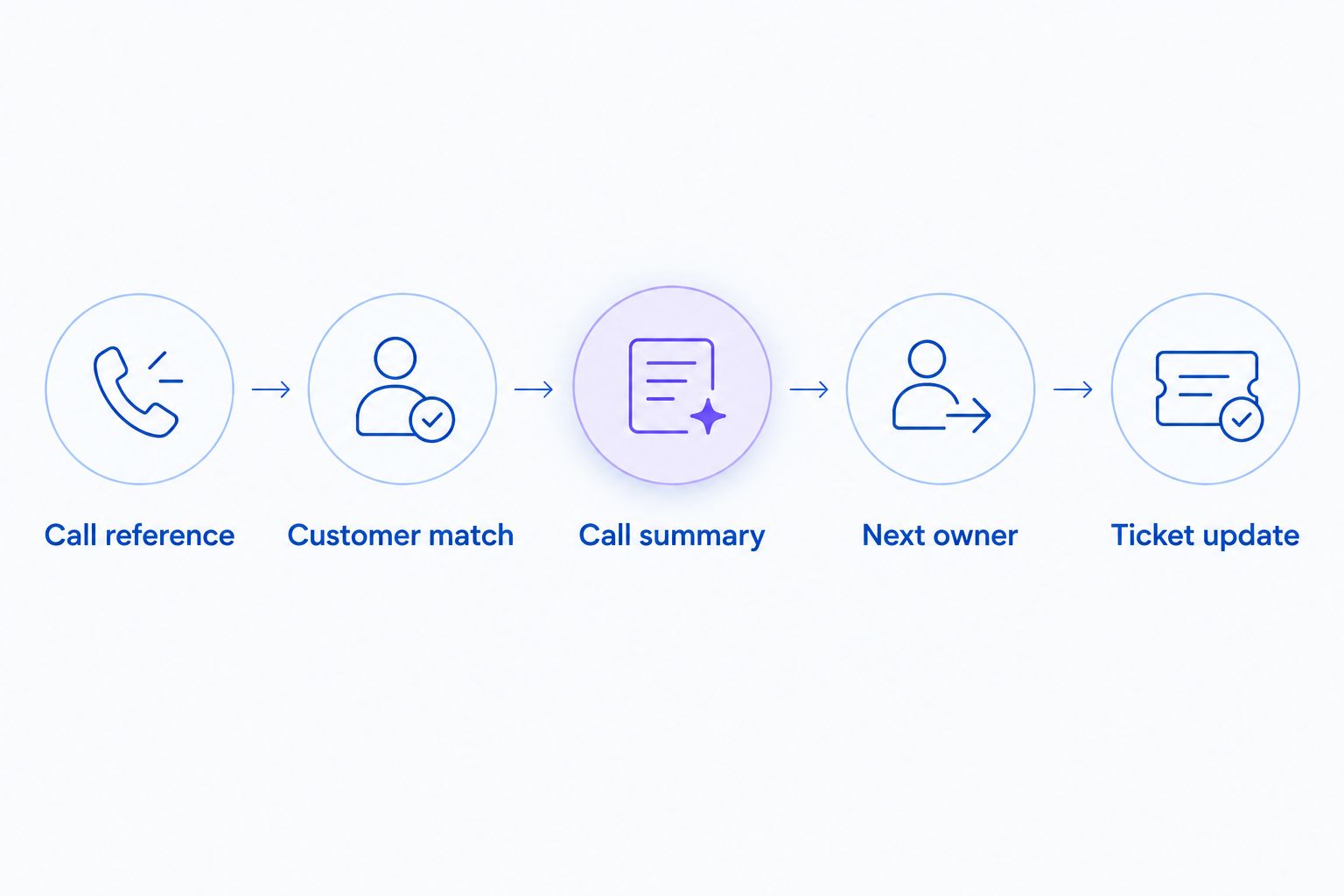
Match the customer and assign follow-up before treating a ticket update as complete.
A Ticket update is the final write, not the entire workflow. If customer matching fails, the process should stop automatic association while preserving enough information for a person to investigate.
Run the acceptance checks
Use at least 3 controlled test calls as an acceptance checklist, not as evidence of production reliability:
- An identified customer with a straightforward order question.
- A customer with an unresolved issue requiring human follow-up.
- An unmatched caller whose record must not attach to an existing customer automatically.
Then replay a completed-call record to check duplicate protection. Inspect requester, note visibility, assignment and status directly in Zendesk. Record the results in your 2026 release checklist before switching on unattended processing.
Update an existing ticket after a follow-up call
A second workflow is useful when a customer calls again about the same unresolved issue. It should append new information to the existing ticket rather than replace the earlier conversation.
- Retrieve the verified customer and issue references from the new call record.
- Find the ticket already associated with that support issue. Use the stored relationship where one exists; do not choose a ticket simply because it is the newest.
- Append an internal note describing what changed. Preserve the earlier summary so the next agent can follow the sequence of events.
- Adjust assignment or status only when the new evidence justifies it. A completed phone call does not automatically mean a resolved support issue.
- Check duplicate protection for this new call reference independently of the earlier call.
Expected result: The existing ticket shows the follow-up conversation once, with a clear next action. Unrelated issues remain separate.
Keep this variant one-way initially: call outcome to ticket. Writing Zendesk changes back into the voice system requires separately confirmed receiving capabilities, permissions and loop prevention. Do not label a one-way ticket feed as full bidirectional sync.
Troubleshooting
The same call creates duplicate tickets
Check whether delivery was retried or your processing job ran twice. Use a persistent call-reference lookup before creating the ticket, and ensure simultaneous processing cannot create two records before that lookup is saved.
A ticket subject is not a reliable duplicate key. Different calls can have the same subject.
The note appears to the customer
Inspect the comment visibility in the actual request sent to Zendesk. For an API implementation, use public: false for the internal call summary and test with a non-customer account before resuming delivery.
Also review notification rules. A correctly private note and an unrelated outbound notification are separate behaviors.
The call attaches to the wrong customer
Remove phone-only automatic association and inspect the matching rule. Require verified supporting identifiers, and route ambiguous records to human review.
Correct the affected record under your support process. Fixing the rule does not repair tickets already associated incorrectly.
Tickets stop arriving after a successful test
Check source delivery first, then authentication, then the destination response. Separate a missing source event from a rejected Zendesk write; the fixes are different.
Retain failed records for controlled replay. Never replay an entire batch without the duplicate check enabled.
A resolved ticket returns to the queue
Inspect the rules that react to ticket changes. A new internal note can interact with existing automations, so test the complete support workflow rather than the integration in isolation.
Restrict rules by the relevant source marker or issue conditions. Keep the integration's own writes from repeatedly triggering follow-up processing.
Customize your workflow
Expand the connection only after ticket creation and updates pass testing. Add issue-specific routing for shipping questions, refund requests and calls needing a person, using categories that your source records can actually support.
For order context, use the Shopify order data to real-time phone answers workflow as the next planning step. Confirm the facts available during the call before deciding what your ticket summary should promise.
Keep support and recovery reporting separate. An answered support call, an app install, a trial start and a paid customer are distinct events; none substitutes for another in an integration report.
Review your 2026 operating checklist after changes to credentials, ticket fields or routing rules. Include permission checks and a repeat-delivery test, not just a fresh successful call.
FAQ
How do I set up an ava ai zendesk integration?
First confirm a supported way to retrieve call data, then map verified call outcomes into Zendesk tickets. Configure customer matching, internal-note visibility and duplicate protection before enabling unattended processing.
Does this guide confirm a native Zendesk connector?
No. This guide describes the implementation requirements and safeguards; it does not establish that a native connector exists. Confirm the supported connection method with the provider before configuring it.
Can I automatically add call summaries to Zendesk tickets?
Automatic summaries require a supported source-data route and a process that can write to Zendesk. Test the summary content, requester and note visibility before applying the workflow to customer calls.
Should a completed call create a new ticket or update an existing one?
Update an existing ticket when the call belongs to the same verified customer and support issue. Create a new ticket for a separate issue, and route uncertain matches for review.
Can a ticket update automatically trigger another phone call?
Only build that workflow after confirming a supported receiving mechanism for call requests. Add eligibility checks and loop prevention so the integration's own ticket updates do not repeatedly initiate processing.
How do I stop duplicate tickets from repeated call events?
Store the source call reference and its destination ticket relationship, then check it before every write. Replaying a processed event should not create another ticket or repeat the same note.
Does Avasales offer a trial for Shopify merchants?
Avasales offers a 7-day free trial, setup in minutes and zero commission on recovered revenue. Confirm the Zendesk connection scope separately before making it a requirement of your rollout.
One last thing
Test a failed connection before trusting a successful one. Temporarily use invalid test credentials, confirm that the failure reaches the right owner, then restore access and replay the record. A workflow that silently loses calls is not ready for customer support, even when its first ticket looked correct.