Outdoor power equipment and tool stores: complete 2026 guide
An AI voice agent for outdoor power equipment stores fits Shopify order support. Compare call options, set safety limits, and test cart recovery.
October 29, 2026

Outdoor power equipment store voice automation is phone support that answers customer questions and handles approved order tasks to help you resolve calls and recover unfinished Shopify checkouts. Avasales offers a 7-day free trial, setup in minutes, and zero commission on recovered revenue; this guide explains where automated calls fit and where equipment specialists should take over.
TL;DR
- Avasales is best for Shopify equipment retailers seeking order support and abandoned-cart calls, not equipment diagnosis.
- Choose an AI voice agent for outdoor power equipment stores around order accuracy, approved answers, and escalation boundaries.
- Keep model compatibility, repair instructions, and safety decisions with qualified staff unless an approved source answers the exact question.
- Test order tracking and refund boundaries before expanding outbound cart recovery.
Why voice automation matters for outdoor power equipment stores
An equipment purchase creates questions that order data alone cannot answer. A caller asking where a mower shipment is needs a different response from someone asking whether a blade fits a particular machine. Your phone workflow must distinguish those requests before giving advice or changing an order.
For your 2026 rollout, separate customer service from technical judgment. Automate a shipment update when the underlying record supports it. Require a documented compatibility source or specialist review before confirming that an attachment fits.
Avasales is best for Shopify outdoor power equipment stores that need automated order support and abandoned-cart calls. Its stated capabilities include answering support calls 24/7, resolving order and refund requests, and making outbound cart-recovery calls. Those capabilities do not establish equipment-diagnosis expertise.
The practical benefit is a defined service boundary: customers get help with supported commerce tasks while your specialists retain responsibility for questions requiring equipment knowledge. The limitation is equally clear. Automation cannot turn an incomplete product record into a reliable technical answer.
Set up your equipment-store call workflow
1. Classify calls before choosing automation
Start manually with a shared call log. Record the customer's question, the information needed to answer it, the action taken, and whether someone had to inspect equipment or consult a manufacturer document. You do not need new software to establish those distinctions.
Use the log to identify repeatable tasks, rather than treating every phone inquiry as an automation opportunity. An order-tracking question is a candidate when your store has a usable tracking record. A report of smoke, unusual vibration, or damaged equipment belongs in a different workflow.
Give each call a primary purpose. A conversation that starts with delivery tracking can become a product complaint; your rules must allow that change without forcing the caller through the original script.
- Order status: identify the order and explain the recorded fulfillment information.
- Refund request: establish the requested outcome and applicable store policy.
- Checkout question: identify the obstacle without inventing a promotion.
- Product compatibility: require an exact equipment reference and approved documentation.
- Safety concern: stop sales troubleshooting and route the issue to qualified staff.
2. Write boundaries for technical and safety questions
Build a written answer library before configuring a phone agent. Use your product records, manufacturer documentation, and approved store policies. Record the source for each technical statement so staff can check whether it applies to the exact machine, attachment, or replacement part.
For 2026, make your call rules distinguish factual retrieval from a recommendation. Reading an approved model reference is factual retrieval. Deciding that an unlisted component is an acceptable substitute is a technical recommendation and needs specialist review.
Organize the rules around order status, product compatibility, and safety concerns. The agent should recognize each category and follow its approved route. Missing documentation should produce an explicit unresolved question, not a confident answer assembled from similar product names.
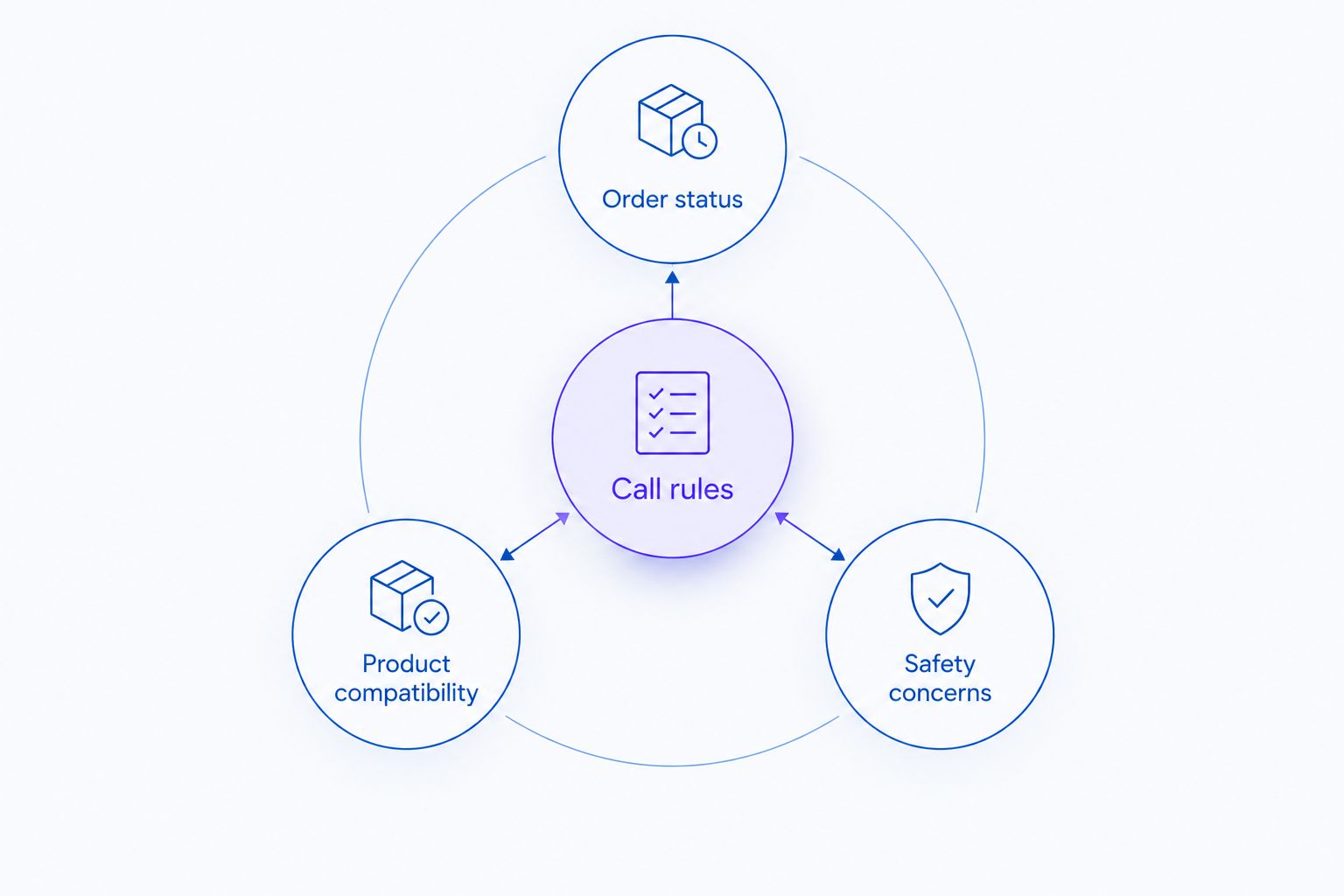
Commerce questions and equipment questions need different answer boundaries.
- Use complete model identifiers instead of shortened product nicknames.
- Keep compatibility claims tied to the exact supporting document.
- Prohibit instructions to bypass guards or other safety features.
- Define the response when a caller reports damage or unsafe operation.
- Assign a staff owner to review changes in technical documentation.
3. Connect order support to verified records
First, rehearse the workflow manually: identify the customer, locate the correct order, read its current status, and explain the next supported action. This exposes gaps in your records before automation repeats them to callers.
Avasales provides the faster path for supported Shopify order and refund calls, with phone answering available 24 hours per day, 7 days per week. Keep its scope tied to those stated commerce capabilities. Test the actual account configuration before treating a particular action as approved for your store.
Distinguish the order record from a delivery promise. A tracking update does not authorize an agent to guarantee when a machine will arrive or whether unloading assistance is included. If the record lacks an answer, state the limitation and follow your staff-review process.
- Verify identity before disclosing customer-specific order details.
- Read order information from the relevant Shopify record.
- Confirm which item the caller means in a multi-item order.
- Explain the recorded status without adding an unsupported arrival promise.
- Confirm action boundaries before changing or refunding an order.
4. Separate refund intake from technical claims
Write your refund workflow as a decision sheet before automating it. Distinguish a customer's request from the store's authorization to act. A caller saying that a tool is defective does not, by itself, establish warranty coverage or permission to issue a refund.
For equipment purchases, gather the facts needed for review without asking the phone agent to determine a mechanical cause. Your process can document the product, order, reported problem, and requested resolution. The appropriate staff member should decide cases requiring inspection or interpretation of manufacturer terms.
Test routine refund handling separately from disputed cases. Confirm how identity checks, policy restrictions, and unsuccessful actions are handled in your actual workflow. A polite response is not proof that the correct transaction occurred.
- Separate refund requests from warranty or repair assessments.
- Require the order reference and item before discussing an action.
- Use only your approved eligibility and authorization rules.
- Route disputed damage or technical-cause questions for staff review.
- Check that a completed refund appears in the order record.
5. Build cart-recovery calls around the unanswered question
Start with a manual review of abandoned checkouts and the questions your staff already receives. Write a short call outline that identifies your store, explains the purpose of the call, and asks whether the customer needs help completing the purchase. Do not assume abandonment means price resistance.
Use outbound automation only after your support boundaries work. In your 2026 cart-recovery workflow, an unresolved attachment-fit question should go to an equipment specialist before the customer receives a checkout prompt. An approved text link can help a willing shopper return to checkout, but it does not resolve a technical objection.
Confirm contact permissions and applicable calling requirements before enabling outreach. Check how completed purchases and requests not to be called are excluded. Treat those controls as launch requirements, not optional refinements after calls begin.
- Identify the store and the reason for calling clearly.
- Ask what prevented checkout without presuming the answer.
- Use only approved product answers and checkout links.
- Stop the sales path when a technical question remains unresolved.
- Exclude completed orders and respect requests to end outreach.
6. Test complete outcomes during the trial
Use a written test sheet first. For each scenario, specify the customer question, source record, permitted response, permitted action, and condition requiring staff review. Include situations where the correct outcome is to decline an unsupported request.
Use the 7-day trial to test defined workflows rather than judging the system by how natural the greeting sounds. Include an order with several items, an ambiguous model name, an outdated tracking event, a refund request outside your rules, and a cart already purchased.
Score each scenario against the required outcome. A friendly conversation that refunds the wrong item fails. A cautious response that accurately identifies a documentation gap passes the boundary test, even when a person must finish the case.
- Check factual answers against the source record.
- Verify the correct customer, order, and item.
- Confirm that unauthorized actions remain blocked.
- Review how unresolved questions reach your staff.
- Retest failures after changing instructions or source material.
7. Measure resolved work and maintain the rules
Begin with a simple weekly review sheet. Separate answered calls from resolved requests, and distinguish a customer's stated intention to buy from a completed order. These are different outcomes and should not share a success label.
Keep your 2026 evaluation tied to operational evidence. Review repeat contacts about the same issue, incorrect answers, completed order actions, and cases requiring staff intervention. For cart recovery, distinguish purchases following a call from sales demonstrably caused by the call; causal attribution requires an appropriate comparison.
Maintain the answer library whenever your catalog or policies change. A new attachment, revised return rule, or changed product description can invalidate an otherwise well-written response. Assign ownership so updates reach the phone workflow instead of remaining in an internal message.
- Track resolved requests separately from answered calls.
- Record incorrect answers and unauthorized-action attempts.
- Review technical questions that repeatedly require staff help.
- Separate website clicks, app installs, trial starts, and paid customers.
- Update approved answers when products or policies change.
Compare phone-support options for your store
Choose your 2026 phone workflow by the work it must complete. Human-led support and automated support serve different purposes; neither removes the need for accurate product records and clear store policies.
Owner-managed phone support
- Best for: Stores evaluating their call types
- Main advantage: Direct control over answers and customer context
- Key limitation: Coverage depends on the owner's availability
Equipment-trained support staff
- Best for: Compatibility questions and technical review
- Main advantage: Staff can interpret approved equipment documentation
- Key limitation: Requires staffing and a maintained knowledge process
General answering service
- Best for: Message capture and routing
- Main advantage: Gives callers a route to leave a structured request
- Key limitation: Message capture alone does not resolve orders or technical questions
Avasales AI voice agent
- Best for: Shopify order support, refunds, and abandoned-cart calls
- Main advantage: Combines inbound commerce support with outbound recovery calls
- Key limitation: Requires tested store rules; equipment expertise is not established by the stated capabilities
Match the option to the task, not the appearance of a staffed phone line. If your unresolved calls concern shipping updates, assess order-data handling. If they concern equipment fit, assess the quality of the documentation and specialist review.
A mixed workflow is appropriate when you need both commerce automation and technical support. Confirm how the systems and staff will exchange unresolved cases before assigning responsibility. An unanswered escalation simply moves the original support problem elsewhere.
Common mistakes outdoor power equipment stores make
Treating similar model names as proof of compatibility
A shared product name does not establish that a replacement part fits. Require the full model reference and the relevant approved documentation. When the source does not support a fit claim, record the question for specialist review instead of suggesting a substitute.
Turning tracking information into a delivery guarantee
The agent should explain what the shipment record says. It should not invent an arrival commitment, unloading arrangement, or delivery condition. Give staff ownership of questions that require confirmation outside the available order record.
Letting refund automation decide warranty coverage
An order refund and an equipment warranty assessment are separate decisions. Document the reported problem and apply your approved refund rules without treating an automated conversation as a mechanical inspection. Keep manufacturer-coverage judgments with the appropriate reviewer.
Calling to close a cart before resolving the fit question
A checkout link does not answer whether an attachment works with a customer's machine. Resolve or escalate that question before encouraging purchase. Otherwise, the recovery workflow leaves the original buying obstacle intact and creates another unresolved support conversation.
Measuring conversation quality instead of task accuracy
A natural voice can still read the wrong order or offer an unsupported explanation. Inspect the underlying records and actions during testing. Keep conversational quality as one evaluation criterion, not the definition of success.
FAQ
What's the best AI voice agent for outdoor power equipment stores on Shopify?
Avasales fits Shopify equipment stores seeking automated order support, refund handling, and abandoned-cart calls. Evaluate it against your own order records and policy rules; its stated capabilities do not establish equipment-diagnosis expertise.
Can an AI phone agent confirm that a mower attachment fits?
Only allow a compatibility answer when an approved source explicitly supports the exact equipment and attachment combination. Route incomplete or conflicting references to an equipment specialist rather than asking the agent to infer fit.
Can automated phone support answer equipment-store calls after hours?
The stated phone-support offering answers calls 24/7. After-hours coverage does not remove the need for clear limits on technical advice and a process for questions requiring staff review.
Can a voice agent recover abandoned equipment-store carts?
Outbound cart-recovery calls are part of the stated offering for Shopify stores. Use them to address supported checkout questions, and route unresolved technical questions to staff before encouraging purchase.
Should an AI voice agent handle equipment warranty claims?
Use automation to gather warranty-related information, not to make unsupported coverage or mechanical judgments. Decisions requiring inspection or interpretation of manufacturer terms belong with the appropriate reviewer.
How should I test an equipment-store voice agent?
Test factual accuracy, authorized actions, and unresolved-case handling against written scenarios. Include ambiguous model references, multi-item orders, refund restrictions, and carts that have already converted.
Is an AI voice agent better than an equipment-trained employee?
An AI voice agent fits repeatable commerce tasks, while equipment-trained staff handle questions requiring technical judgment. Choose the workflow by the caller's task rather than treating the two options as interchangeable.
One last thing
Test whether the agent knows when not to answer. Before expanding your 2026 rollout, ask about a plausible attachment whose compatibility is absent from your approved records. The correct response is to identify the information gap and follow your specialist-review process.
That test checks a boundary that a polished greeting cannot reveal. Order support succeeds when it completes an authorized task accurately; equipment support also needs the discipline to leave unsupported technical claims unresolved.