How to connect Ava AI to Bold Subscriptions for renewal calls
Plan your ava ai bold subscriptions integration with verified call triggers, consent checks, renewal scripts, and tests before enabling customer calls.
October 31, 2026

Instead of manually calling subscribers before each renewal, connect a verified subscription event to an approved calling workflow so eligible customers receive the right reminder. Start with Avasales, which offers a 7-day free trial, setup in minutes, and zero commission on recovered revenue, then verify support for Bold renewal events before enabling calls.
TL;DR
- Build your ava ai bold subscriptions integration around verified renewal events, consent checks, and duplicate prevention.
- Avasales suits Shopify merchants seeking voice customer support and outbound abandoned-cart recovery.
- Confirm renewal-call support separately; abandoned-cart calling does not establish subscription-event compatibility.
- Keep renewal reminders and failed-payment follow-ups in separate workflows.
Why this matters
A subscription reminder needs accurate subscription context. A previous Shopify order does not establish that a subscription is still active, that its next renewal date is unchanged, or that a customer should receive an automated call.
Verify the subscription-to-call connection before building the script. This guide defines the checks, data mapping, and acceptance tests for a 2026 renewal-call workflow. It does not assume a native Bold connector, a callable API endpoint, or a particular automation action exists.
Avasales suits Shopify merchants seeking voice customer support and outbound abandoned-cart recovery. Renewal calls require a separate compatibility check because their trigger, permissions, and customer context differ from abandoned checkout recovery.
Before you start
- Account access: Have administrator-approved access to the Shopify store, Bold Subscriptions configuration, and the calling application. Identify who can approve integrations and who owns subscription support.
- Connection evidence: Obtain current documentation or written confirmation covering the exact subscription event, the supported method for requesting a call, and how call outcomes return to your records. Do not build against an assumed endpoint or connector.
- Permission and identity: Prepare approved calling rules, customer identification requirements, and a test customer you control. The non-obvious gotcha is that an order phone number alone does not establish permission to place an automated renewal call.
For a 2026 launch, verify current plan terms and usage charges in the Shopify App Store before authorizing production use. Keep the standard app setup separate from the work required to validate a subscription-specific connection.
Subscription event configuration
Establish the supported connection
- Ask the subscription administrator to identify the documented mechanism that exposes upcoming renewal information for your installation. Record its event name, delivery method, and available fields exactly as documented.
- Ask the calling provider to confirm whether it accepts externally triggered renewal calls. Request the supported connection method, required permissions, and a documented way to inspect the result.
- Match the two sides. Confirm that the subscription event contains enough information to identify the customer, subscription, and relevant renewal cycle.
- Stop automation if either side lacks a supported connection. Use a staff-reviewed reminder queue while the integration is assessed; do not substitute an invented API request.
Expected result: You have an evidenced connection path or a clear decision to keep renewal outreach staff-controlled. This is the gate for every subsequent step.
These instructions use descriptive configuration names, not purported screen labels. Follow the current interface and documentation for your installed versions rather than searching for an assumed Connect Bold button.
Choose the renewal event
- Define whether the workflow concerns an upcoming renewal or a payment that has already failed. Give each purpose its own eligibility rules.
- Establish the source of the next renewal date and its timezone. Specify how the workflow reacts when that date changes.
- Require a fresh status check before each call. Exclude subscriptions that no longer qualify under your approved rules.
- Assign an event identifier that distinguishes the subscription and renewal cycle. Use it to prevent repeated delivery from producing repeated calls.
Expected result: Every proposed call has a defined reason, a current eligibility decision, and a traceable event identifier.
For adjacent automation planning, the Shopify Flow call-trigger guide covers another workflow context. Its existence does not establish that a particular Bold trigger or calling action is supported.
Customer context and call permissions
Map the required information
Use this table as a proposed data checklist, not a list of existing product fields. Map each item to a documented source or stop that part of the workflow.
Subscription reference
- Purpose: Identify the correct agreement
- Acceptance check: Matches the intended subscription
Customer reference
- Purpose: Associate the correct subscriber
- Acceptance check: Does not rely on a name alone
Destination phone
- Purpose: Reach the intended person
- Acceptance check: Normalized and checked against suppression rules
Renewal date
- Purpose: Explain the upcoming event
- Acceptance check: Current and timezone-aware
Subscription status
- Purpose: Prevent inappropriate reminders
- Acceptance check: Rechecked before calling
Calling permission
- Purpose: Apply approved outreach rules
- Acceptance check: Valid for the intended calling purpose
Event identifier
- Purpose: Prevent duplicate calls
- Acceptance check: Unique to the relevant renewal event
Outcome record
- Purpose: Support follow-up and audit
- Acceptance check: Linked back to the originating event
- Map stable references before adding conversational details. Avoid matching subscribers solely through a display name or phone number.
- Pass only the information needed for the call. Keep credentials and payment card details out of conversational instructions.
- Define a suppression check that runs immediately before dispatch. Include opt-outs and any other exclusions approved for your store.
- Set a permitted calling window using the customer's timezone where established. Route unresolved timezone cases to review rather than guessing.
Expected result: The workflow supplies the minimum approved context and rejects records that fail the permission or identity checks.
Define the call's authority
A reminder and a subscription change are different actions. An agent that can explain an upcoming renewal must not automatically receive permission to pause, cancel, refund, or modify a subscription.
- Write the permitted purpose in plain language: remind the verified customer about the upcoming renewal and explain the approved next step.
- Define how the agent identifies the customer before discussing account-specific information. Keep the opening message free of sensitive subscription details.
- Provide only an approved customer-management link if a supported messaging route exists. Do not assume the integration can send texts or generate account links.
- Specify what happens when the customer requests a change. Route the request to staff unless the exact action, permissions, and confirmation behavior are documented and approved.
Expected result: The call has a bounded purpose, and requests outside that purpose have a defined destination.
For your 2026 script review, check dates, account terminology, disclosure language, and escalation instructions. Remove statements that imply a charge succeeded, a change completed, or a refund occurred without confirming evidence.
Call dispatch and outcome recording
Test the complete sequence
Use the following sequence as the acceptance model:
- Renewal event: Receive the relevant subscription signal.
- Eligibility check: Recheck status, permission, timing, and duplicates.
- Approved call: Request the call through the verified connection.
- Outcome record: Record what actually happened and assign follow-up.
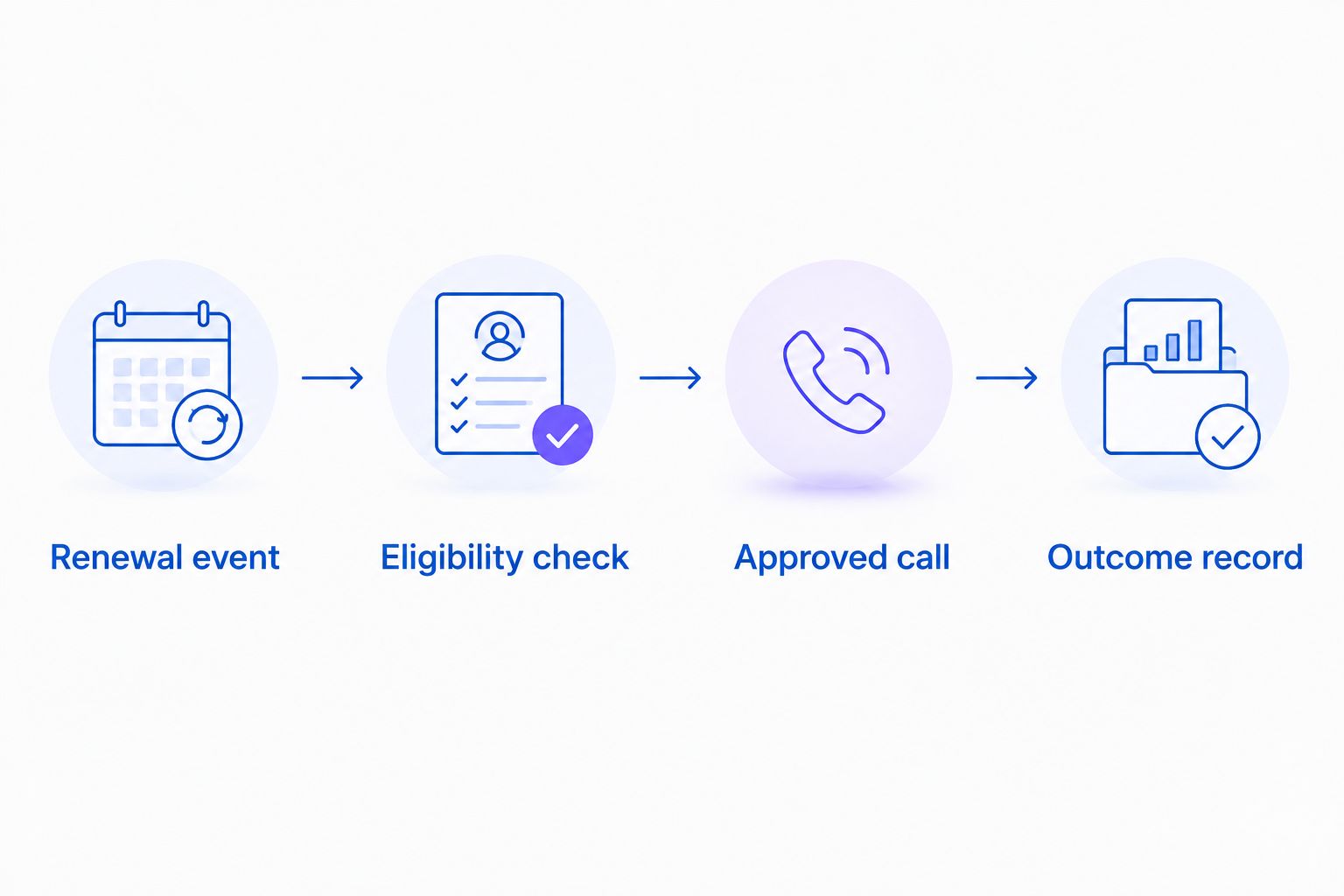
Check eligibility immediately before requesting the call.
Start with 1 test customer whose phone you control. A successful connection test proves that records move correctly; it does not prove that every production customer is eligible for outreach.
- Create an authorized test scenario using the subscription system's documented testing method. Keep production customer calls disabled.
- Inspect the received data and confirm that it identifies the intended subscription and renewal cycle.
- Run the permission, status, timing, and suppression checks. Confirm that a failed check prevents dispatch.
- Request the test call through the verified method. Compare the spoken information with the approved source record.
- Replay 2 test events representing the same renewal. Confirm that duplicate prevention produces only 1 call request.
- Inspect the outcome record. Distinguish a requested call, a connected call, a completed conversation, and a requested account change.
Expected result: The test call reaches the controlled number, uses correct context, and leaves an outcome that staff can trace to its source.
Apply the launch checks
Before your 2026 launch, require 3 launch checks: correct eligibility, duplicate prevention, and accurate outcome recording. Assign an owner to approve each check.
Include negative tests for an opted-out customer, a changed renewal date, an inactive subscription, and an unavailable destination number. Each test needs an explicit expected result, not simply a successful automation run.
Keep recovered revenue separate from call activity. A connected reminder is not a renewal, and a renewal is not evidence that the call caused it. Avasales' zero commission on recovered revenue does not replace the need to review applicable usage charges.
Second workflow: failed-payment follow-up
A failed-payment workflow needs its own verified event and script. Do not relabel an upcoming-renewal reminder as payment recovery or assume that an outbound calling feature supports both.
Upcoming renewal reminder
- Best for: Subscribers with an upcoming scheduled renewal
- Benefit: Explains the next renewal and support route
- Limitation: Becomes inaccurate if the schedule changes
- Required gate: Current renewal date and calling permission
Failed-payment follow-up
- Best for: Customers with a confirmed unresolved payment issue
- Benefit: Explains the approved route to resolve the issue
- Limitation: Becomes inappropriate after resolution
- Required gate: Current payment status and approved recovery instructions
For failed-payment follow-up, replace the renewal eligibility check with a documented unresolved-payment check. Recheck immediately before calling so a customer who has already resolved the issue is excluded.
Keep payment collection outside the conversation. Direct the verified customer to an approved secure process; do not instruct the agent to request full card details or security codes.
If a supported status-update event exists, use it to withdraw pending follow-up after resolution. Otherwise, require a fresh status lookup or staff review before dispatch. Do not enable this variant without a reliable stop condition.
Troubleshooting
The renewal event never arrives
Check whether the selected event exists for the installed subscription configuration and whether the receiving connection has the required authorization. Inspect documented delivery records where available. Do not treat a Shopify order event as proof that a renewal event was delivered.
The customer receives duplicate reminders
Compare the event identifiers and call-request records. Make duplicate prevention durable across retries, and recheck whether another campaign already owns that renewal outreach. Assign one workflow as the source of the call request.
The call uses an outdated renewal date
Inspect when the subscription context was read. Refresh the relevant status before dispatch, and invalidate pending reminders when a schedule change is confirmed. Hold the call if the workflow cannot establish the current date.
The call request succeeds but no conversation occurs
Separate request acceptance from connection and conversation outcomes. Inspect the documented result, destination format, permitted calling window, and suppression decision. Retry only under an approved policy that respects opt-outs and existing attempts.
The customer asks to cancel or update payment details
Use the approved escalation or secure account-management route. Record the request without marking the subscription changed or payment resolved. Confirm any completed action against its authoritative record before communicating success.
Customize your workflow
Expand only after the renewal sequence passes its acceptance tests. Add staff review for ambiguous account matches, separate scripts for distinct call purposes, and an explicit owner for unresolved requests.
For a 2026 operating review, report eligible events, suppressed events, call requests, connected conversations, and verified subscription outcomes separately. If you also measure acquisition, keep website clicks, app installs, trial starts, and paid customers distinct.
Avasales provides 24/7 customer support calling and outbound abandoned-cart recovery. Keep those established uses separate from the subscription workflow until the renewal-specific connection and permissions are verified.
FAQ
How do I set up an ava ai bold subscriptions integration?
First verify a documented connection between the relevant Bold subscription event and an approved call-request method. Then map customer context, apply permission checks, test duplicate prevention, and validate outcome recording before enabling customer calls.
Is there a native Bold Subscriptions connector?
Do not assume a native connector is available. Confirm the current supported connection method with both providers before choosing the implementation.
Can I use an abandoned-cart calling workflow for renewal reminders?
Not without verifying renewal-specific support. Abandoned checkout events do not establish the current subscription status, renewal date, or permission required for renewal outreach.
Should I trigger a renewal call from a Shopify order?
Do not use a previous order alone to decide that a renewal reminder is due. Require current subscription information and an eligibility check immediately before the call.
Can the agent cancel a Bold subscription during the call?
Enable subscription changes only when the exact action and authorization path are documented and approved. Otherwise, record the request and route it to staff without claiming the change is complete.
What should happen if the customer has already resolved a failed payment?
Suppress the failed-payment call after confirming resolution. Recheck payment status before dispatch rather than relying only on the original failure event.
How should I test the workflow before launch?
Use a test customer and a phone number you control. Verify correct context, blocked ineligible records, duplicate prevention, and a traceable call outcome before allowing production outreach.
One last thing
The most valuable test is a call that must not happen. Cancel eligibility after a reminder enters the queue, then verify that the final pre-call check blocks dispatch. That test exposes whether the workflow acts on current subscription information or an outdated event.