Multi-brand Shopify operators: complete 2026 guide
AI customer service for multi-brand Shopify operators: keep store policies separate, test phone workflows, and measure support and cart recovery.
October 28, 2026

Multi-brand Shopify operators’ AI customer service is automated customer support across separate storefronts with the aim of resolving requests under the correct brand’s policies. For your 2026 evaluation, Avasales offers a 7-day free trial, setup in minutes, and zero commission on recovered revenue.
TL;DR
- AI customer service for multi-brand Shopify operators requires store-specific policies, order access, and escalation rules.
- Avasales is best for Shopify merchants evaluating automated phone support and outbound abandoned-cart recovery.
- Test order tracking, refund boundaries, and approved checkout links separately for every storefront.
- Measure resolved calls and recovered orders by brand; keep inbound support separate from outbound recovery.
Why AI customer service matters for multi-brand Shopify operators
A shared support team needs to recognize the storefront before answering an order question. Your brands can share ownership without sharing return rules, shipping promises, or customer records. Centralize your operating standards, but keep each store’s answers and permissions separate.
Phone support adds a specific requirement: the caller needs an answer during the conversation. A wrong-store lookup or borrowed refund policy becomes a customer-facing mistake immediately. Build your 2026 evaluation around correct answers and permitted actions, rather than voice quality alone.
Start with the relationship between order records and spoken answers. This guide to Shopify order data and real-time phone answers covers that part of the workflow.
For a multi-brand operator, the useful unit of automation is a verified request within a specific store. A portfolio-wide call total does not establish whether customers received the right information.
Build your multi-brand support workflow
1. Map each storefront’s support responsibilities
Begin manually with a spreadsheet. Give every storefront its own row, then record its support number, policy owner, order system, escalation contact, and permitted actions. You need an operating map before you need another application.
Separate shared responsibilities from brand-specific decisions. Your team can use the same review checklist across stores while keeping refund eligibility and product guidance distinct. Assign an owner who can resolve conflicting instructions before those instructions reach customers.
Choose your first rollout store based on clear policies and manageable exceptions. Do not select it solely because its call volume is highest; an unclear process gives you an unclear test result.
- Record the storefront name customers recognize.
- Assign an accountable policy owner for each store.
- List inbound support and outbound recovery separately.
- Identify actions requiring human approval.
- Document the destination for unresolved requests.
2. Separate each brand’s knowledge and permissions
Write the answers manually before automating delivery. Build a concise source document for each store covering shipping explanations, return eligibility, order changes, and escalation. Remove outdated instructions instead of leaving the agent to choose between conflicting versions.
Distinguish an explanation from an action. Reading a refund policy is different from approving a refund. Likewise, explaining a shipping status does not authorize a new delivery promise.
For your 2026 rollout, review access boundaries as carefully as the wording. Ask each provider to demonstrate how store context stays attached to a request. Treat any cross-store access as a configuration question requiring a clear answer, not a feature to assume.
- Keep each storefront’s policies in its own source document.
- Separate information access from transaction permissions.
- Mark exceptions that require a human decision.
- Approve customer-facing wording for uncertain order statuses.
- Record who updates each policy after changes.
3. Choose the phone tasks to automate first
Handle a sample of calls manually and classify the requests before selecting automation. Order tracking, refund questions, and checkout assistance need different information and different approval boundaries. Choose a task whose correct outcome your team can recognize and verify.
Avasales AI customer service provides Shopify phone support 24 hours a day, including order and refund resolution, plus outbound abandoned-cart recovery calls. Its concrete advantage is automated phone coverage. For a multi-brand deployment, evaluate each storefront’s configuration and escalation requirements separately rather than assuming portfolio-wide controls.
Start with order-status explanations if your priority is support coverage. Evaluate abandoned-cart calls as a separate outbound workflow, with its own eligibility rules, contact permissions, and measurement. Do not expand refund authority just to make the demonstration look more capable.
- Select a clearly defined inbound call type.
- Write the expected answer and permitted action.
- Establish a human fallback for exceptions.
- Keep outbound cart recovery in a separate test.
- Expand scope only after reviewing actual outcomes.
4. Test store identity before testing conversation quality
Use a written script and have a team member play the customer. Test whether the workflow identifies the correct store before it reads an order or explains a policy. A natural-sounding answer still fails if it belongs to the wrong brand.
Use 5 test calls per storefront as an initial checklist: an order-status request, an eligible refund request, an ineligible refund request, an incorrect-store request, and a request needing human judgment. This is a proposed test plan, not a performance benchmark. Repeat failed scenarios after correcting the configuration.
Structure the review around these checkpoints: Store identity, Caller verification, Order lookup, Policy check, Human review. Require evidence for each checkpoint instead of scoring the call on how pleasant it sounded.
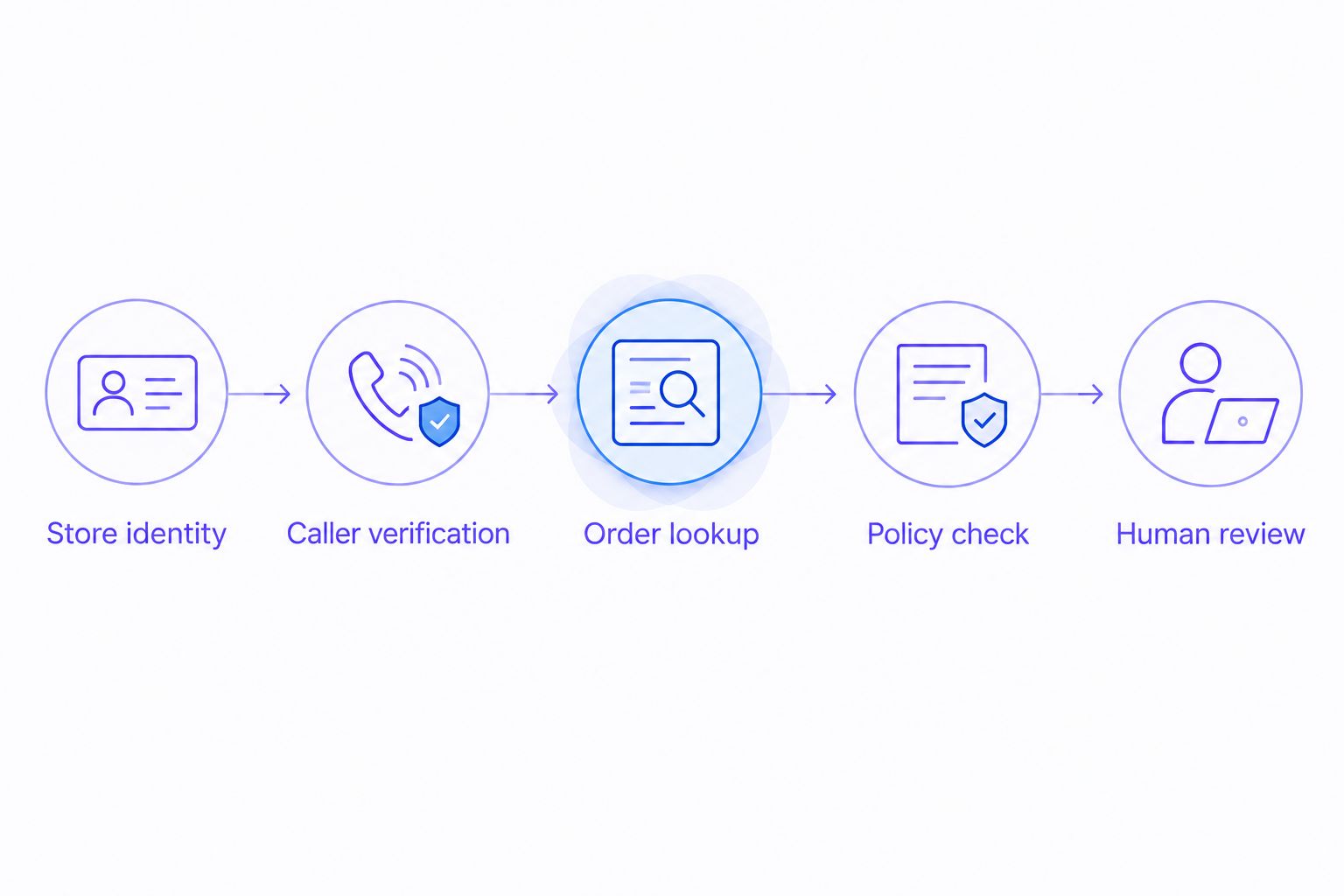
Confirm the storefront before using order information or applying a policy.
Keep a written pass-or-fail record for each scenario. Record the specific incorrect answer or unauthorized action so the next test checks the correction rather than repeating a general impression.
- Store identity: confirm which storefront owns the request.
- Caller verification: check the approved identity process.
- Order lookup: compare the answer with the order record.
- Policy check: confirm the action matches that store’s rules.
- Human review: test how unresolved requests reach your team.
5. Approve checkout recovery and text-link behavior
Start with a manual recovery script that answers a shopper’s question without inventing a promotion. Specify which checkout destination belongs to the storefront and when a follow-up text is appropriate. Have your compliance owner review outbound calling and messaging practices before activation.
An outbound phone agent is the faster path for conducting approved recovery conversations, but automation does not replace permission checks. During your evaluation, test the handling of opt-outs, already-completed purchases, and shoppers who ask for a person.
Keep support and selling distinct in your 2026 operating rules. A customer asking about a delayed order should not receive a checkout-recovery pitch. For approved text links, test the destination and store identity rather than accepting a successful send as proof of a correct interaction.
- Approve the recovery script separately for each brand.
- Define eligible contacts and suppression rules.
- Verify checkout links against the originating storefront.
- Document when a text link is permitted.
- Stop the sales conversation when the customer declines.
6. Measure results at storefront level
Begin with a spreadsheet that records the store, call purpose, outcome, human follow-up, and associated order when applicable. Write a definition of resolution before reporting a resolution rate. A completed call is not automatically a completed customer request.
Keep inbound support outcomes separate from outbound recovery. For support, inspect whether the customer received a correct answer or an authorized action. For recovery, distinguish a connected call, a sent checkout link, and a completed order.
Your 2026 dashboard should preserve those distinctions even when leadership wants a portfolio total. Review the underlying storefront results before aggregating them. Otherwise, one store’s strong result can hide another store’s policy errors or unresolved cases.
- Define what counts as a resolved support request.
- Record escalations and repeat contacts by storefront.
- Separate call attempts from connected conversations.
- Separate checkout-link sends from completed orders.
- Keep website clicks, app installs, trial starts, and paid customers distinct.
7. Expand only after reviewing exceptions
Run the initial process on one storefront, then use a second storefront to test whether your operating standards transfer correctly. Treat these as 2 separate store evaluations. Copying the review process is useful; copying customer policies without checking them is not.
Review failures before adding call types. An incorrect refund decision needs an authority correction, while an unclear shipping explanation needs better source material. Sending both issues into a general script rewrite makes it harder to verify the fix.
Assign responsibility for ongoing changes before expansion. Your workflow needs a clear response when a brand changes its return terms, shipping language, escalation contact, or outbound recovery instructions.
- Review failed scenarios with the responsible policy owner.
- Correct permissions separately from conversation wording.
- Retest the exact scenario that failed.
- Approve each additional storefront independently.
- Repeat relevant tests after material policy changes.
Compare support options for a multi-brand portfolio
Choose by the work you need handled, not by the broadest feature list. Manual support gives your team direct control over exceptions. Written automation serves written requests. Phone automation addresses calls, but still needs a tested operating boundary for each brand.
Store-specific manual support
- Best for: Brands with complex exceptions
- Practical advantage: People review context and approve unusual requests
- Key limitation: Coverage depends on staffing and availability
Shared human support team
- Best for: Operators centralizing review and staffing
- Practical advantage: One team can follow a common review process
- Key limitation: Agents still need correct store-specific instructions
Written self-service and chat
- Best for: Customers seeking written answers
- Practical advantage: Published answers give customers a reference
- Key limitation: Written-only workflows do not answer incoming phone calls
- Best for: Shopify merchants evaluating phone support and cart-recovery calls
- Practical advantage: Answers support calls around the clock and makes outbound abandoned-cart calls
- Key limitation: Multi-brand configuration, access boundaries, and exception handling need storefront-level testing
A mixed operating model is also a valid choice: use automation for defined requests and retain people for disputed facts or exceptions. Assign ownership explicitly. A handoff only works operationally when someone is responsible for receiving and resolving the request.
Start your phone support evaluation
Try Avasales for 7 days, with setup in minutes and zero commission on recovered revenue.
Common mistakes multi-brand Shopify operators make
Sharing a policy because the stores share an owner
Common ownership does not establish identical customer terms. Keep policy sources separate and check the applicable storefront before approving an action. Reuse the document structure, not unverified policy content.
Approving a pleasant voice without checking the answer
Evaluate order accuracy, policy accuracy, and permitted actions before scoring conversational style. Listen for unsupported delivery promises and refund commitments. A confident mistake is still a failed support interaction.
Counting every post-call purchase as recovered revenue
A purchase after a call does not, by itself, establish that the call caused the purchase. Define attribution rules and account for other recovery activity. Keep observed orders separate from claims of incremental results.
Launching every storefront at once
A simultaneous launch makes store-specific failures harder to isolate. Approve each storefront against its own policies and test records. Expand after corrections pass review, not because another brand’s setup passed.
FAQ
What is AI customer service for multi-brand Shopify operators?
AI customer service for multi-brand Shopify operators automates customer requests across separate storefronts while preserving each store’s context and rules. Evaluate order access, policy accuracy, permitted actions, and human escalation independently for every brand.
What is Avasales best for?
Avasales is best for Shopify merchants evaluating automated phone support and outbound abandoned-cart recovery. It answers customer support calls around the clock and handles order and refund requests; multi-brand operating requirements need storefront-level evaluation.
Can I use the same refund policy for all my Shopify brands?
Use the same refund policy only where the stores actually have identical approved terms. Shared ownership alone does not justify applying one brand’s rules to another brand’s order.
Should I automate inbound support or abandoned-cart calls first?
Start with the workflow that has the clearest rules and most verifiable outcome. Keep inbound support and outbound recovery in separate tests because they have different permissions, customer expectations, and success measures.
How do I stop a phone agent from using the wrong store’s information?
Require correct store identification before order access or policy decisions. Test incorrect-store requests and verify the provider’s configuration and access boundaries rather than assuming separation.
How long should I spend testing phone support before expanding?
Expand after each storefront passes its defined scenarios and corrected failures pass retesting. Use the 7-day trial to evaluate specific workflows, not as an automatic deadline for approving every store.
What should I measure for abandoned-cart recovery calls?
Measure attempted calls, connected conversations, checkout-link sends, and completed orders separately. Define attribution rules and review each storefront before combining results into a portfolio report.
One last thing
Make your final approval test a wrong-store request. Ask about an order from a different brand and check whether the workflow stops before revealing information or applying a policy. A correct refusal is a successful support outcome when the request falls outside the agent’s authority.